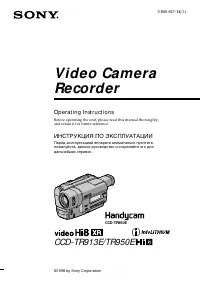
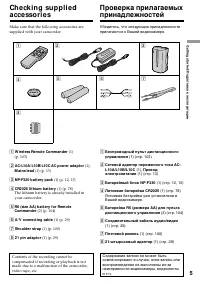
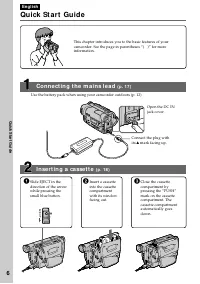
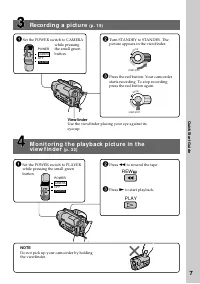
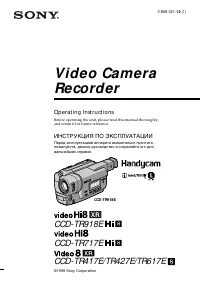
Страница 2 - En g l i sh; camcorder. With your Handycam; W ARNING; Русский; ПРЕДУПРЕЖДЕНИЕ; or
2 En g l i sh We l co m e ! Congratulations on your purchase of this SonyHandycam camcorder. With your Handycam you can capture life’s precious moments withsuperior picture and sound quality.Your Handycam is loaded with advancedfeatures, but at the same time it is very easy touse. You will soon be...
Страница 4 - Оглавление
4 Русский Оглавление Проверка прилагаемых принадлежностей .... 5 Руководство по быстрому запуску ............ 8 Подготовка к эксплуатации Использование данного руководства .......... 10Пункт 1 Подготовка источника питания ..... 12 Установка батарейного блока ................... 12Зарядка батарейного...
Страница 8 - Руководство по быстрому запуску; был; Установка кассеты
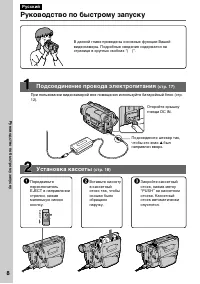
8 Руководство по быстрому запуску Русский Руководство по быстрому запуску В данной главе приведены основные функции Вашейвидеокамеры. Подробные сведения содержатся настранице в круглых скобках “( )”. Откройте крышкугнезда DC IN. Подсоедините штекер так,чтобы его знак 4 был направлен вверх. Установка...
Страница 9 - Запись изображения; Видоискатель; Контроль воспроизводимого изображения в; ПРИМЕЧАНИЕ; Нажмите кнопку
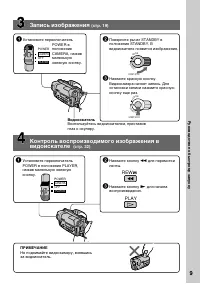
9 Руководство по быстрому запуску Запись изображения (стр. 19) Видоискатель Воспользуйтесь видоискателем, приставивглаз к окуляру. Контроль воспроизводимого изображения в видоискателе (стр. 32) ПРИМЕЧАНИЕ Не поднимайте видеокамеру, взявшисьза видоискатель. 1 Установите переключательPOWER в положение...
Страница 10 - — Ge t t i n g st a r t e d —; Usi n g t h i s m a n u a l; Ty p e s o f d i f f e r e n ce s; Viewfinder; — Подготовка к эксплуатации —; Типы отличий
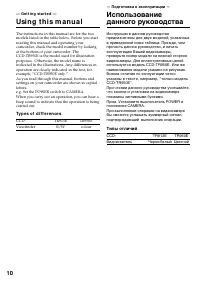
10 — Ge t t i n g st a r t e d — Usi n g t h i s m a n u a l The instructions in this manual are for the twomodels listed in the table below. Before you startreading this manual and operating yourcamcorder, check the model number by lookingat the bottom of your camcorder. TheCCD-TR950E is the model ...
Страница 11 - • Do not let your camcorder get wet. Keep your; Предостережение об авторском праве; • Не допускайте, чтобы видеокамера
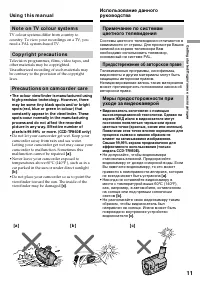
11 G etting s tarted/ Подготовка к эксплуатации [ a ] [ b ] [ c] Usi n g t h i s m a n u a l N o t e o n TV co l o u r sy st e m s TV colour systems differ from country tocountry. To view your recordings on a TV, youneed a PAL system-based TV. Co p y r i g h t p r e ca u t i o n s Television program...
Страница 12 - I n st a l l i n g t h e b a t t e r y p a ck; Slide the battery pack down.; To r e m o v e t h e b a t t e r y p a ck; Af t er inst alling t he bat t ery pack; St e p 1 Pre p a r i n g t h e; BATT RELEASE; Пункт 1 Подготовка; Установка батарейного блока; Передвиньте батарейный блок вниз.; Для снятия батарейного блока; После установки батарейного блока
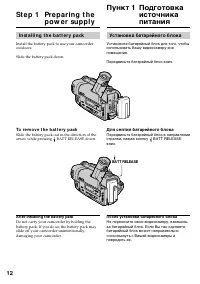
12 I n st a l l i n g t h e b a t t e r y p a ck Install the battery pack to use your camcorderoutdoors. Slide the battery pack down. To r e m o v e t h e b a t t e r y p a ck Slide the battery pack out in the direction of thearrow while pressing BATT RELEASE down. Af t er inst alling t he bat t ery...
Страница 13 - St e p 1 Pr e p a r i n g t h e p o w e r; Connect the mains lead to the mains.; normal charge; is completed. To fully charge; Пункт 1 Подготовка источника; был направлен вверх.; нормальная; завершена. Для полной зарядки
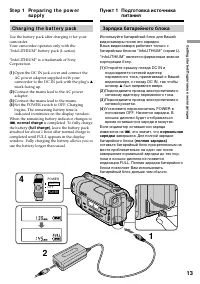
13 G etting s tarted/ Подготовка к эксплуатации POWER OFF PLAYER CAMERA St e p 1 Pr e p a r i n g t h e p o w e r su p p l y Ch a r g i n g t h e b a t t e r y p a ck Use the battery pack after charging it for yourcamcorder.Your camcorder operates only with the“InfoLITHIUM” battery pack (L series). ...
Страница 14 - “– – – – min” appears in the display window.; Plug t he mains lead deeply; Примечание
14 Not e Prevent metallic objects from coming into contactwith the metal parts of the DC plug of the ACpower adaptor. This may cause a short-circuit,damaging the AC power adaptor. Remaining bat t ery t ime indicat or The remaining battery time indicator in thedisplay window roughly indicates the rec...
Страница 15 - )” указывают время при; Bat t ery pack
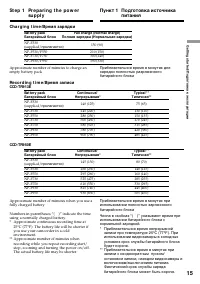
15 G etting s tarted/ Подготовка к эксплуатации St e p 1 Pr e p a r i n g t h e p o w e r su p p l y Bat t ery pack Full charge (Normal charge) Батарейный блок Полная зарядка (Нормальная зарядка) NP-F330 150 (90) (supplied/ прилагается ) NP-F530/F550 210 (150) NP-F730/F750 300 (240) NP-F930/F950 390...
Страница 16 - Pl a y i n g t i m e /; Af t er charging t he bat t ery pack; После зарядки батарейного блока
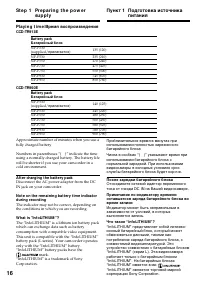
16 St e p 1 Pr e p a r i n g t h e p o w e r su p p l y Pl a y i n g t i m e / Время воспроизведения CCD-TR913E CCD-TR950E Approximate number of minutes when you use afully charged battery Numbers in parentheses “( )” indicate the timeusing a normally charged battery. The battery lifewill be shorter...
Страница 17 - Co n n e ct i n g t o t h e m a i n s; • The AC power adaptor can supply power even; Using a car bat t ery; на; • Питание от сетевого адаптера переменного; Использование автомобильного аккумулятора
17 G etting s tarted/ Подготовка к эксплуатации Co n n e ct i n g t o t h e m a i n s When you use your camcorder for a long time,we recommend that you power it from the mainsusing the AC power adaptor. (1 ) Open the DC IN jack cover, and connect theAC power adaptor to the DC IN jack on yourcamcorde...
Страница 18 - To e j e ct a ca sse t t e; Not e; St e p 2 I n se r t i n g a; Для извлечения кассеты
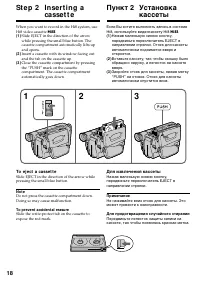
18 When you want to record in the Hi8 system, useHi8 video cassette H . (1 ) Slide EJECT in the direction of the arrowwhile pressing the small blue button. Thecassette compartment automatically lifts upand opens. (2 ) Insert a cassette with its window facing outand the tab on the cassette up. (3 ) C...
Страница 19 - — Re co r d i n g – Ba si cs —; Re co rd i n g a p i ct u re; Your camcorder automatically focuses for you.; — Запись – Основные положения —
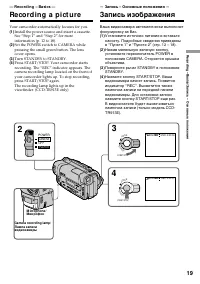
19 R ecording – B asic s/ Запись – Основные положения 3 4 LO CK START/STOP S TA N D B Y LO CK START/STOP S TA N D B Y 40min SP H STBY 0:00:00 2 POWER OFF PLAYER CAMERA 40min SP H REC 0:00:01 — Re co r d i n g – Ba si cs — Re co rd i n g a p i ct u re Your camcorder automatically focuses for you. (1 ...
Страница 20 - A f t e r r e co r d i n g; Turn STANDBY down to LOCK.; Af t er use your camcorder; Примечания; После записи; После пользования видеокамерой
20 Not e Fasten the grip strap firmly. Do not touch thebuilt-in microphone during recording. To enable smoot h t ransit ion You can make the transition between the lastscene you recorded and the next scene smooth aslong as you do not eject the cassette. When youexchange the battery pack in the recor...
Страница 22 - Usi n g t h e zo o m f e a t u r e; Zoom greater than 20; W hen you shoot close t o a subject; • Digital zoom starts to function when zoom; Сторона “W”: для широкоугольного вида; При съемке объекта с близкого положения; • Цифровой вариообъектив начинает
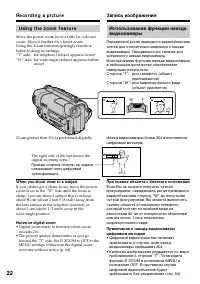
22 Usi n g t h e zo o m f e a t u r e Move the power zoom lever a little for a slowerzoom. Move it further for a faster zoom.Using the Zoom function sparingly results inbetter-looking recordings.“T” side: for telephoto (subject appears closer)“W” side: for wide-angle (subject appears farther away) Z...
Страница 23 - STA RT/STOP M OD E se t t i n g; Not es; • You cannot use the fader function in the 5SEC; ANTI GROUND SHOOTING; • Вы не можете использовать функцию
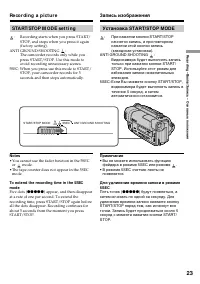
23 R ecording – B asic s/ Запись – Основные положения STA RT/STOP M OD E se t t i n g : Recording starts when you press START/STOP, and stops when you press it again(factory setting). ANTI GROUND SHOOTING : The camcorder records only while youpress START/STOP. Use this mode toavoid recording unneces...
Страница 24 - Recording mode indicat or/; The indicators are not recorded on tape.; BACK LIGHT; Hi8 f ormat indicat or; This appears while playing back or recording in Hi8 format./
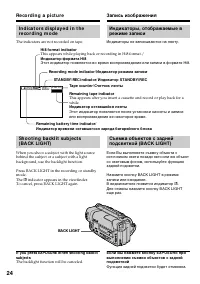
24 SP H 0:00:01 40 min REC Re co r d i n g a p i ct u r e Recording mode indicat or/ Индикатор режима записи STANDBY/ REC indicat or/ Индикатор STANDBY/REC Tape count er/ Счетчик ленты Remaining t ape indicat or This appears after you insert a cassette and record or play back for awhile. Индикатор о...
Страница 25 - and “NIGHTSHOT” indicators flash in the; Night Shot Light emit t er/; Usi n g +SLOW SHUTTER; и “NIGHTSHOT” начнут
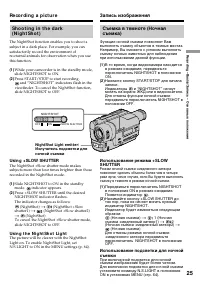
25 R ecording – B asic s/ Запись – Основные положения Sh o o t i n g i n t h e d a r k( N i g h t Sh o t ) The NightShot function enables you to shoot asubject in a dark place. For example, you cansatisfactorily record the environment ofnocturnal animals for observation when you usethis function. (1...
Страница 26 - • Do not use the NightShot function in bright; The +SLOW SHUTTER but t on does not w ork:; Подсветка для ночной съемки
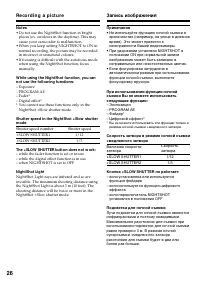
26 Re co r d i n g a p i ct u r e Not es • Do not use the NightShot function in bright places (ex. outdoors in the daytime). This maycause your camcorder to malfunction. • When you keep setting NIGHTSHOT to ON in normal recording, the picture may be recordedin incorrect or unnatural colours. • If fo...
Страница 28 - Ch e ck i n g t h e re co rd i n g; – ED I TSEA RCH / Re c Re v i e w; You can search for the next recording start point.; Re c Re v i e w; You can check the last recorded section.; Проверка записи; – EDITSEARCH / Просмотр записи; Нажмите кратковременно сторону – (
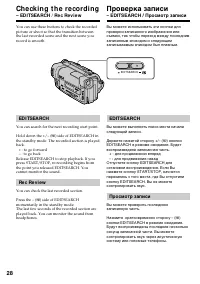
28 Ch e ck i n g t h e re co rd i n g – ED I TSEA RCH / Re c Re v i e w You can use these buttons to check the recordedpicture or shoot so that the transition betweenthe last recorded scene and the next scene yourecord is smooth. ED I TSEA RCH You can search for the next recording start point. Hold ...
Страница 29 - — Pl a y b a ck – Ba si cs —; Передача сигнала; — Воспроизведение – Основные положения —
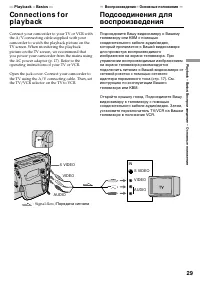
29 P laybac k – B asic s/ Воспроизведение – Основные положения — Pl a y b a ck – Ba si cs — Co n n e ct i o n s f o rp l a y b a ck Connect your camcorder to your TV or VCR withthe A/V connecting cable supplied with yourcamcorder to watch the playback picture on theTV screen. When monitoring the pla...
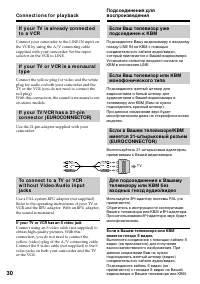
Страница 30 - If your TV or VCR has an S video jack; Co n n e ct i o n s f o r p l a y b a ck; TV
30 I f y o u r TV i s a l r e a d y co n n e ct e dt o a V CR Connect your camcorder to the LINE IN input onthe VCR by using the A/V connecting cablesupplied with your camcorder. Set the inputselector on the VCR to LINE. I f y o u r TV o r V CR i s a m o n a u r a lt y p e Connect the yellow plug fo...
Страница 31 - To ca n ce l t h e l a se r l i n k f u n ct i o n; If you t urn t he pow er of f; Laser link turns off automatically.; LASER LINK; Для отмены функции LASER LINK; Если Вы выключите питание
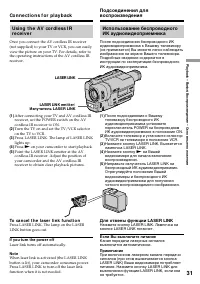
31 P laybac k – B asic s/ Воспроизведение – Основные положения Usi n g t h e A V co r d l e ss I Rr e ce i v e r Once you connect the AV cordless IR receiver(not supplied) to your TV or VCR, you can easilyview the picture on your TV. For details, refer tothe operating instructions of the AV cordless...
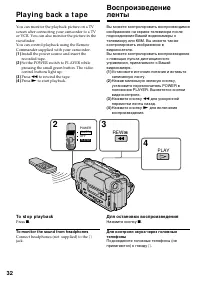
Страница 32 - Pl a y i n g b a ck a t a p e; To st o p p l a y b a ck; To monit or t he sound f rom headphones; Connect headphones (not supplied) to the; PLAY; Для остановки воспроизведения
32 Pl a y i n g b a ck a t a p e You can monitor the playback picture on a TVscreen after connecting your camcorder to a TVor VCR. You can also monitor the picture in theviewfinder.You can control playback using the RemoteCommander supplied with your camcorder. (1 ) Install the power source and inse...
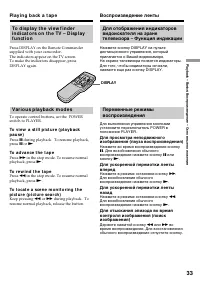
Страница 33 - DISPLAY; To a d v a n ce t h e t a p e; Воспроизведение ленты
33 P laybac k – B asic s/ Воспроизведение – Основные положения To d i sp l a y t h e v i e w f i n d e ri n d i ca t o r s o n t h e TV – D i sp l a yf u n ct i o n Press DISPLAY on the Remote Commandersupplied with your camcorder.The indicators appear on the TV screen.To make the indicators disappe...
Страница 34 - В переменных режимах воспроизведения
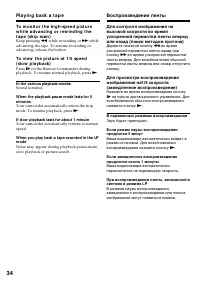
34 To m o n i t o r t h e h i g h -sp e e d p i ct u r ew h i l e a d v a n ci n g o r r e w i n d i n g t h et a p e ( sk i p sca n ) Keep pressing 0 while rewinding or ) while advancing the tape. To resume rewinding oradvancing, release the button. To v i e w t h e p i ct u r e a t 1 /5 sp e e d( ...
Страница 35 - — A d v a n ce d Re co r d i n g Op e r a t i o n s —; Ph o t o re co r d i n g; ОБЫЧНОЕ ФОТО; This mode records a still picture for about seven seconds./; M ENU; — Усовершенствованные операции съемки —; Фотосъемка; Нажмите кнопку PHOTO сильнее.
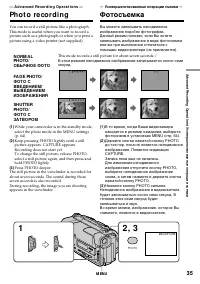
35 Advanc ed R ecording Operat ions / Усовершенствованные операции съемки — A d v a n ce d Re co r d i n g Op e r a t i o n s — Ph o t o re co r d i n g N ORM A LPHOTO/ ОБЫЧНОЕ ФОТО FA D E PHOTO/ ФОТО СВВЕДЕНИЕМ/ВЫВЕДЕНИЕМИЗОБРАЖЕНИЯ SHUTTERPHOTO/ ФОТО СЗАТВОРОМ This mode records a still picture for...
Страница 36 - Ph o t o r e co r d i n g
36 Not es • During photo recording, you cannot change the mode or setting of the following functions:– Digital effect– Fader– PROGRAM AE– Picture effect– Exposure– Wide mode– Backlight– NightShot +Slow shutter • The PHOTO button does not work: – while the digital effect function is set or in use. – ...
Страница 37 - CI N EM A; back on a normal TV; Usi n g t h e w i d e m o d e; CINEM A; CINEMA
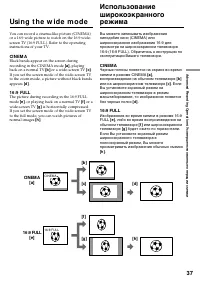
37 Advanc ed R ecording Operat ions / Усовершенствованные операции съемки You can record a cinema-like picture (CINEMA)or a 16:9 wide picture to watch on the 16:9 wide-screen TV (16:9 FULL). Refer to the operatinginstructions of your TV. CI N EM A Black bands appear on the screen duringrecording in ...
Страница 38 - To ca n ce l t h e w i d e m o d e; Set 16:9WIDE to OFF in the MENU settings.; If t he w ide mode is set t o 16:9FULL; flashes and; In t he w ide mode; You cannot change or cancel the wide mode.; , и функция устойчивой съемки; В широкоэкранном режиме
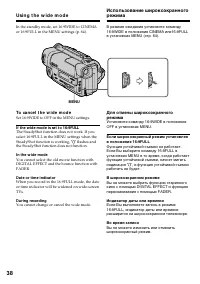
38 Usi n g t h e w i d e m o d e In the standby mode, set 16:9WIDE to CINEMAor 16:9FULL in the MENU settings (p. 64). To ca n ce l t h e w i d e m o d e Set 16:9WIDE to OFF in the MENU settings. If t he w ide mode is set t o 16:9FULL The SteadyShot function does not work. If youselect 16:9FULL in th...
Страница 39 - M ONOTONE; The sound does not wipe away.; FADER; MONOTONE; Звук при этом не убирается.
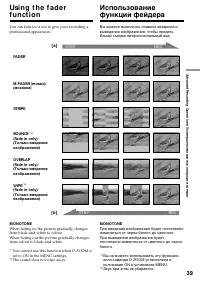
39 Advanc ed R ecording Operat ions / Усовершенствованные операции съемки You can fade in or out to give your recording aprofessional appearance. Usi n g t h e f a d e rf u n ct i o n M ONOTONE When fading in, the picture gradually changesfrom black-and-white to colour.When fading out the picture gr...
Страница 40 - Usi n g t h e f a d e r f u n ct i o n; To ca n ce l t h e f a d e r f u n ct i o n; Использование функции фейдера; При введении изображение; Для отмены функции фейдера
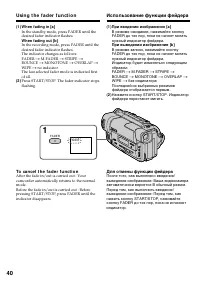
40 Usi n g t h e f a d e r f u n ct i o n (1 ) W hen f ading in [a ] In the standby mode, press FADER until thedesired fader indicator flashes. W hen f ading out [b ] In the recording mode, press FADER until thedesired fader indicator flashes.The indicator changes as follows:FADER n M.FADER n STRIPE...
Страница 41 - – NightShot +Slow shutter; W hen START/ STOP M ODE is set t o; You cannot use the fader function.; Not e on t he bounce f unct ion; – Ночная суперсъемка +медленный затвор; Примечание по функции перескакивания; ON в установках MENU
41 Advanc ed R ecording Operat ions / Усовершенствованные операции съемки Not e You cannot use the following functions whileusing the fader function. Also, you cannot usethe fader function while using the followingfunctions.– Digital effect– Low lux mode of PROGRAM AE (Overlap/ Wipe function only) –...
Страница 42 - : The colour and brightness of the; SEPIA; The picture is sepia.
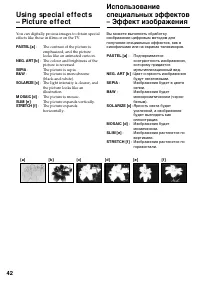
42 You can digitally process images to obtain specialeffects like those in films or on the TV. PASTEL [a ] : The contrast of the picture isemphasized, and the picturelooks like an animated cartoon. NEG. ART [b] : The colour and brightness of the picture is reversed. SEPIA : The picture is sepia. B&a...
Страница 43 - W hile using t he pict ure ef f ect f unct ion
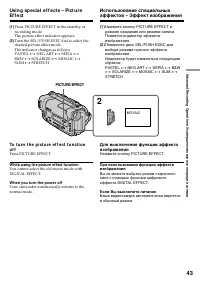
43 Advanc ed R ecording Operat ions / Усовершенствованные операции съемки (1 ) Press PICTURE EFFECT in the standby orrecording mode.The picture effect indicator appears. (2 ) Turn the SEL/PUSH EXEC dial to select thedesired picture effect mode.The indicator changes as follows:PASTEL ˜ NEG.ART ˜ SEPI...
Страница 44 - Неподвижное изображение; STILL
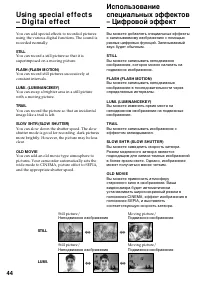
44 Usi n g sp e ci a l e f f e ct s– D i g i t a l e f f e ct You can add special effects to recorded picturesusing the various digital functions. The sound isrecorded normally. STILL You can record a still picture so that it issuperimposed on a moving picture. FLASH (FLASH M OTION) You can record s...
Страница 45 - It ems t o adjust; DIGITAL EFFECT; Пункты для регулировки
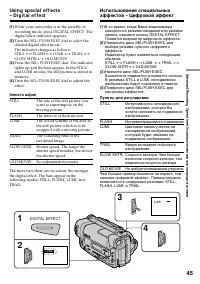
45 Advanc ed R ecording Operat ions / Усовершенствованные операции съемки Usi n g sp e ci a l e f f e ct s– D i g i t a l e f f e ct (1 ) While your camcorder is in the standby orrecording mode, press DIGITAL EFFECT. Thedigital effect indicator appears. (2 ) Turn the SEL/PUSH EXEC dial to select the...
Страница 46 - To ca n ce l t h e d i g i t a l e f f e ct; Для отмены цифрового эффекта
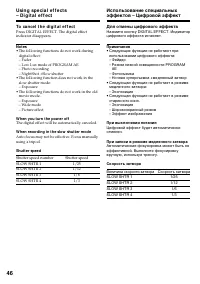
46 Usi n g sp e ci a l e f f e ct s– D i g i t a l e f f e ct To ca n ce l t h e d i g i t a l e f f e ct Press DIGITAL EFFECT. The digital effectindicator disappears. Not es • The following functions do not work during digital effect:– Fader– Low Lux mode of PROGRAM AE– Photo recording– NightShot +...
Страница 47 - Spot light mode
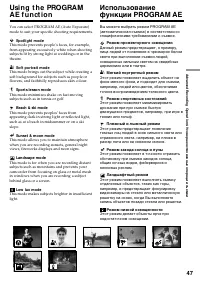
47 Advanc ed R ecording Operat ions / Усовершенствованные операции съемки Usi n g t h e PROGRA MA E f u n ct i o n You can select PROGRAM AE (Auto Exposure)mode to suit your specific shooting requirements. Spot light mode This mode prevents people’s faces, for example,from appearing excessively whit...
Страница 48 - Usi n g t h e PROGRA M A E f u n ct i o n; Нажмите кнопку PROGRAM AE.
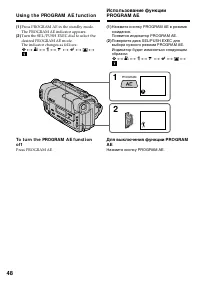
48 Usi n g t h e PROGRA M A E f u n ct i o n (1 ) Press PROGRAM AE in the standby mode.The PROGRAM AE indicator appears. (2 ) Turn the SEL/PUSH EXEC dial to select thedesired PROGRAM AE mode.The indicator changes as follows: ˜ a ˜ A ˜ ˜ ˜ ˜ To t u r n t h e PROGRA M A E f u n ct i o no f f Press PRO...
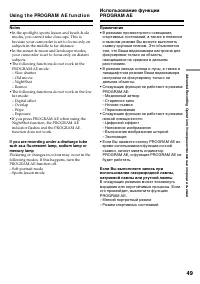
Страница 49 - • In the spotlight, sports lesson and beach & ski; • В режимах прожекторного освещения,
49 Advanc ed R ecording Operat ions / Усовершенствованные операции съемки Not es • In the spotlight, sports lesson and beach & ski modes, you cannot take close-ups. This isbecause your camcorder is set to focus only onsubjects in the middle to far distance. • In the sunset & moon and landsca...
Страница 50 - ночных сцен) с большой достоверностью
50 You can manually adjust and set the exposure.When you turn your camcorder on, it willautomatically be in the automatic exposuremode. This mode works to record subjects so thatthey are recorded slightly brighter than theyactually are.Adjust the exposure manually in the followingcases:• The subject...
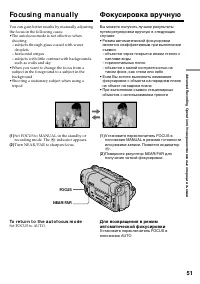
Страница 51 - droplets; To r e t u r n t o t h e a u t o f o cu s m o d e; FOCUS; Fo cu si n g m a n u a l l y; каплями воды
51 Advanc ed R ecording Operat ions / Усовершенствованные операции съемки You can gain better results by manually adjustingthe focus in the following cases:•The autofocus mode is not effective when shooting– subjects through glass coated with water droplets – horizontal stripes– subjects with little...
Страница 52 - To r e co r d d i st a n t su b j e ct s; W hen you shoot close t o t he subject; Для съемки удаленных объектов; Следующие индикаторы могут появиться
52 To r e co r d d i st a n t su b j e ct s When you press FOCUS down to INFINITY, thelens focuses on infinity. When you releaseFOCUS, your camcorder returns to the manualfocus mode. Use this mode when your camcorderfocuses on near objects even though you aretrying to shoot a distant object. Shoot i...
Страница 53 - VACATION; Su p e r i m p o si n g a t i t l e; TITLE; Наложение титра; Нажмите кнопку TITLE в режиме ожидания.
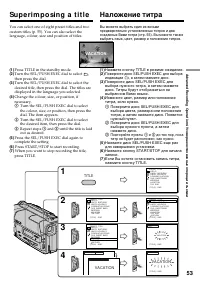
53 Advanc ed R ecording Operat ions / Усовершенствованные операции съемки VACATION Su p e r i m p o si n g a t i t l e You can select one of eight preset titles and twocustom titles (p. 55). You can also select thelanguage, colour, size and position of titles. (1 ) Press TITLE in the standby mode. (...
Страница 54 - Для наложения титра во время записи
54 To su p e r i m p o se t h e t i t l e w h i l e y o ua r e r e co r d i n g Press TITLE while you are recording, and carryout steps 2 to 5. When you press the SEL/PUSHEXEC dial at step 5, the title is superimposed. To se l e ct t h e l a n g u a g e o f a p r e se tt i t l e If you want to chang...
Страница 55 - Press TITLE in the standby or PLAYER mode.
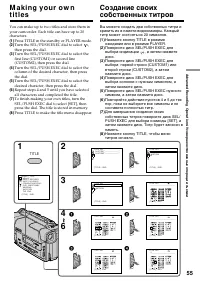
55 Advanc ed R ecording Operat ions / Усовершенствованные операции съемки M a k i n g y o u r o w nt i t l e s You can make up to two titles and store them inyour camcorder. Each title can have up to 20characters. (1 ) Press TITLE in the standby or PLAYER mode. (2 ) Turn the SEL/PUSH EXEC dial to se...
Страница 56 - To ch a n g e a t i t l e y o u h a v e st o r e d; To delet e t he t it le; M a k i n g y o u r o w n t i t l e s; Если Вы выбрали команду [; вернуться к предыдущему экрану.; Для удаления титра
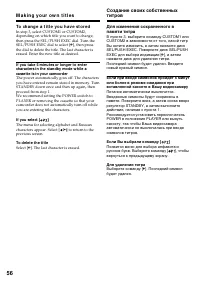
56 To ch a n g e a t i t l e y o u h a v e st o r e d In step 3, select CUSTOM1 or CUSTOM2,depending on which title you want to change,then press the SEL/PUSH EXEC dial. Turn theSEL/PUSH EXEC dial to select [ M ], then press the dial to delete the title. The last character iserased. Enter the new ti...
Страница 57 - To t u r n o f f t h e b u i l t -i n l i g h t; CA UTI ON; Для выключения встроенной подсветки; ВНИМАНИЕ
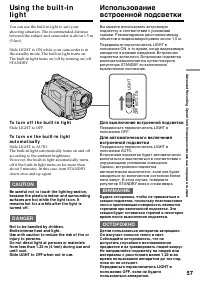
57 Advanc ed R ecording Operat ions / Усовершенствованные операции съемки Usi n g t h e b u i l t -i nl i g h t You can use the built-in light to suit yourshooting situation. The recommended distancebetween the subject and camcorder is about 1.5 m(5 feet). Slide LIGHT to ON while your camcorder is i...
Страница 58 - Re p l a ci n g t h e b u l b; Замена лампы накаливания
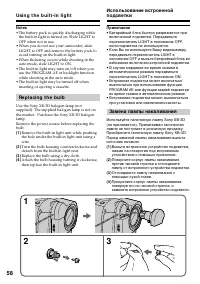
58 Not es • The battery pack is quickly discharging while the built-in light is turned on. Slide LIGHT toOFF when not in use. • When you do not use your camcorder, slide LIGHT to OFF and remove the battery pack toavoid turning on the built-in light. • When flickering occurs while shooting in the aut...
Страница 59 - • When replacing the bulb, use only the Sony; Usi n g t h e b u i l t -i n l i g h t; • При замене лампы накаливания
59 Advanc ed R ecording Operat ions / Усовершенствованные операции съемки CA UTI ON • When replacing the bulb, use only the Sony XB-3D halogen lamp (not supplied) to reducethe risk of fire. • To prevent possible burn hazard, disconnect the power source before replacing and do nottouch the bulb until...
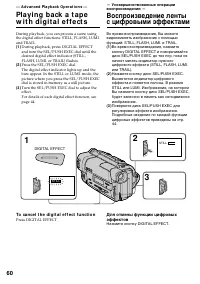
Страница 60 - — A d v a n ce d Pl a y b a ck Op e r a t i o n s —; To ca n ce l t h e d i g i t a l e f f e ct f u n ct i o n; Press DIGITAL EFFECT.; Нажмите кнопку DIGITAL EFFECT.
60 — A d v a n ce d Pl a y b a ck Op e r a t i o n s — Pl a y i n g b a ck a t a p ew i t h d i g i t a l e f f e ct s During playback, you can process a scene usingthe digital effect functions: STILL, FLASH, LUMI.and TRAIL. (1 ) During playback, press DIGITAL EFFECTand turn the SEL/PUSH EXEC dial u...
Страница 62 - — Ed i t i n g o n Ot h e r Eq u i p m e n t —; D u b b i n g a t a p e; Set the POWER switch to PLAYER.; — Монтаж на другую аппаратуру —; Перезапись ленты; Начните запись на Вашем КВМ.; Если Вы закончили перезапись ленты
62 — Ed i t i n g o n Ot h e r Eq u i p m e n t — D u b b i n g a t a p e You can dub and edit tapes using yourcamcorder for playback and another VCR forrecording. Connect your camcorder to the VCR using theA/V connecting cable supplied with yourcamcorder.Set the input selector on the VCR to LINE, i...
Страница 63 - If your VCR is a monaural t ype; mini; Если Ваш КВМ монофонического типа
63 E diting on Ot her E quipment / Монтаж на другую аппаратуру D u b b i n g a t a p e If you have displayed t he view f inderindicat ors on t he TV Make the indicators disappear by pressingDISPLAY so that they will not be superimposedon the edited tape. You can edit on VCRs t hat have Video/ Audioi...
Страница 64 - — Cu st o m i zi n g Y o u r Ca m co r d e r —; In the standby or PLAYER mode, press MENU.; Изменение установок
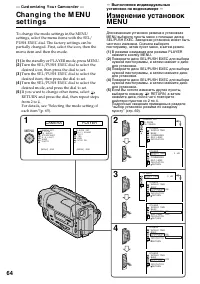
64 — Cu st o m i zi n g Y o u r Ca m co r d e r — Ch a n g i n g t h e M EN Use t t i n g s To change the mode settings in the MENUsettings, select the menu items with the SEL/PUSH EXEC dial. The factory settings can bepartially changed. First, select the icon, then themenu item and then the mode. (...
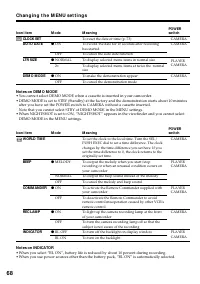
Страница 65 - Ch a n g i n g t h e M EN U se t t i n g s; To m a k e t h e M EN U d i sp l a y d i sa p p e a r; Depending on your camcorder model; Se l e ct i n g t h e m o d e se t t i n g o f e a ch i t e m; is the factory setting.; Изменение установок MENU
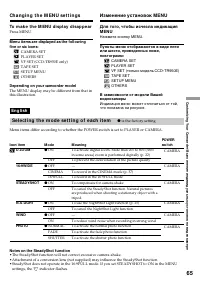
65 C ustomizing Your C amc order/ Выполнение индивидуальных установок на видеокамере Ch a n g i n g t h e M EN U se t t i n g s To m a k e t h e M EN U d i sp l a y d i sa p p e a r Press MENU. M enu it ems are displayed as t he f ollow ingf ive or six icons: CAMERA SETPLAYER SETVF SET (CCD-TR950E o...
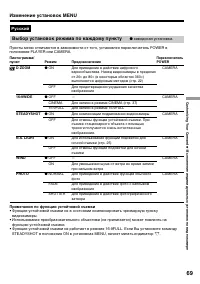
Страница 69 - Примечания по функции устойчивой съемки; функцию устойчивой съемки.; Выбор установок режима по каждому пункту; заводская установка.
69 C ustomizing Your C amc order/ Выполнение индивидуальных установок на видеокамере Пиктограмма/пункт D ZOOM 16:9WIDE STEADYSHOT N.S. LIGHT WIND PHOTO Режим r ON OFF r OFF CINEMA 16:9FULL r ON OFF r ON OFF r OFF ON r NORMAL FADE SHUTTER Предназначение Для приведение в действие цифровоговариообъекти...
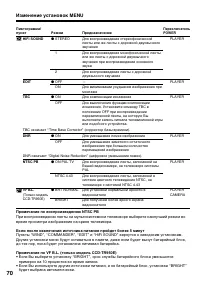
Страница 70 - примерно на 10 процентов во время записи.
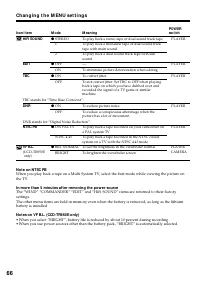
70 Пиктограмма/пункт HiFi SOUND EDIT TBC ТВС означает “Time Base Corrector” (корректор базы времени). DNR DNR означает “Digital Noise Reduction” (цифровое уменьшение помех). NTSC PB VF B.L. (Только модельCCD-TR950E) Режим r STEREO 1 2 r OFF ON r ON OFF r ON OFF r ON PAL TV NTSC 4.43 r BRT NORMAL BRI...
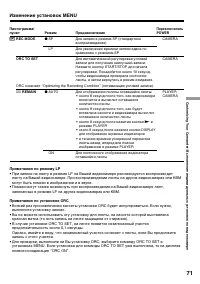
Страница 71 - REC MODE; Примечания по режиму LP; записанных в режиме LP на других видеокамерах или КВМ.; Примечания по установке ORC; выполните установку заново.
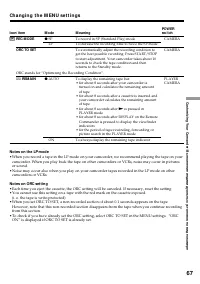
71 C ustomizing Your C amc order/ Выполнение индивидуальных установок на видеокамере Изменение установок MENU Пиктограмма/пункт REC MODE ORC TO SET ORC означает “Optimizing the Recording Condition” (оптимизация условий записи). Ò REMAIN Режим r SP LP r AUTO ON Предназначение Для записи в режиме SP (...
Страница 72 - Примечания по режиму DEMO MODE
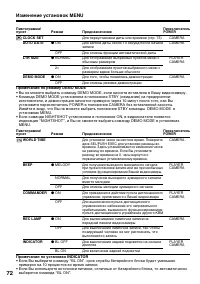
72 Изменение установок MENU Примечания по режиму DEMO MODE • Вы не можете выбрать команду DEMO MODE, если кассета вставлена в Вашу видеокамеру.• Команда DEMO MODE установлена в положение STBY (ожидание) на предприятии- изготовителе, и демонстрация начнется примерно через 10 минут после того, как Выу...
Страница 73 - Turn the SEL/PUSH EXEC dial to select
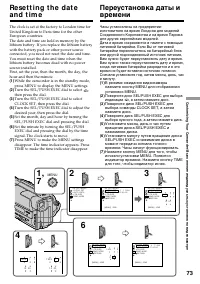
73 C ustomizing Your C amc order/ Выполнение индивидуальных установок на видеокамере S E T U P M E N U [MENU] : END 1 9 9 8 1 1 1 2 0 0 2 4 1 9 9 9 1 1 1 2 0 0 S E T U P M E N U CLOCK SETAUTO DATEL T R S I Z EDEMO MODE 1 ,7 3 [MENU] : END S E T U P M E N U CLOCK SETAUTO DATEL T R S I Z EDEMO MODE RE...
Страница 74 - To ch e ck t h e p r e se t d a t e a n d t i m e; The year changes as f ollow s:; function works only once a day.; Not e on t he t ime indicat or; back ON in the MENU settings.; Re se t t i n g t h e d a t e a n d t i m e; Год изменяется следующим образом:; функция работает один раз в день.; Примечание по индикатору времени
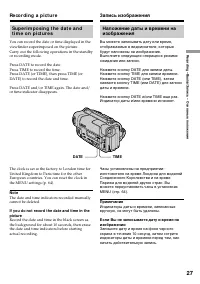
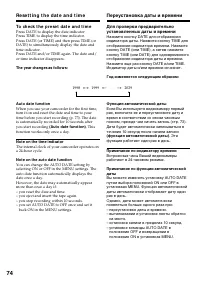
74 To ch e ck t h e p r e se t d a t e a n d t i m e Press DATE to display the date indicator.Press TIME to display the time indicator.Press DATE (or TIME) and then press TIME (orDATE) to simultaneously display the date andtime indicator.Press DATE and/or TIME again. The date and/or time indicator d...
Страница 75 - — A d d i t i o n a l I n f o r m a t i o n —; Se l e ct i n g t h e ca sse t t e t y p e; W h a t i s v i d e o Hi 8; — Дополнительная информация —; Выбор типа кассеты; Что такое video Hi8; * “XR” означает “улучшенная разрешающая
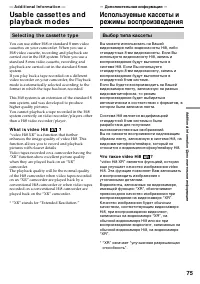
75 Addit ional inf ormat ion/ Дополнительная информация — A d d i t i o n a l I n f o r m a t i o n — Usa b l e ca sse t t e s a n dp l a y b a ck m o d e s Se l e ct i n g t h e ca sse t t e t y p e You can use either Hi8 or standard 8 mm videocassettes on your camcorder. When you use aHi8 video ca...
Страница 76 - W h e n y o u p l a y b a ck; N o t e o n A FM Hi Fi st e r e o; • You record the tape on an AFM HiFi monaural; Fo r e i g n 8 m m v i d e o; Playing back an NTSC-recorded t ape; • During playback, a black band appears on the; При выполнении воспроизведения; Примечание по системе AFM HiFi
76 Usa b l e ca sse t t e s a n d p l a y b a ckm o d e s W h e n y o u p l a y b a ck The Playback mode (SP/LP) and system (Hi8/standard 8 mm) are automatically selectedaccording to the format in which the tape hasbeen recorded. The quality of the recordedpicture in the LP mode, however, will not b...
Страница 77 - STEREO Стерео
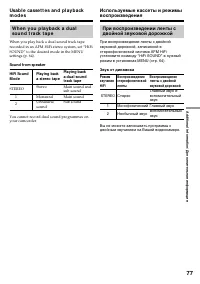
77 Addit ional inf ormat ion/ Дополнительная информация W h e n y o u p l a y b a ck a d u a lso u n d t r a ck t a p e When you play back a dual sound track taperecorded in an AFM HiFi stereo system, set “HiFiSOUND” to the desired mode in the MENUsettings (p. 64). Sound f rom speaker HiFi Sound Pla...
Страница 79 - Ch a n g i n g t h e l i t h i u m b a t t e r y
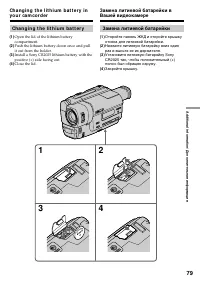
79 Addit ional inf ormat ion/ Дополнительная информация 1 2 3 4 Ch a n g i n g t h e l i t h i u m b a t t e r y (1 ) Open the lid of the lithium batterycompartment. (2 ) Push the lithium battery down once and pullit out from the holder. (3 ) Install a Sony CR2025 lithium battery with thepositive (+...
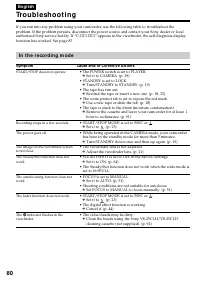
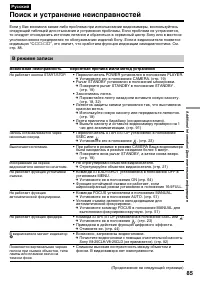
Страница 85 - В режиме записи; Возможная неисправность; Поиск и устранение неисправностей
85 Addit ional inf ormat ion/ Дополнительная информация Если у Вас возникла какая-либо проблема при использовании видеокамеры, воспользуйтесьследующей таблицей для отыскания и устранения проблемы. Если проблема не устраняется,то следует отсоединить источник питания и обратиться в сервисный центр Son...
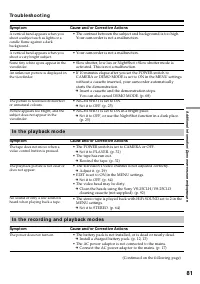
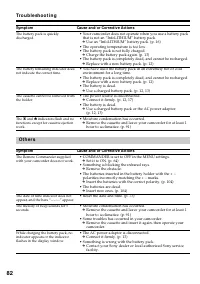
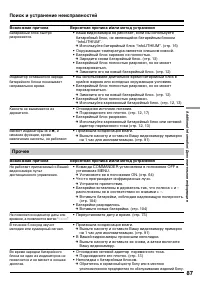
Страница 87 - Прочее; Возможная причина
87 Addit ional inf ormat ion/ Дополнительная информация Возможная причина Вероятная причина и/или метод устранения • Ваша видеокамера не работает, если Вы используете батарейный блок, не являющийся батарейным блоком“InfoLITHIUM”. m Используйте батарейный блок “InfoLITHIUM”. (стр. 16) • Окружающая те...
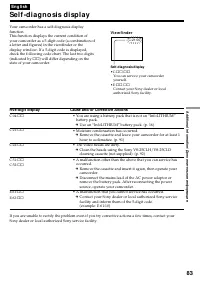
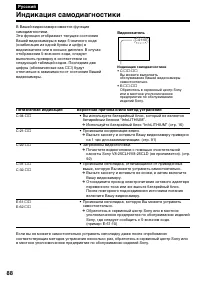
Страница 88 - Индикация самодиагностики
88 Пятизначная индикация Вероятная причина и/или метод устранения • Вы используете батарейный блок, который не является батарейным блоком “InfoLITHIUM”. m Используйте батарейный блок “InfoLITHIUM” (стр. 16) • Произошла конденсация влаги. m Выньте кассету и оставьте Вашу видеокамеру примернона 1 час ...
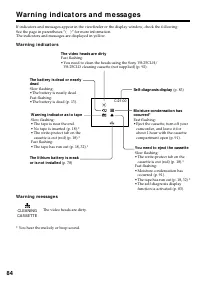
Страница 89 - Предупреждающие индикаторы и сообщения; Индикаторы и сообщения отображаются желтым цветом.; Предупреждающие индикаторы; Загрязнились видеоголовки; Предупреждающие сообщения; Загрязнились видеоголовки.; • Сработала функция
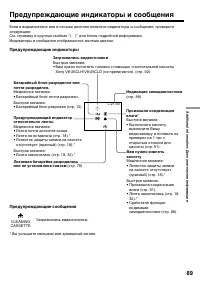
89 Addit ional inf ormat ion/ Дополнительная информация C:21:00 Предупреждающие индикаторы и сообщения Если в видоискателе или в окошке дисплея появятся индикаторы и сообщения, проверьтеследующее:См. страницу в круглых скобках “( )” для более подробной информации. Индикаторы и сообщения отображаются...
Страница 90 - Usi n g y o u r ca m co r d e r a b r o a d; PAL syst em; Brazil; NTSC syst em; Бразилия; Система NTSC
90 Usi n g y o u r ca m co r d e r a b r o a d You can use your camcorder in any country orarea with the AC power adaptor supplied withyour camcorder within 100 V to 240 V AC,50/60 Hz. Your camcorder is a PAL system basedcamcorder. If you want to view the playbackpicture on a TV, it must be a PAL sy...
Страница 91 - M o i st u r e co n d e n sa t i o n; I f m o i st u r e co n d e n sa t i o n o ccu r r e d; Not e on moist ure condensat ion; Конденсация влаги; Если произошла конденсация влаги; Примечание по конденсации влаги
91 Addit ional inf ormat ion/ Дополнительная информация M a i n t e n a n cei n f o r m a t i o n a n dp re ca u t i o n s M o i st u r e co n d e n sa t i o n If your camcorder is brought directly from a coldplace to a warm place, moisture may condenseinside your camcorder, on the surface of the ta...
Страница 92 - M a i n t e n a n ce i n f o r m a t i o n; Cl e a n i n g t h e v i d e o h e a d; indicator and “; Not e on video heads; Чистка видеоголовок; Примечание по видеоголовкам
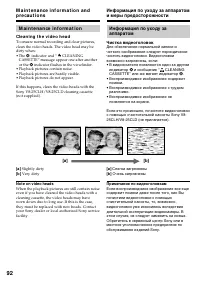
92 M a i n t e n a n ce i n f o r m a t i o n Cl e a n i n g t h e v i d e o h e a d To ensure normal recording and clear pictures,clean the video heads. The video head may bedirty when:• The v indicator and “ CLEANING CASSETTE” message appear one after anotheror the v indicator flashes in the viewf...
Страница 93 - Caut ion; Pr e ca u t i o n s; Ca m co r d e r o p e r a t i o n; Внимание; Меры предосторожности; Эксплуатация видеокамеры
93 Addit ional inf ormat ion/ Дополнительная информация M a i n t e n a n ce i n f o r m a t i o n a n dp r e ca u t i o n s Re m o v i n g d u st f r o m i n si d e t h ev i e w f i n d e r– CCD -TR9 1 3 E o n l y (1 ) 1 Remove the screw with a screwdriver (not supplied). 2 Then, while sliding the ...
Страница 95 - N o t e s o n d r y b a t t e r i e s; If bat t eries are leaking; Примечание к сухим батарейкам
95 Addit ional inf ormat ion/ Дополнительная информация M a i n t e n a n ce i n f o r m a t i o n a n dp r e ca u t i o n s • Prevent metallic objects from coming into contact with the metal parts of the connectingsection. If this happens, a short may occur andthe unit may be damaged. • Always keep...
Страница 97 - Видеокамера; Технические характеристики
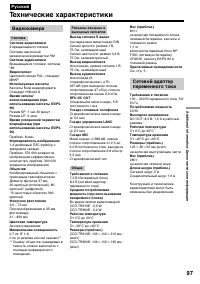
97 Addit ional inf ormat ion/ Дополнительная информация Разъемы входных ивыходных сигналов Выход сигнала S видео 4-штырьковое мини-гнездо DINСигнал яркости: размах 1 В,75 Ом, несиммеричныйСигнал цветности: размах 0,3 В,75 Ом, несимметричный Выход видеосигнала Фоногнездо, размах сигнала 1 В,75 Ом, не...
Страница 99 - I d e n t i f y i n g t h e p a r t s a n d co n t r o l s
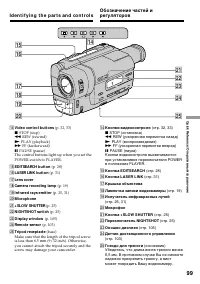
99 Quic k R eferenc e/ Оперативный справочник !¢ Video cont rol but t ons (p. 32, 33) p STOP (stop) 0 REW (rewind) ( PLAY (playback) ) FF (fastforward) P PAUSE (pause) The control buttons light up when you set thePOWER switch to PLAYER. !∞ EDITSEARCH but t on (p. 28) !§ LASER LINK but t on (p. 31) !...
Страница 100 - mark by using infrared rays.
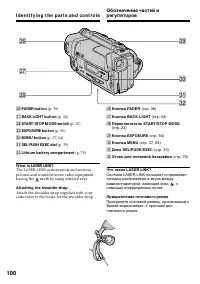
100 #º #¡ @ª @¶ @§ @• #™ I d e n t i f y i n g t h e p a r t s a n d co n t r o l s @§ FADER but t on (p. 39) @¶ BACK LIGHT but t on (p. 24) @• START/ STOP M ODE sw it ch (p. 23) @ª EXPOSURE but t on (p. 50) #º M ENU but t on (p. 37, 64) #¡ SEL/ PUSH EXEC dial (p. 35) #™ Lit hium bat t ery compart m...
Страница 101 - Fasten the grip strap firmly.
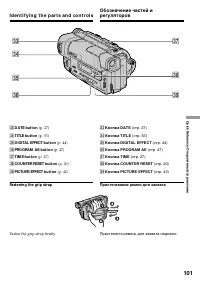
101 Quic k R eferenc e/ Оперативный справочник #• #ª #¶ #∞ #¢ #§ #£ I d e n t i f y i n g t h e p a r t s a n d co n t r o l s #£ DATE but t on (p. 27) #¢ TITLE but t on (p. 53) #∞ DIGITAL EFFECT but t on (p. 44) #§ PROGRAM AE but t on (p. 47) #¶ TIM E but t on (p. 27) #• COUNTER RESET but t on (p. ...
Страница 102 - control jack is used for
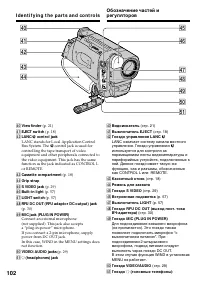
102 %¡ $∞ $§ $• $ª %º $¶ $º $™ $¢ $¡ $£ I d e n t i f y i n g t h e p a r t s a n d co n t r o l s $º View f inder (p. 21) $¡ EJECT sw it ch (p. 18) $™ LANC l cont rol jack LANC stands for Local Application ControlBus System. The l control jack is used for controlling the tape transport of videoequi...
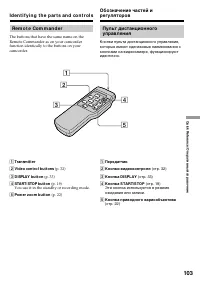
Страница 103 - Re m o t e Co m m a n d e r; Transmit t er; You use it in the standby or recording mode.; Pow er zoom but t on
103 Quic k R eferenc e/ Оперативный справочник 5 1 2 3 4 Re m o t e Co m m a n d e r The buttons that have the same name on theRemote Commander as on your camcorderfunction identically to the buttons on yourcamcorder. I d e n t i f y i n g t h e p a r t s a n d co n t r o l s 1 Transmit t er 2 Video...
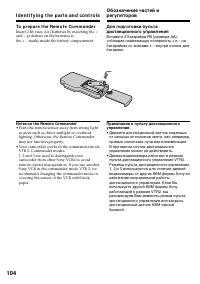
Страница 104 - To p r e p a r e t h e Re m o t e Co m m a n d e r; Not es on t he Remot e Commander; • Point the remote sensor away from strong light
104 I d e n t i f y i n g t h e p a r t s a n d co n t r o l s To p r e p a r e t h e Re m o t e Co m m a n d e r Insert 2 R6 (size AA) batteries by matching the +and – polarities on the batteries tothe + – marks inside the battery compartment. Not es on t he Remot e Commander • Point the remote sen...
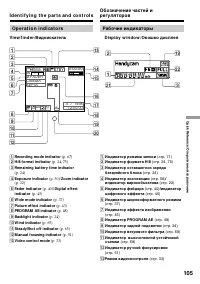
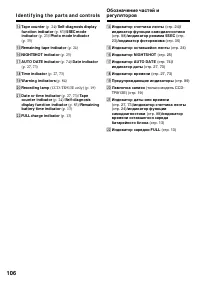
Страница 105 - STBY; V i e w f i n d e r /
105 Quic k R eferenc e/ Оперативный справочник 40 min SP H STBY 0:00:00 M.FADERCINEMASEPIA c „ f T W 4 7 1998 12:00:00 2 4567 890!¡!™ 3 1 !£ !¢ !§ !¶ !• !ª !∞ @º V i e w f i n d e r / Видоискатель D i sp l a y w i n d o w / Окошко дисплея I d e n t i f y i n g t h e p a r t s a n d co n t r o l s 1 ...
Страница 108 - Руководство по быстрым функциям
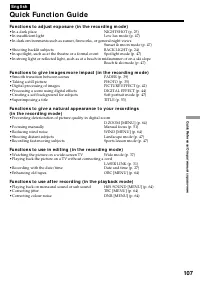
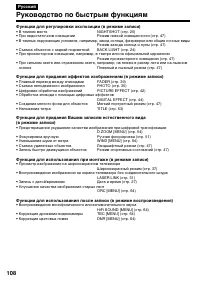
108 Функции для регулировки экспозиции (в режиме записи) • В темном месте NIGHTSHOT (стр. 25) • При недостаточном освещении Режим низкой освещенности (стр. 47) • В темных окружающих условиях, например, заход солнца, феерверки или общие ночные виды Режим захода солнца и луны (стр. 47) • Съемка объект...
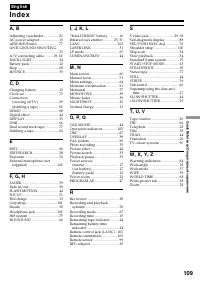
Страница 110 - Алфавитный указатель; У – Я
110 Русский Алфавитный указатель А, Б, В, Г Батарейный блок .................. 12Батарейный блок “InfoLITHIUM” ...................... 16 Вариообъектив ...................... 22Введение/выведение изображения ....................... 39 Внешний микрофон (не прилагается) ..................... 102 Время ...