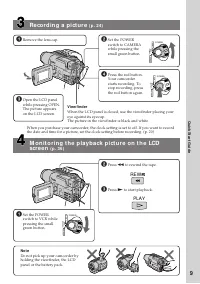
Страница 2 - En g l i sh; camcorder. With your Digital; W ARNING; Русский; ПРЕДУПРЕЖДЕНИЕ
2 En g l i sh We l co m e ! Congratulations on your purchase of this SonyDigital Handycam camcorder. With your Digital Handycam, you can capture life’s preciousmoments with superior picture and soundquality.Your Digital Handycam is loaded with advancedfeatures, but at the same time it is very easy t...
Страница 4 - Руководство по быстрым функциям; Функции для регулировки экспозиции (в режиме записи); Функции для использования при монтаже (в режиме записи)
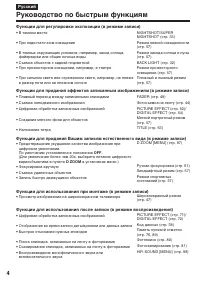
4 Русский Руководство по быстрым функциям Функции для регулировки экспозиции (в режиме записи) • В темном месте • При недостаточном освещении • В темных окружающих условиях, например, заход солнца, фейерверки или общие ночные виды • Съемка объектов с задней подсветкой • При прожекторном освещении, н...
Страница 6 - Оглавление
6 Русский Оглавление Руководство по быстрым функциям ...... 4Проверка прилагаемых принадлежностей ............................... 7 Руководство по быстромузапуску ..................................................... 10 Подготовка к эксплуатации Использование данного руководства .......................
Страница 7 - электропитания
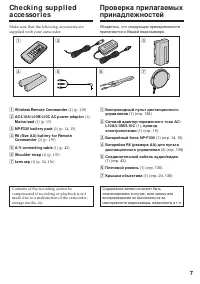
7 G etting s tarted Подготовка к эксплуатации Ch e ck i n g su p p l i e da cce sso r i e s Make sure that the following accessories aresupplied with your camcorder. 1 W ireless Remot e Commander (1) (p. 138) 2 AC-L10A/ L10B/ L10C AC pow er adapt or (1), M ains lead (1) (p. 15) 3 NP-F330 bat t ery p...
Страница 10 - Руководство по быстрому запуску; Подсоединение провода электропитания; на кассетном
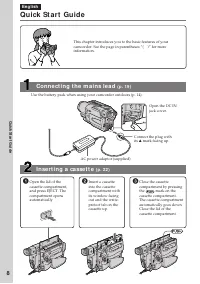
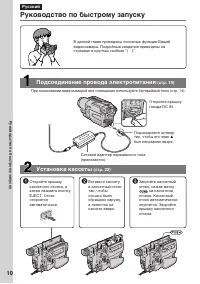
10 Руководство по быстрому запуску Русский Руководство по быстрому запуску В данной главе приведены основные функции Вашейвидеокамеры. Подробные сведения приведены настранице в круглых скобках “( )”. Откройте крышкугнезда DC IN. Подсоедините штекертак, чтобы его знак v был направлен вверх. Подсоедин...
Страница 11 - Запись изображения; Видоискатель; Контроль воспроизводимого изображения на; ПРИМЕЧАНИЕ
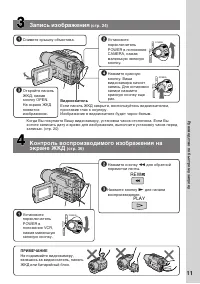
11 4 Нажмите красную кнопку. Вашавидеокамера начнетзапись. Для остановкизаписи нажмитекрасную кнопку ещераз. Запись изображения (стр. 24) 3 Откройте панельЖКД, нажавкнопку OPEN.На экране ЖКДпоявитсяизображение. 1 Снимите крышку объектива. 2 Установите переключательPOWER в положениеCAMERA, нажавмален...
Страница 12 - — Ge t t i n g st a r t e d —; Usi n g t h i s m a n u a l; Be f o r e u si n g y o u r ca m co r d e r; — Подготовка к эксплуатации —
12 — Ge t t i n g st a r t e d — Usi n g t h i s m a n u a l As you read through this manual, buttons andsettings on your camcorder are shown in capitalletters.e.g. Set the POWER switch to CAMERA.When you carry out an operation, you can hear abeep sound to indicate that the operation is beingcarried...
Страница 13 - • Не допускайте, чтобы видеокамера; • Do not let your camcorder get wet. Keep your
13 G etting s tarted Подготовка к эксплуатации Меры предосторожности приуходе за видеокамерой Объектив и экран ЖКД/видоискатель(только на смонтированных моделях) • Экран ЖКД и видоискатель изготовлены спомощью высокопрецизионнойтехнологии, так что свыше 99,99%элементов изображения предназначеныдля э...
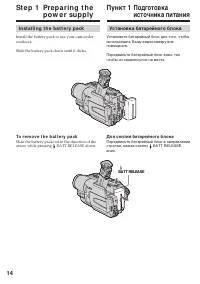
Страница 14 - I n st a l l i n g t h e b a t t e r y p a ck; Slide the battery pack down until it clicks.; To r e m o v e t h e b a t t e r y p a ck; St e p 1 Pre p a r i n g t h e; Установка батарейного блока; Для снятия батарейного блока; BATT RELEASE
14 I n st a l l i n g t h e b a t t e r y p a ck Install the battery pack to use your camcorderoutdoors. Slide the battery pack down until it clicks. To r e m o v e t h e b a t t e r y p a ck Slide the battery pack out in the direction of thearrow while pressing BATT RELEASE down. St e p 1 Pre p a r...
Страница 15 - St e p 1 Pr e p a r i n g t h e p o w e r; Connect the mains lead to the mains.; Пункт 1 Подготовка источника; штекера был направлен вверх.; Лампа CHG
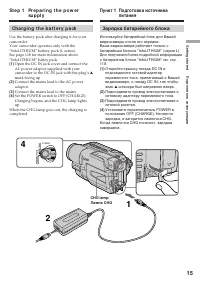
15 G etting s tarted Подготовка к эксплуатации St e p 1 Pr e p a r i n g t h e p o w e r su p p l y Ch a r g i n g t h e b a t t e r y p a ck Use the battery pack after charging it for yourcamcorder.Your camcorder operates only with the“InfoLITHIUM” battery pack (L series).See page 118 for more info...
Страница 16 - A f t e r ch a r g i n g t h e b a t t e r y p a ck; Not es; • Prevent metallic objects from coming into; W hen t he bat t ery pack is charged f ully; The CHG lamp goes out.; If t he bat t ery pack is not inst alled properly; После зарядки батарейного блока; Примечания; • Не допускайте контакта металлических; Если батарейный блок заряжен полностью; Лампочка CHG погаснет.
16 A f t e r ch a r g i n g t h e b a t t e r y p a ck Disconnect the AC power adaptor from the DCIN jack on your camcorder. Not es • Prevent metallic objects from coming into contact with the metal parts of the DC plug ofthe AC power adaptor. This may cause a short-circuit, damaging the AC power ad...
Страница 17 - Recording w it h; Ch a r g i n g t i m e /
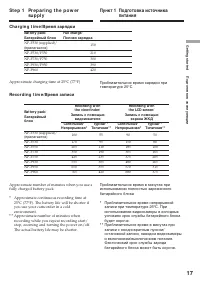
17 G etting s tarted Подготовка к эксплуатации St e p 1 Pr e p a r i n g t h e p o w e r su p p l y Recording w it h Recording w it h Bat t ery pack/ t he view f inder/ t he LCD screen/ Батарейный Запись с помощью Запись с помощью блок видоискателя экрана ЖКД Cont inuous* Typical* * Cont inuous* Typ...
Страница 18 - Playing t ime; W hat is ”Inf oLITHIUM ”?; Что такое “InfoLITHIUM”?
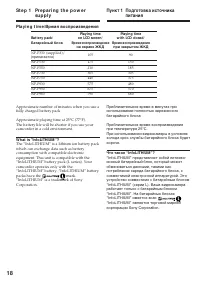
18 Pl a y i n g t i m e / Время воспроизведения Playing t ime Playing t ime Bat t ery pack/ on LCD screen/ w it h LCD closed/ Батарейный блок Время воспроизведения Время воспроизведения на экране ЖКД при закрытом ЖКД NP-F330 (supplied)/ (прилагается) 105 90 NP-F530 175 150 NP-F550 210 185 NP-F730 36...
Страница 19 - на; ПРЕДОСТЕРЕЖЕНИЕ; • Питание от сетевого адаптера переменного; Использование автомобильного аккумулятора; Co n n e ct i n g t o t h e m a i n s; PRECAUTION; • The AC power adaptor can supply power even; Using a car bat t ery
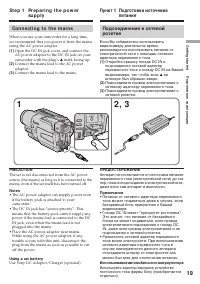
19 G etting s tarted Подготовка к эксплуатации Подсоединение к сетевойрозетке Если Вы собираетесь использоватьвидеокамеру длительное время,рекомендуется использовать питание отэлектрической сети с помощью сетевогоадаптера переменного тока. (1 ) Откройте крышку гнезда DC IN иподсоедините сетевой адап...
Страница 20 - Turn the SEL/PUSH EXEC dial to select; Пункт 2 Установка даты; St e p 2 Se t t i n g t h e
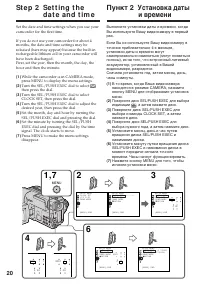
20 Set the date and time settings when you use yourcamcorder for the first time. If you do not use your camcorder for about 4months, the date and time settings may bereleased (bars may appear) because the built-inrechargeable lithium cell in your camcorder willhave been discharged.First, set the yea...
Страница 21 - Год изменяется следующим образом:; Пункт 2 Установка даты и; The year changes as f ollow s:; St e p 2 Se t t i n g t h e d a t e a n d t i m e
21 G etting s tarted Подготовка к эксплуатации Год изменяется следующим образом: Примечание по индикатору времени Встроенные часы Вашей видеокамерыработают в 24-часовом режиме. Пункт 2 Установка даты и времени The year changes as f ollow s: Not e on t he t ime indicat or The internal clock of your c...
Страница 22 - Для извлечения кассеты; We recommend using Hi8; To e j e ct a ca sse t t e; St e p 3 I n se r t i n g a
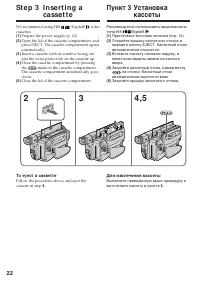
22 Рекомендуется использовать видеокассетытипа Hi8 /Digital8 . (1 ) Приготовьте источник питания (стр. 14). (2 ) Откройте крышку кассетного отсека инажмите кнопку EJECT. Кассетный отсекавтоматически откроется. (3 ) Вставьте кассету окошком наружу, алепестком защиты записи на кассетевверх. (4 ) Закро...
Страница 23 - St e p 3 I n se r t i n g a ca sse t t e
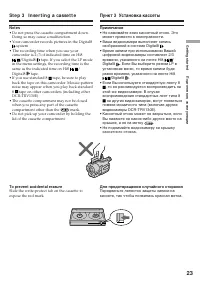
23 G etting s tarted Подготовка к эксплуатации Not es • Do not press the cassette compartment down. Doing so may cause a malfunction. • Your camcorder records pictures in the Digital8 system. • The recording time when you use your camcorder is 2/3 of indicated time on Hi8 /Digital8 tape. If you sele...
Страница 24 - — Re co r d i n g – Ba si cs —; Re co rd i n g a p i ct u re; Your camcorder automatically focuses for you.; Микрофон
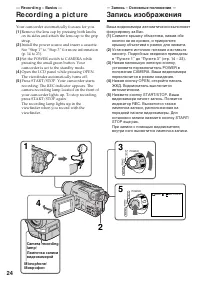
24 5 3 1 2 40min REC 0:00:01 VCR POWER OFF CAMERA (CHARGE ) VCR POWER OFF CAMERA (CHARGE ) 4 — Re co r d i n g – Ba si cs — Re co rd i n g a p i ct u re Your camcorder automatically focuses for you. (1 ) Remove the lens cap by pressing both knobson its sides and attach the lens cap to the gripstrap....
Страница 25 - • Плотно пристегните ремень для захвата; Примечание по режиму записи
25 R ecording – B asic s Запись – Основные положения Not es • Fasten the grip strap firmly.• Do not touch the built-in microphone during recording. Not e on Recording mode Your camcorder records and plays back in the SP(standard play) mode and in the LP (long play)mode. Select SP or LP in the menu s...
Страница 26 - indicator appears on the screen; M irror mode; The STBY indicator appears as; Индикатор STBY появится в виде
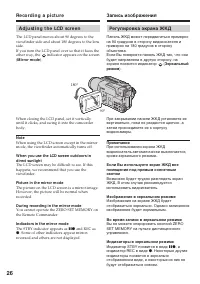
26 Re co r d i n g a p i ct u r e A d j u st i n g t h e LCD scr e e n The LCD panel moves about 90 degrees to theviewfinder side and about 180 degrees to the lensside.If you turn the LCD panel over so that it faces theother way, the indicator appears on the screen ( M irror mode ). When closing the...
Страница 27 - LCD screen backlight; The recorded picture will not be affected.; A f t e r r e co r d i n g; Af t er using your camcorder; На записанное изображение это не повлияет.; После записи; Присоедините крышку объектива.; После использования Вашей видеокамеры; M ENU
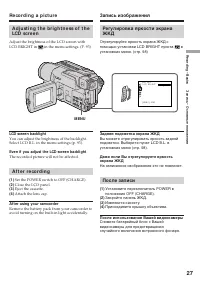
27 R ecording – B asic s Запись – Основные положения Re co r d i n g a p i ct u r e Запись изображения A d j u st i n g t h e b r i g h t n e ss o f t h eLCD scr e e n Adjust the brightness of the LCD screen withLCD BRIGHT in in the menu settings. (P. 93) LCD screen backlight You can adjust the brig...
Страница 28 - Zoom greater than 20; Сторона “W”: для широкоугольного вида
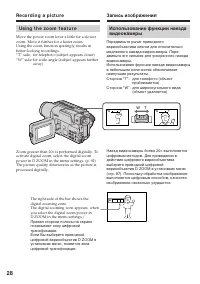
28 Re co r d i n g a p i ct u r e Usi n g t h e zo o m f e a t u r e Move the power zoom lever a little for a slowerzoom. Move it further for a faster zoom.Using the zoom function sparingly results inbetter-looking recordings.“T” side: for telephoto (subject appears closer)“W” side: for wide-angle (...
Страница 29 - Not es on digit al zoom; • Digital zoom starts to function when zoom; W hen you shoot close t o a subject; • Цифровой вариообъектив начинает
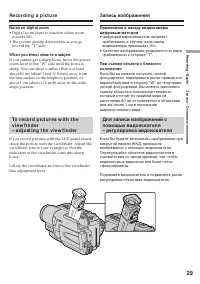
29 R ecording – B asic s Запись – Основные положения Re co r d i n g a p i ct u r e Запись изображения Not es on digit al zoom • Digital zoom starts to function when zoom exceeds 20 × . • The picture quality deteriorates as you go toward the “T” side. W hen you shoot close t o a subject If you canno...
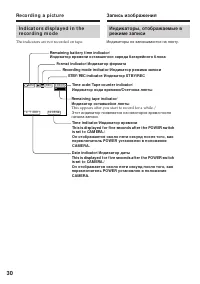
Страница 30 - The indicators are not recorded on tape.; Индикаторы не записываются на ленту.; Remaining bat t ery t ime indicat or/; This appears after you start to record for a while./
30 I n d i ca t o r s d i sp l a y e d i n t h er e co r d i n g m o d e The indicators are not recorded on tape. 0:00:01 12:05:56 4 7 2001 40 min REC Re co r d i n g a p i ct u r e Запись изображения Индикаторы, отображаемые врежиме записи Индикаторы не записываются на ленту. STBY/ REC indicat or/ ...
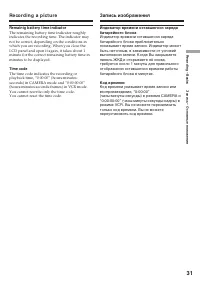
Страница 31 - Код времени
31 R ecording – B asic s Запись – Основные положения Индикатор времени оставшегося зарядабатарейного блока Индикатор времени оставшегося зарядабатарейного блока приблизительнопоказывает время записи. Индикатор можетбыть неточным, в зависимости от условийвыполнения записи. Когда Вы закрываетепанель Ж...
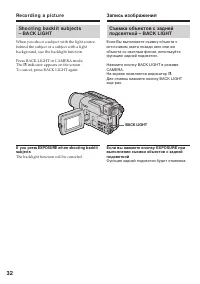
Страница 32 - BACK LIGHT; indicator appears on the screen.; Функция задней подсветки будет отменена.
32 Re co r d i n g a p i ct u r e BACK LIGHT Sh o o t i n g b a ck l i t su b j e ct s– BA CK LI GHT When you shoot a subject with the light sourcebehind the subject or a subject with a lightbackground, use the backlight function. Press BACK LIGHT in CAMERA mode.The . indicator appears on the screen...
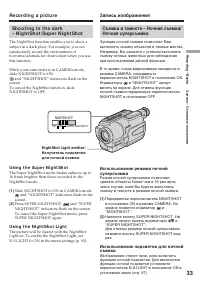
Страница 33 - Usi n g t h e Su p e r N i g h t Sh o t; Slide NIGHTSHOT to ON in CAMERA mode.; Usi n g t h e N i g h t Sh o t Li g h t; and “NIGHTSHOT” indicators flash on the; Night Shot Light emit t er/; и “NIGHTSHOT” начнут
33 R ecording – B asic s Запись – Основные положения Usi n g t h e Su p e r N i g h t Sh o t The Super NightShot mode makes subjects up to16 times brighter than those recorded in theNightShot mode. (1 ) Slide NIGHTSHOT to ON in CAMERA mode. and “NIGHTSHOT” indicators flash on the screen. (2 ) Press ...
Страница 34 - • Do not use the NightShot function in bright; Shut t er speed in t he Super Night Shot mode; • Не используйте функцию ночной съемки в; Подсветка для ночной съемки
34 Re co r d i n g a p i ct u r e Not es • Do not use the NightShot function in bright places (ex. outdoors in the daytime). This maycause your camcorder to malfunction. • When you keep NIGHTSHOT setting to ON in normal recording, the picture may be recordedin incorrect or unnatural colours. • If fo...
Страница 35 - • If you start recording after using the end search; Проверка записи; • Если Вы случайно начали запись после
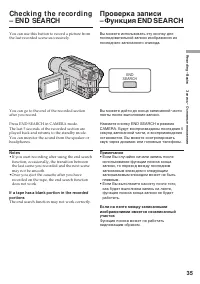
35 R ecording – B asic s Запись – Основные положения Ch e ck i n g t h e re co rd i n g– EN D SEA RCH You can use this button to record a picture fromthe last recorded scene successively. You can go to the end of the recorded sectionafter you record. Press END SEARCH in CAMERA mode.The last 5 second...
Страница 36 - — Pl a y b a ck – Ba si cs —; Pl a y i n g b a ck a t a p e; Open the LCD panel while pressing OPEN.; To st o p p l a y b a ck; — Воспроизведение – Основные положения —; Для остановки воспроизведения
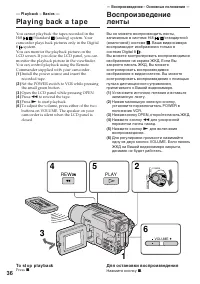
36 — Pl a y b a ck – Ba si cs — Pl a y i n g b a ck a t a p e You cannot playback the tapes recorded in theHi8 /Standard (analog) system. Your camcorder plays back pictures only in the Digital8 system.You can monitor the playback picture on theLCD screen. If you close the LCD panel, you canmonitor t...
Страница 37 - Во время контроля на экране ЖКД; . You can adjust the angle of the; DISPLAY; Воспроизведение ленты
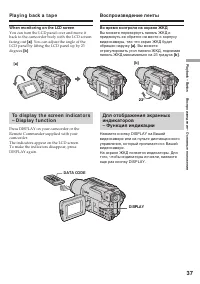
37 P laybac k – B asic s Воспроизведение – Основные положения Во время контроля на экране ЖКД Вы можете перевернуть панель ЖКД ипридвинуть ее обратно на место к корпусувидеокамеры, так что экран ЖКД будетобращен наружу [a] . Вы можете отрегулировать угол панели ЖКД, поднимаяпанель ЖКД максимально на...
Страница 38 - Использование функции кода данных; Usi n g t h e d a t a co d e f u n ct i o n; Not t o display recording dat e; Различные установки
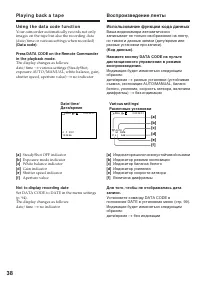
38 Использование функции кода данных Ваша видеокамера автоматическизаписывает не только изображения на ленту,но также и данные записи (дату/время илиразные установки при записи). (Код данных) . Нажмите кнопку DATA CODE на пультедистанционного управления в режимевоспроизведения. Индикация будет измен...
Страница 39 - Записанные данные; – Воспроизводится незаписанный участок на; Код данных; – A blank section of the tape is being played; Dat a code
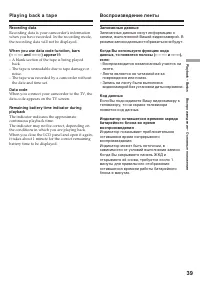
39 P laybac k – B asic s Воспроизведение – Основные положения Pl a y i n g b a ck a t a p e Воспроизведение ленты Записанные данные Записанные данные несут информацию озаписи, выполненной Вашей видеокамерой. Врежиме записи данные отображаться не будут. Когда Вы используете функцию кодаданных, то поя...
Страница 40 - V a r i o u s p l a y b a ck m o d e s; To a d v a n ce t h e t a p e; Для ускоренной перемотки ленты назад
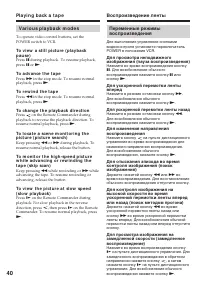
40 V a r i o u s p l a y b a ck m o d e s To operate video control buttons, set thePOWER switch to VCR. To v i e w a st i l l p i ct u r e ( p l a y b a ckp a u se ) Press X during playback. To resume playback, press X or N . To a d v a n ce t h e t a p e Press M in the stop mode. To resume normal p...
Страница 41 - To v i e w t h e p i ct u r e a t d o u b l e sp e e d; In t he various playback modes; В переменных режимах воспроизведения
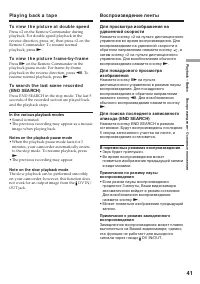
41 P laybac k – B asic s Воспроизведение – Основные положения To v i e w t h e p i ct u r e a t d o u b l e sp e e d Press × 2 on the Remote Commander during playback. For double speed playback in thereverse direction, press , then press × 2 on the Remote Commander. To resume normalplayback, press N...
Страница 42 - Желтый
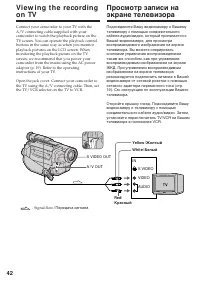
42 Vi e w i n g t h e re co rd i n go n TV Connect your camcorder to your TV with theA/V connecting cable supplied with yourcamcorder to watch the playback picture on theTV screen. You can operate the playback controlbuttons in the same way as when you monitorplayback pictures on the LCD screen. Whe...
Страница 43 - V i e w i n g t h e r e co r d i n g o n TV; If your TV has an S video jack
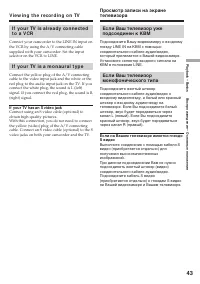
43 P laybac k – B asic s Воспроизведение – Основные положения V i e w i n g t h e r e co r d i n g o n TV I f y o u r TV i s a l r e a d y co n n e ct e dt o a V CR Connect your camcorder to the LINE IN input onthe VCR by using the A/V connecting cablesupplied with your camcorder. Set the inputselec...
Страница 45 - • During the tape photo recording, you cannot
45 Advanc ed R ecording Operat ions Усовершенствованные операции съемки Not es • During the tape photo recording, you cannot change the mode or setting. • The PHOTO button does not work: – while the digital effect function is set or in use.– while the fader function is in use. • When recording a sti...
Страница 46 - Pr i n t i n g t h e st i l l i m a g e; Передача сигнала
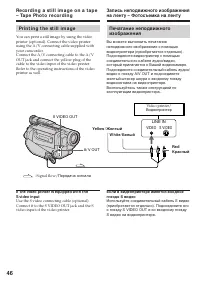
46 A/ V OUT LINE IN VIDEO S VIDEO S VIDEO OUT Pr i n t i n g t h e st i l l i m a g e You can print a still image by using the videoprinter (optional). Connect the video printerusing the A/V connecting cable supplied withyour camcorder.Connect the A/V connecting cable to the A/VOUT jack and connect ...
Страница 47 - Usi n g t h e w i d e m o d e; during playing back on a normal TV; To ca n ce l t h e w i d e m o d e; Set 16:9WIDE to OFF in the menu settings.; Для отмены широкоэкранного режима
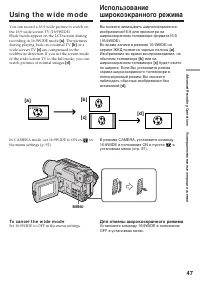
47 Advanc ed R ecording Operat ions Усовершенствованные операции съемки M ENU Usi n g t h e w i d e m o d e You can record a 16:9 wide picture to watch onthe 16:9 wide-screen TV (16:9WIDE).Black bands appear on the LCD screen duringrecording in 16:9WIDE mode [a ] . The pictures during playing back o...
Страница 48 - ” flashes; Во время записи; ”, а функция SteadyShot не будет
48 In t he w ide mode, you cannot select t hef ollow ing f unct ions: – Old movie– Bounce During recording You cannot select or cancel the wide mode. Whenyou cancel the wide mode, set your camcorder tothe standby mode and then set 16:9WIDE to OFFin the menu settings. If t he w ide mode is set t o ON...
Страница 49 - M ONOTONE; Fade in only; FADER; MONOTONE; Только плавное введение изображения
49 Advanc ed R ecording Operat ions Усовершенствованные операции съемки You can fade the picture in or out to give yourrecording a professional appearance. Usi n g t h e f a d e rf u n ct i o n M ONOTONE When fading in, the picture gradually changesfrom black-and-white to colour.When fading out, the...
Страница 50 - Usi n g t h e f a d e r f u n ct i o n; To ca n ce l t h e f a d e r f u n ct i o n; Использование функции фейдера; При введении изображения; Для отмены функции фейдера
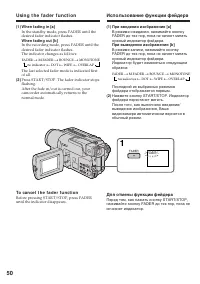
50 Usi n g t h e f a d e r f u n ct i o n (1 ) W hen f ading in [a] In the standby mode, press FADER until thedesired fader indicator flashes. W hen f ading out [b ] In the recording mode, press FADER until thedesired fader indicator flashes.The indicator changes as follows: no indicator T DOT T WIP...
Страница 51 - wipe or dot function only); Not e on t he bounce f unct ion; Примечание; ON в установках меню
51 Advanc ed R ecording Operat ions Усовершенствованные операции съемки Not e You cannot use the following functions whileusing the fader function. Also, you cannot usethe fader function while using the followingfunctions: – Digital effect– Low lux mode of PROGRAM AE (Overlap, wipe or dot function o...
Страница 52 - : The colour and brightness of the; SEPIA; The image expands vertically.
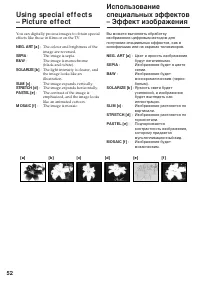
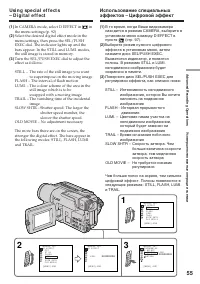
52 Usi n g sp e ci a l e f f e ct s– Pi ct u re e f f e ct You can digitally process images to obtain specialeffects like those in films or on the TV. NEG. ART [a ] : The colour and brightness of the image are reversed. SEPIA : The image is sepia. B&W : The image is monochrome(black-and-white). ...
Страница 53 - In CAMERA mode, select P EFFECT in; To ca n ce l t h e p i ct u r e e f f e ct f u n ct i o n; Set P EFFECT to OFF in the menu settings.; W hile using t he pict ure ef f ect f unct ion; The picture effect is automatically canceled.; в установках меню; Если Вы выключите питание
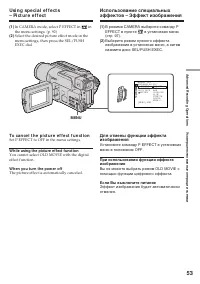
53 Advanc ed R ecording Operat ions Усовершенствованные операции съемки (1 ) In CAMERA mode, select P EFFECT in in the menu settings. (p. 92) (2 ) Select the desired picture effect mode in themenu settings, then press the SEL/PUSHEXEC dial. To ca n ce l t h e p i ct u r e e f f e ct f u n ct i o n S...
Страница 56 - To ca n ce l t h e d i g i t a l e f f e ct f u n ct i o n
56 To ca n ce l t h e d i g i t a l e f f e ct f u n ct i o n Set D EFFECT to OFF in the menu settings. Not es • The following functions do not work during digital effect:– Fader– Low lux mode of PROGRAM AE– Tape photo recording– Super NightShot • The PROGRAM AE function does not work in the slow sh...
Страница 57 - Spot light
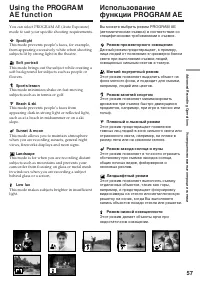
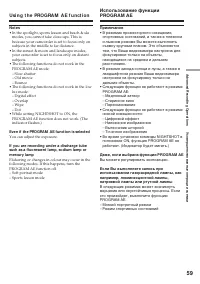
57 Advanc ed R ecording Operat ions Усовершенствованные операции съемки Usi n g t h e PROGRA MA E f u n ct i o n You can select PROGRAM AE (Auto Exposure)mode to suit your specific shooting requirements. Spot light This mode prevents people’s faces, for example,from appearing excessively white when ...
Страница 58 - In CAMERA mode, select PROGRAM AE in; To ca n ce l t h e PROGRA M A E f u n ct i o n; Usi n g t h e PROGRA M A E f u n ct i o n; Для отмены функции PROGRAM AE
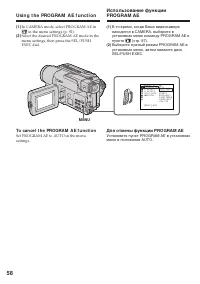
58 (1 ) In CAMERA mode, select PROGRAM AE in in the menu settings (p. 92). (2 ) Select the desired PROGRAM AE mode in themenu settings, then press the SEL/PUSHEXEC dial. To ca n ce l t h e PROGRA M A E f u n ct i o n Set PROGRAM AE to AUTO in the menusettings. Usi n g t h e PROGRA M A E f u n ct i o...
Страница 60 - faithfully; ночных сцен) с большой достоверностью; NIGHTSHOT в положение ON
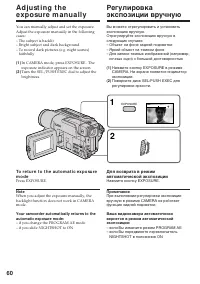
60 You can manually adjust and set the exposure.Adjust the exposure manually in the followingcases:– The subject is backlit– Bright subject and dark background– To record dark pictures (e.g. night scenes) faithfully (1 ) In CAMERA mode, press EXPOSURE . Theexposure indicator appears on the screen. (...
Страница 61 - such as walls and sky.; To r e t u r n t o t h e a u t o f o cu s m o d e; Fo cu si n g m a n u a l l y; FOCUS; Фокусировка вручную; • Если Вы хотите выполнить изменение
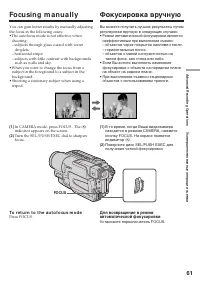
61 Advanc ed R ecording Operat ions Усовершенствованные операции съемки You can gain better results by manually adjustingthe focus in the following cases:•The autofocus mode is not effective when shooting:– subjects through glass coated with water droplets. – horizontal stripe.– subjects with little...
Страница 62 - Для точной фокусировки
62 To f ocus precisely Adjust the zoom by first focusing at the “T”(telephoto) position and then shooting at the “W”(wide-angle) position. This makes focusingeasier. W hen you shoot close t o t he subject Focus at the end of the “W” (wide-angle)position. 9 changes t o t he f ollow ing indicat ors: w...
Страница 63 - Su p e r i m p o si n g a t i t l e; VACATION; T I TLE; Наложение титра; Выберите нужный титр в установках
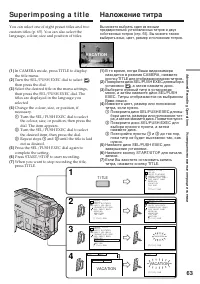
63 Advanc ed R ecording Operat ions Усовершенствованные операции съемки Su p e r i m p o si n g a t i t l e You can select one of eight preset titles and twocustom titles (p. 65). You can also select thelanguage, colour, size and position of titles. (1 ) In CAMERA mode, press TITLE to displaythe tit...
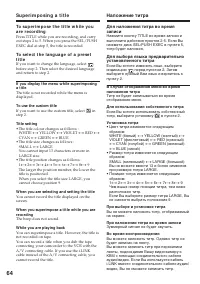
Страница 64 - To use t he cust om t it le; перед пунктом 2. Затем; Для использования собственного титра; • Цвет титра изменяется следующим; При выборе и установке титра; Зуммерный сигнал не будет звучать.; Во время воспроизведения
64 Su p e r i m p o si n g a t i t l e To su p e r i m p o se t h e t i t l e w h i l e y o ua r e r e co r d i n g Press TITLE while you are recording, and carryout steps 2 to 5. When you press the SEL/PUSHEXEC dial at step 5, the title is recorded. To se l e ct t h e l a n g u a g e o f a p r e se...
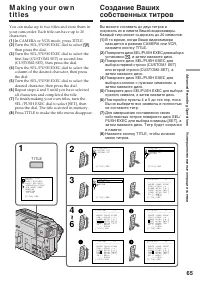
Страница 66 - To ch a n g e a t i t l e y o u h a v e st o r e d; To erase a charact er; M a k i n g y o u r o w n t i t l e s; Если Вы выбрали установку [
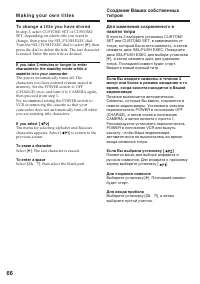
66 To ch a n g e a t i t l e y o u h a v e st o r e d In step 3, select CUSTOM1 SET or CUSTOM2SET, depending on which title you want tochange, then press the SEL/PUSH EXEC dial.Turn the SEL/PUSH EXEC dial to select [ C ], then press the dial to delete the title. The last characteris erased. Enter th...
Страница 67 - To t u r n o f f t h e b u i l t -i n l i g h t; Press LIGHT until the; LIGHT; не появится на экране,; Для выключения встроенного фонаря; не появится на экране.
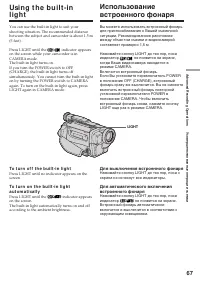
67 Advanc ed R ecording Operat ions Усовершенствованные операции съемки Usi n g t h e b u i l t -i nl i g h t You can use the built-in light to suit yourshooting situation. The recommended distancebetween the subject and camcorder is about 1.5 m(5 feet). Press LIGHT until the indicator appears on th...
Страница 68 - W hen you press LIGHT; Usi n g t h e b u i l t -i n l i g h t; При нажатии кнопки LIGHT; Индикатор изменяется следующим образом:; Использование встроенного фонаря
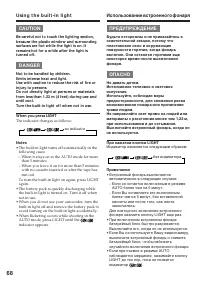
68 CA UTI ON Be caref ul not t o t ouch t he light ing sect ion,because t he plast ic w indow and surroundingsurf aces are hot w hile t he light is on. Itremains hot f or a w hile af t er t he light ist urned of f . D A N GER Not t o be handled by children.Emit s int ense heat and light .Use w it h ...
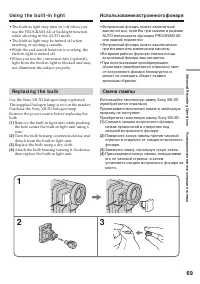
Страница 69 - • The built-in light may turn on/off when you; Re p l a ci n g t h e b u l b; Replace the bulb using a dry cloth.; Во время работы функции поиска конца; Смена лампы
69 Advanc ed R ecording Operat ions Усовершенствованные операции съемки 1 2 3 • The built-in light may turn on/off when you use the PROGRAM AE or backlight functionwhile shooting in the AUTO mode. • The built-in light may be turned off when inserting or ejecting a cassette. •While the end search fun...
Страница 70 - • When replacing the bulb, use only the Sony
70 Usi n g t h e b u i l t -i n l i g h t CA UTI ON • When replacing the bulb, use only the Sony XB-3D halogen lamp (optional) to reduce therisk of fire. • To prevent possible burn hazard, disconnect the power source before replacing and do nottouch the bulb until the bulb becomes coolenough to hand...
Страница 71 - in the menu settings; • You cannot process externally input scenes; — A d v a n ce d Pl a y b a ck Op e r a t i o n s —; — Усовершенствованные операции воспроизведения —; • Вы не можете видоизменять вводимые от
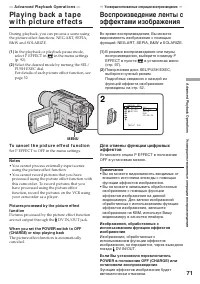
71 Advanc ed P laybac k Operat ions Усовершенствованные операции воспроизведения During playback, you can process a scene usingthe picture effect functions: NEG.ART, SEPIA,B&W and SOLARIZE. (1 ) In the playback or playback pause mode,select P EFFECT in in the menu settings (p. 92). (2 ) Select t...
Страница 72 - Set D EFFECT to OFF in the menu settings.; Для отмены функции цифровых эффектов
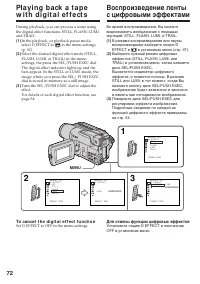
72 During playback, you can process a scene usingthe digital effect functions: STILL, FLASH, LUMI.and TRAIL. (1 ) In the playback, or playback pause mode,select D EFFECT in in the menu settings (p. 92). (2 ) Select the desired digital effect mode (STILL,FLASH, LUMI. or TRAIL) in the menusettings, th...
Страница 74 - appears on the screen.; To ca n ce l Ta p e PB ZOOM f u n ct i o n; появится на дисплее.; Для отмены функции ленты PB ZOOM; Нажмите кнопку PB ZOOM.
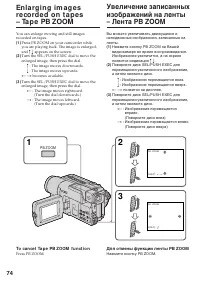
74 You can enlarge moving and still imagesrecorded on tapes. (1 ) Press PB ZOOM on your camcorder whileyou are playing back. The image is enlarged,and R r appears on the screen. (2 ) Turn the SEL/PUSH EXEC dial to move theenlarged image, then press the dial. R : The image moves downwards. r : The im...
Страница 75 - Pict ures processed by Tape PB ZOOM f unct ion; • Вы не можете обрабатывать введенные с
75 Advanc ed P laybac k Operat ions Усовершенствованные операции воспроизведения Not es • You cannot process externally input scenes using Tape PB ZOOM function. • You cannot record pictures that you have processed using Tape PB ZOOM function withthis camcorder. To record pictures that youhave proce...
Страница 77 - • When you press ZERO SET MEMORY before; • Если Вы нажмете кнопку ZERO SET
77 Advanc ed P laybac k Operat ions Усовершенствованные операции воспроизведения Qu i ck l y l o ca t i n g a sce n e u si n gt h e ze r o se t m e m o r y f u n ct i o n Быстрое отыскание эпизода спомощью функции памятинулевой отметки Not es • When you press ZERO SET MEMORY before rewinding the tap...
Страница 79 - To st o p se a r ch i n g; The date search function may not work correctly.; Для остановки поиска; Нажмите кнопку
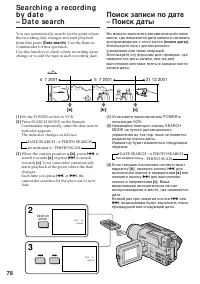
79 Advanc ed P laybac k Operat ions Усовершенствованные операции воспроизведения Se a r ch i n g a r e co r d i n g b y d a t e– D a t e se a r ch To st o p se a r ch i n g Press x . Not e If one day’s recording is less than 2 minutes, yourcamcorder may not accurately find the pointwhere the recordi...
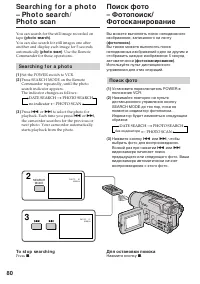
Страница 80 - Se a r ch i n g f o r a p h o t o; Поиск фото
80 You can search for the still image recorded ontape (phot o search) . You can also search for still images one afteranother and display each image for 5 secondsautomatically (phot o scan) . Use the Remote Commander for these operations. Se a r ch i n g f o r a p h o t o (1 ) Set the POWER switch t...
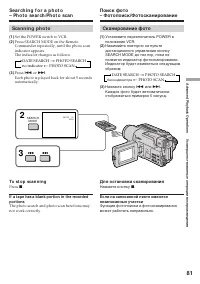
Страница 81 - Sca n n i n g p h o t o; Set the POWER switch to VCR.; To st o p sca n n i n g; Сканирование фото; Для остановки сканирования
81 Advanc ed P laybac k Operat ions Усовершенствованные операции воспроизведения Se a r ch i n g f o r a p h o t o– Ph o t o se a r ch /Ph o t o sca n Sca n n i n g p h o t o (1 ) Set the POWER switch to VCR. (2 ) Press SEARCH MODE on the RemoteCommander repeatedly, until the photo scanindicator app...
Страница 82 - Usi n g t h e A /V co n n e ct i n g ca b l e; — Ed i t i n g —; D u b b i n g a t a p e; — Монтаж —; Перезапись ленты; Если Вы закончили перезапись ленты
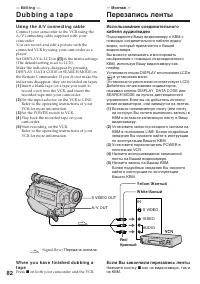
82 Usi n g t h e A /V co n n e ct i n g ca b l e Connect your camcorder to the VCR using theA/V connecting cable supplied with yourcamcorder.You can record and edit a picture with theconnected VCR by using your camcorder as aplayer.Set DISPLAY to LCD in in the menu settings (The default setting is s...
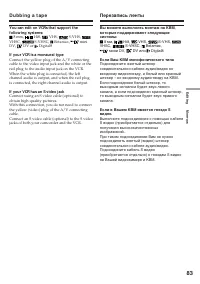
Страница 83 - mini; If your VCR is a monaural t ype; DV или Digital8; Если Ваш КВМ монофонического типа
83 E diting Монтаж You can edit on VCRs t hat support t hef ollow ing syst ems: 8 mm, Hi8, VHS, S-VHS, VHSC, S-VHSC, Betamax, mini DV, DV or Digital8 If your VCR is a monaural t ype Connect the yellow plug of the A/V connectingcable to the video input jack and the white or thered plug to the audio i...
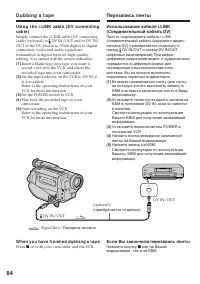
Страница 84 - W h e n y o u h a v e f i n i sh e d d u b b i n g a t a p e
84 S VIDEO DV Usi n g t h e i .LI N K ca b l e ( D V co n n e ct i n gca b l e ) Simply connect the i.LINK cable (DV connectingcable) (optional) to DV IN/OUT and to DV IN/OUT of the DV products. With digital-to-digitalconnection, video and audio signals aretransmitted in digital form for high-qualit...
Страница 85 - See page 120 for more information about i.LINK.; If you record a playback pause pict ure via t he
85 E diting Монтаж D u b b i n g a t a p e Перезапись ленты You can connect one VCR only using t he i.LINKcable (DV connect ing cable). See page 120 for more information about i.LINK. The f ollow ing f unct ions do not w ork duringdigit al edit ing: – Picture effect– Digital effect– Tape PB ZOOM If ...
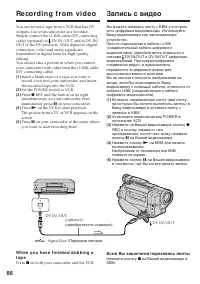
Страница 86 - Re co rd i n g f ro m v i d e o; Запись с видео
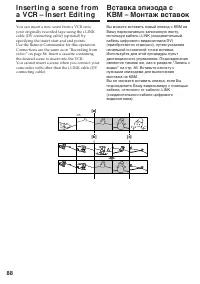
86 You can record a tape from a VCR that has DVoutputs. Use your camcorder as a recorder.Simply connect the i.LINK cable (DV connectingcable) (optional) to DV IN/OUT and to DV IN/OUT of the DV products. With digital-to-digitalconnection, video and audio signals aretransmitted in digital form for hig...
Страница 87 - Re co r d i n g f r o m v i d e o; Во время цифрового монтажа
87 E diting Монтаж Re co r d i n g f r o m v i d e o Запись с видео Вы можете подсоединить только одинКВМ с помощью шнура i.LINK(соединительный кабель цифровоговидеосигнала). Во время цифрового монтажа Цвет на дисплее может быть неравномерным.Однако, это не влияет на записываемоеизображение. При зап...
Страница 90 - To ch a n g e t h e i n se r t e n d p o i n t; Skip step 3 and 4. Press; Для изменения точки окончания вставки; Пропустите пукты 3 и 4. Нажмите кнопку
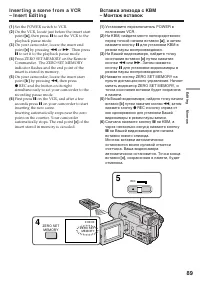
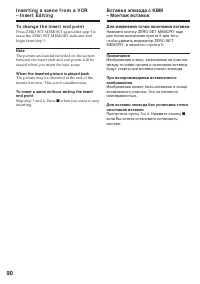
90 I n se r t i n g a sce n e f r o m a V CR– I n se r t Ed i t i n g Вставка эпизода с КВМ– Монтаж вставок To ch a n g e t h e i n se r t e n d p o i n t Press ZERO SET MEMORY again after step 5 toerase the ZERO SET MEMORY indicator andbegin from step 3. Not e The picture and sound recorded on the ...
Страница 91 - — Cu st o m i zi n g Y o u r Ca m co r d e r —; Changing t he m enu set t ings; Изменение установок меню
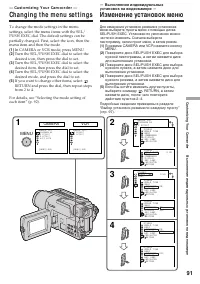
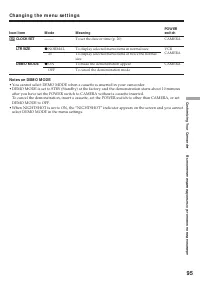
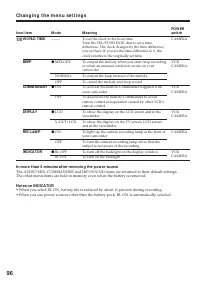
91 C ustomizing Your C amc order Выполнение индивидуальных установок на видеокамере — Cu st o m i zi n g Y o u r Ca m co r d e r — Changing t he m enu set t ings To change the mode settings in the menusettings, select the menu items with the SEL/PUSH EXEC dial. The default settings can bepartially c...
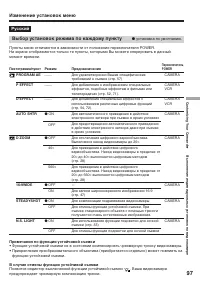
Страница 97 - Примечания по функции устойчивой съемки; функцию устойчивой съемки.; В случае отмены функции устойчивой съемки; Появится индиктор выключенной функции устойчивой съемки; Выбор установок режима по каждому пункту; установка по умолчанию.
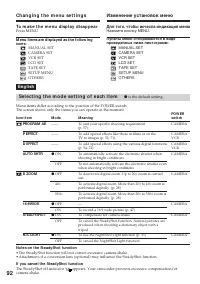
97 C ustomizing Your C amc order Выполнение индивидуальных установок на видеокамере Пиктограмма/пункт PROGRAM AE P EFFECT D EFFECT AUTO SHTR D ZOOM 16:9WIDE STEADYSHOT N.S. LIGHT Режим —— —— —— z ON OFF z OFF 40 × 560 × z OFF ON z ON OFF z ON OFF Предназначение Для удовлетворения Ваших специфических...
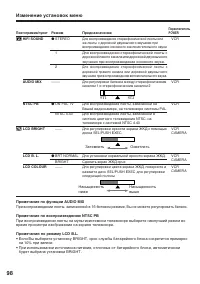
Страница 98 - Примечание по функции AUDIO MIX; будет выбрана установка BRIGHT.
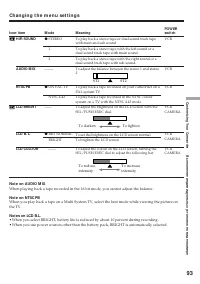
98 Изменение установок меню Пиктограмма/пункт HiFi SOUND AUDIO MIX NTSC PB LCD BRIGHT LCD B. L. LCD COLOUR Режим z STEREO 1 2 ––––– z ON PAL TV NTSC 4.43 —— z BRT NORMAL BRIGHT —— Предназначение Для воспроизведения стереофонической ленты илиже ленты с дорожкой двуязычного звучания привоспроизведении...
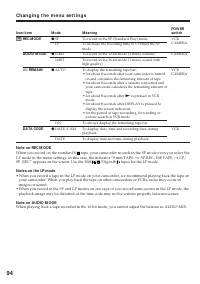
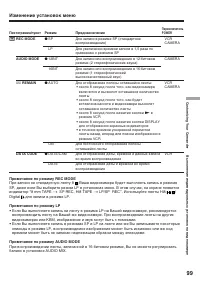
Страница 99 - Примечание по режиму REC MODE; Digital для записи в режиме LP.; Примечания по режиму LP
99 C ustomizing Your C amc order Выполнение индивидуальных установок на видеокамере Изменение установок меню Пиктограмма/пункт REC MODE AUDIO MODE q REMAIN DATA CODE Режим z SP LP z 12BIT 16BIT z AUTO ON z DATE/CAM DATE Предназначение Для записи в режиме SP (стандартноевоспроизведение) Для увеличени...
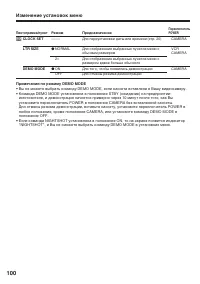
Страница 100 - Примечания по режиму DEMO MODE
100 Изменение установок меню Пиктограмма/пункт CLOCK SET LTR SIZE DEMO MODE Режим ––––– z NORMAL 2 × z ON OFF Предназначение Для пepeycтaнoвки даты или времени (стр. 20) Для отображения выбранных пунктов меню собычным размером Для отображения выбранных пунктов меню сразмером вдвое больше обычного Дл...
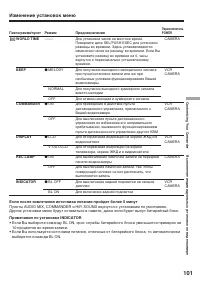
Страница 101 - Если после извлечения источника питания пройдет более 5 минут; 0 процентов во время записи.
101 C ustomizing Your C amc order Выполнение индивидуальных установок на видеокамере Изменение установок меню Пиктограмма/пункт WORLD TIME BEEP COMMANDER DISPLAY REC LAMP INDICATOR Режим ––––– z MELODY NORMAL OFF z ON OFF z LCD V-OUT/LCD z ON OFF z BL OFF BL ON Предназначение Для установки часов на ...
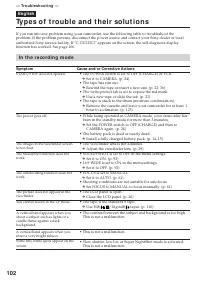
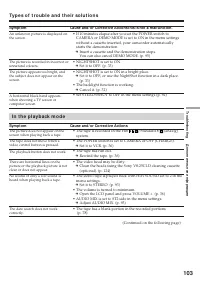
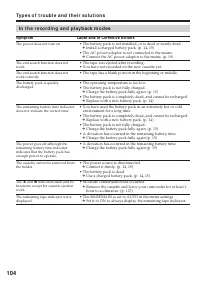
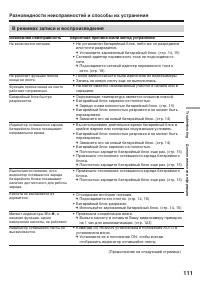
Страница 109 - В режиме записи; Возможная неисправность; Разновидности неисправностей и способы их устранения
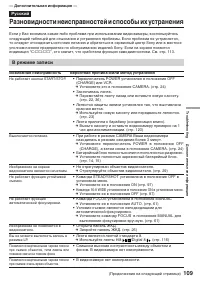
109 T roubles hoot ing Дополнительная информация Если у Вас возникла какая-либо проблема при использовании видеокамеры, воспользуйтесьследующей таблицей для отыскания и устранения проблемы. Если проблема не устраняется,то следует отсоединить источник питания и обратиться в сервисный центр Sony или в...
Страница 110 - В режиме воспроизведения
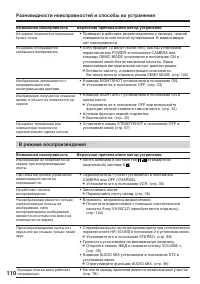
110 Разновидности неисправностей и способы их устранения Возможная неисправность Вероятная причина и/или метод устранения • Приведен в действие режим медленного затвора, низкой освещенности или ночной суперсъемки. В видеокамеренет неисправности. • Если пройдет 10 минут после того, как Вы установили ...
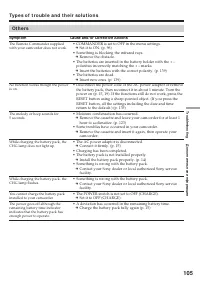
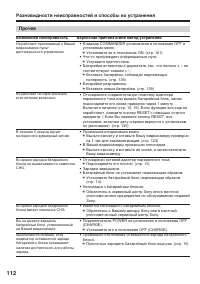
Страница 112 - Прочее
112 Прочее Возможная неисправность Вероятная причина и/или метод устранения • Команда COMMANDER установлена в положение OFF в установках меню. c Установите ее в положение ON. (стр. 101) • Что-то преграждает инфракрасные лучи. c Устраните препятствие. • Батарейки вставлены в держатель так, что полюса...
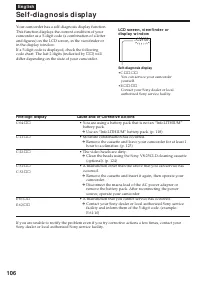
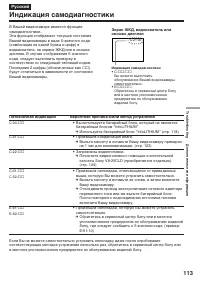
Страница 113 - Пятизначная индикация; Индикация самодиагностики
113 T roubles hoot ing Дополнительная информация Пятизначная индикация Вероятная причина и/или метод устранения • Вы используете батарейный блок, который не является батарейным блоком “InfoLITHIUM”. c Используйте батарейный блок “InfoLITHIUM” (стр. 118) • Произошла конденсация влаги. c Выньте кассет...
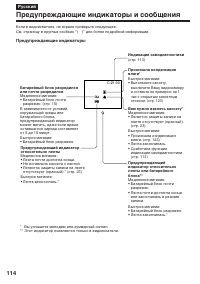
Страница 114 - Предупреждающие индикаторы; Предупреждающие индикаторы и сообщения; • Лента почти достигла конца
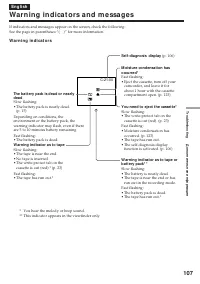
114 C:21:00 Если в видоискателе, на экране проверьте следующее:См. страницу в круглых скобках “( )” для более подробной информации. Предупреждающие индикаторы Предупреждающий индикаторотносительно ленты Медленное мигание:• Лента почти достигла конца.• Не вставлена кассета с лентой.• Лепесток защиты ...
Страница 115 - Предупреждающие сообщения
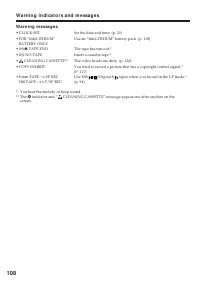
115 T roubles hoot ing Дополнительная информация Предупреждающие сообщения • CLOCK SET Установите дату и время (стр. 20) • FOR “InfoLITHIUM” Используйте батарейный блок “InfoLITHIUM” (стр. 118) BATTERY ONLY • Q Z TAPE END Лента закончилась.* • Q NO TAPE Вставьте кассету.* • CLEANING CASSETTE** Загря...
Страница 116 - — A d d i t i o n a l I n f o r m a t i o n —; A b o u t v i d e o ca sse t t e s; W h a t i s t h e “ D i g i t a l 8 sy st e m ” ?; Pl a y b a ck sy st e m; Playing back an NTSC-recorded t ape; О видеокассетах; Что такое “Цифровая система Digital8; Система воспроизведения
116 — A d d i t i o n a l I n f o r m a t i o n — A b o u t v i d e o ca sse t t e s W h a t i s t h e “ D i g i t a l 8 sy st e m ” ? This video system has been developed to enabledigital recording to Hi8 /Digital8 video cassette . Usa b l e ca sse t t e t a p e s We recommend using Hi8 /Digital8 v...
Страница 117 - W h e n y o u p l a y b a ck; Сигнал авторского права; При воспроизведении; STEREO
117 Addit ional Inf ormat ion Дополнительная информация A b o u t v i d e o ca sse t t e s О видеокассетах Co p y r i g h t si g n a l W h e n y o u p l a y b a ck Using any other video camera recorder, youcannot record on a tape that has recordedcopyright control signals for copyright protectionof ...
Страница 119 - Re m a i n i n g b a t t e r y t i m e i n d i ca t o r; О батарейном блоке “InfoLITHIUM”; Иногда метка; Как хранить батарейный блок
119 Addit ional Inf ormat ion Дополнительная информация A b o u t t h e “ I n f o LI THI UM ” b a t t e r yp a ck Re m a i n i n g b a t t e r y t i m e i n d i ca t o r • If the power goes off although the battery remaining indicator indicates that the batterypack has enough power to operate, charg...
Страница 120 - A b o u t t h e N a m e “ i .LI N K”; Относительно названия “i.LINK”
120 A b o u t i .LI N K The DV jack on this unit is an i.LINK-compliantDV input/output jack. This section describes thei.LINK standard and its features. W h a t i s “ i .LI N K” ? i.LINK is a digital serial interface for handlingdigital video, digital audio and other data in twodirections between eq...
Страница 121 - i .LI N K Ba u d r a t e
121 Addit ional Inf ormat ion Дополнительная информация A b o u t i .LI N K i .LI N K Ba u d r a t e i.LINK’s maximum baud rate varies according tothe equipment. Three maximum baud rates aredefined: S100 (approx. 100Mbps*)S200 (approx. 200Mbps)S400 (approx. 400Mbps) The baud rate is listed under “Sp...
Страница 122 - Usi n g y o u r ca m co r d e r a b r o a d; PAL syst em; Brazil; NTSC syst em; Бразилия; Система NTSC
122 Usi n g y o u r ca m co r d e r a b r o a d You can use your camcorder in any country orarea with the AC power adaptor supplied withyour camcorder within 100 V to 240 V AC, 50/60Hz. Your camcorder is a PAL system basedcamcorder. If you want to view the playbackpicture on a TV, it must be a PAL s...
Страница 123 - M o i st u r e co n d e n sa t i o n; I f m o i st u r e co n d e n sa t i o n o ccu r s; Not e on moist ure condensat ion; Конденсация влаги; Если произошла конденсация влаги; Примечание по конденсации влаги
123 Addit ional Inf ormat ion Дополнительная информация M a i n t e n a n cei n f o r m a t i o n a n dp re ca u t i o n s M o i st u r e co n d e n sa t i o n If your camcorder is brought directly from a coldplace to a warm place, moisture may condenseinside your camcorder, on the surface of the ta...
Страница 124 - M a i n t e n a n ce i n f o r m a t i o n; Cl e a n i n g t h e LCD scr e e n; indicator and “; Чистка экрана ЖКД
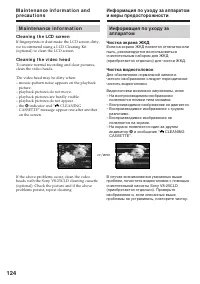
124 M a i n t e n a n ce i n f o r m a t i o n Cl e a n i n g t h e LCD scr e e n If fingerprints or dust make the LCD screen dirty,we recommend using a LCD Cleaning Kit(optional) to clean the LCD screen. Cl e a n i n g t h e v i d e o h e a d To ensure normal recording and clear pictures,clean the ...
Страница 125 - Remove the screw with a screwdriver (not; Caut ion; Отвинтите винт с помощью отвертки; Внимание
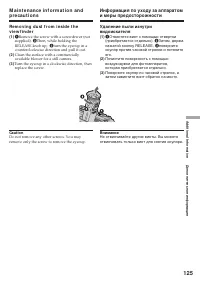
125 Addit ional Inf ormat ion Дополнительная информация Re m o v i n g d u st f r o m i n si d e t h ev i e w f i n d e r (1 ) 1 Remove the screw with a screwdriver (not supplied). 2 Then, while holding the RELEASE knob up, 3 turn the eyecup in a counterclockwise direction and pull it out. (2 ) Clea...
Страница 126 - Charging t he built -in rechargeable lit hium cell:; • Connect your camcorder to the mains using the
126 Ch a r g i n g t h e b u i l t -i nr e ch a r g e a b l e l i t h i u m ce l l Your camcorder is supplied with a built-inrechargeable lithium cell so as to retain the dateand time, etc., regardless of the setting of thePOWER switch. The rechargeable lithium cell isalways charged as long as you a...
Страница 127 - Pr e ca u t i o n s; Ca m co r d e r o p e r a t i o n; Меры предосторожности; Эксплуатация видеокамеры
127 Addit ional Inf ormat ion Дополнительная информация Pr e ca u t i o n s Ca m co r d e r o p e r a t i o n • Operate your camcorder on 7.2 V (battery pack) or 8.4 V (AC power adaptor). • For DC or AC operation, use the accessories recommended in this operating instructions. • If any solid object ...
Страница 128 - • Remove the tape, and periodically turn on the; Обращение с лентами; • Периодически вынимайте кассету и
128 M a i n t e n a n ce i n f o r m a t i o n a n dp r e ca u t i o n s On h a n d l i n g t a p e s Do not insert anything into the small holes on therear of the cassette. These holes are used to sensethe type and thickness of the tape and if therecording tab is in or out. Ca m co r d e r ca r e •...
Страница 129 - A C p o w e r a d a p t o r
129 Addit ional Inf ormat ion Дополнительная информация A C p o w e r a d a p t o r • Unplug the unit from the mains when you are not using the unit for a long time. Todisconnect the mains lead, pull it out by theplug. Never pull the mains lead itself. • Do not operate the unit with a damaged cord o...
Страница 130 - If bat t eries are leaking
130 M a i n t e n a n ce i n f o r m a t i o n a n dp r e ca u t i o n s Информация по уходу за аппаратоми меры предосторожности Батарейный блок • Используйте только рекомендуемое зарядное устройство или видеоаппаратуру сзарядной функцией. • Для предотвращения случайного короткого замыкания не допус...
Страница 132 - Технические характеристики; Видеокамера; Батарейный блок
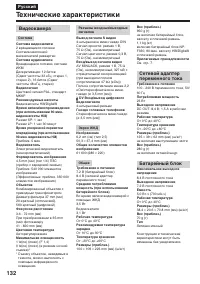
132 Русский Технические характеристики Видеокамера Система Система видеозаписи 2 вращающиеся головкиСистема наклонноймеханической развертки Система аудиозаписи Вращающиеся головки, системаИКМДискретизация: 12 битов(Сдвиг частоты 32 кГц, стерео 1,стерео 2), 16 битов (Сдвигчастоты 48 кГц, стерео) Виде...
Страница 133 - Ca m co r d e r; qs; qa
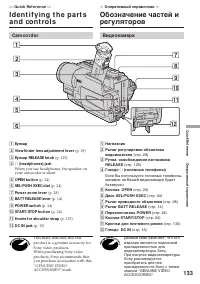
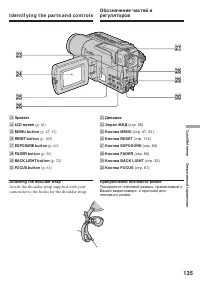
133 Quic k R eferenc e Оперативный справочник — Qu i ck Re f e r e n ce — I d e n t i f y i n g t h e p a r t sa n d co n t ro l s 1 Eyecup 2 View f inder lens adjust ment lever (p. 29) 3 Eyecup RELEASE knob (p. 125) 4 i (headphones) jack When you use headphones, the speaker onyour camcorder is sile...
Страница 134 - I d e n t i f y i n g t h e p a r t s a n d co n t r o l s
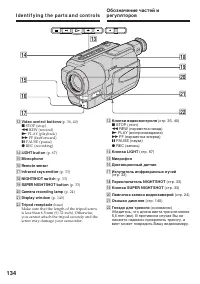
134 qd Video cont rol but t ons (p. 36, 40) x STOP (stop) m REW (rewind) N PLAY (playback) M FF (fastforward) X PAUSE (pause) z REC (recording) qf LIGHT but t on (p. 67) qg M icrophone qh Remot e sensor qj Inf rared rays emit t er (p. 33) qk NIGHTSHOT sw it ch (p. 33) ql SUPER NIGHTSHOT but t on (p....
Страница 136 - Attach the lens cap to the grip strap as illustrated.
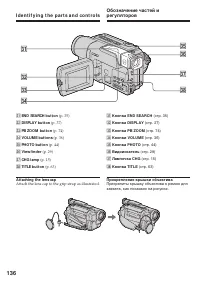
136 I d e n t i f y i n g t h e p a r t s a n d co n t r o l s ea END SEARCH but t on (p. 35) es DISPLAY but t on (p. 37) ed PB ZOOM but t on (p. 74) ef VOLUM E but t ons (p. 36) eg PHOTO but t on (p. 44) eh View f inder (p. 29) ej CHG lamp (p. 15) ek TITLE but t on (p. 63) At t aching t he lens cap...
Страница 137 - EJECT but t on; Fasten the grip strap firmly.; ra; Гнездо
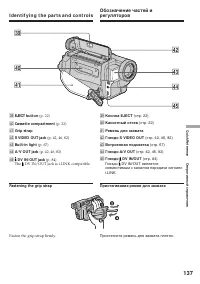
137 Quic k R eferenc e Оперативный справочник I d e n t i f y i n g t h e p a r t s a n d co n t r o l s el EJECT but t on (p. 22) r; Casset t e compart ment (p. 22) ra Grip st rap rs S VIDEO OUT jack (p. 42, 46, 82) rd Built -in light (p. 67) rf A/ V OUT jack (p. 42, 46, 82) rg DV IN/ OUT jack (p. ...
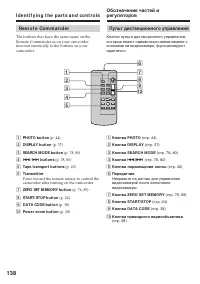
Страница 139 - To p r e p a r e t h e Re m o t e Co m m a n d e r; Not es on t he Remot e Commander; • Point the remote sensor away from strong light
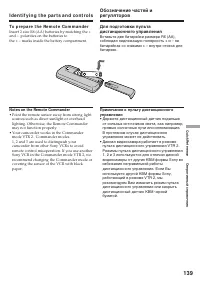
139 Quic k R eferenc e Оперативный справочник I d e n t i f y i n g t h e p a r t s a n d co n t r o l s To p r e p a r e t h e Re m o t e Co m m a n d e r Insert 2 size R6 (AA) batteries by matching the +and – polarities on the batteries tothe + – marks inside the battery compartment. Not es on t h...
Страница 140 - Op e r a t i o n i n d i ca t o r s; LCD scr e e n a n d V i e w f i n d e r /; wf; Рабочие индикаторы
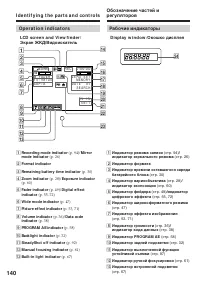
140 Op e r a t i o n i n d i ca t o r s LCD scr e e n a n d V i e w f i n d e r / Экран ЖКД/Видоискатель D i sp l a y w i n d o w / Окошко дисплея 1 Recording mode indicat or (p. 94) / M irror mode indicat or (p. 26) 2 Format indicat or 3 Remaining bat t ery t ime indicat or (p. 30) 4 Zoom indicat o...
Страница 141 - This indicator appears in the viewfinder only.; В видоискателе появится индикатор.
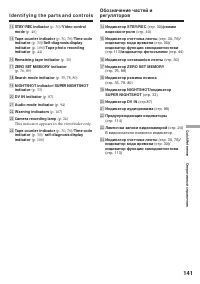
141 Quic k R eferenc e Оперативный справочник qf STBY/ REC indicat or (p. 30) / Video cont rol mode (p. 40) qg Tape count er indicat or (p. 30, 76) / Time code indicat or (p. 30) / Self -diagnosis display indicat or (p. 106) / Tape phot o recording indicat or (p. 44) qh Remaining t ape indicat or (p...
Страница 143 - Алфавитный указатель
143 Quic k R eferenc e Оперативный справочник Русский Алфавитный указатель А, Б, В, Г Батарейный блок .................. 14Батарейный блок “InfoLITHIUM” .............. 18, 118 Вариообъектив ...................... 28Введение/выведение изображения ....................... 49 Время записи .................