Страница 2 - Operating Instructions; Руководство по эксплуатации
3-859-496-33 (1) Video CameraRecorder Operating Instructions Before operating the unit, please read this manual thoroughly, andretain it for future reference. Руководство по эксплуатации Перед эксплуатацией аппарата рекомендуется внимательноизучить настоящее руководство и сохранить его у себя длядал...
Страница 3 - English; camcorder. With your Handycam; WARNING; Русский; or
2 English Welcome! Congratulations on your purchase of this SonyHandycam ® camcorder. With your Handycam you can capture life’s precious moments withsuperior picture and sound quality.Your Handycam is loaded with advancedfeatures, but at the same time it is very easy touse. You will soon be producin...
Страница 5 - Русский язык; Содержание
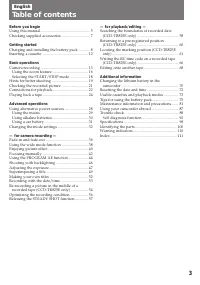
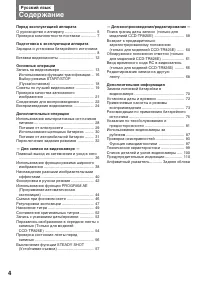
4 Русский язык Содержание Перед эксплуатацией аппарата О руководстве к аппарату ............................. 5Проверка комплектности поставки .............. 7 Подготовка к эксплуатации аппарата Зарядка и установка батарейного источника ..................................................................
Страница 6 - in the illustrations, you can; Type of differences; Note on TV colour systems; Различие по моделям; Before you begin; Using this manual; Перед эксплуатацией аппарата
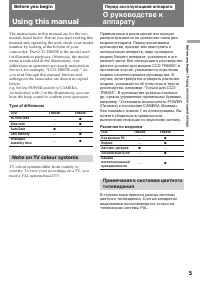
5 Before you begin / Перед эксплуатацией аппара The instructions in this manual are for the twomodels listed below. Before you start reading thismanual and operating the unit, check your modelnumber by looking at the bottom of yourcamcorder. The CCD-TR825E is the model usedfor illustration purposes....
Страница 7 - • Do not let the camcorder get wet. Keep the; О руководстве к аппарату; Об авторском праве
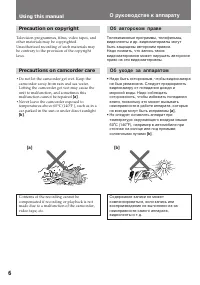
6 Using this manual Precaution on copyright Television programmes, films, video tapes, andother materials may be copyrighted.Unauthorized recording of such materials maybe contrary to the provision of the copyrightlaws. Precautions on camcorder care • Do not let the camcorder get wet. Keep the camco...
Страница 8 - для модели CCD-TR825E
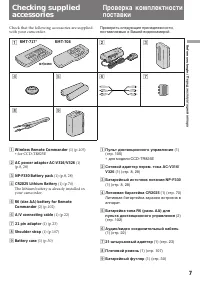
7 Before you begin / Перед эксплуатацией аппара Проверить следующие принадлежности,поставляемые е Вашей видеокамерой. Check that the following accessories are suppliedwith your camcorder. Checking suppliedaccessories Проверка комплектностипоставки 1 2 4 5 6 7 8 9 RMT-717 ∗ RMT-708 or/ или 3 1 Wirele...
Страница 9 - Charging the battery pack; Connect the mains lead to mains.; normal; Getting started; Зарядка батарейного источника; Совместить отмеченную знаком; Нормальная зарядка; кончится с погашением; полной; , позволяющей продлить срок службы
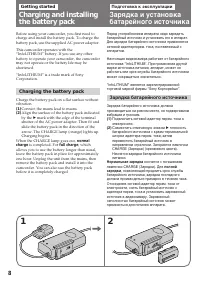
8 Before using your camcorder, you first need tocharge and install the battery pack. To charge thebattery pack, use the supplied AC power adaptor. This camcorder operates with the“InfoLITHIUM” battery. If you use any otherbattery to operate your camcorder, the camcordermay not operate or the battery...
Страница 10 - Charging time; Battery life; Battery pack; Время зарядки; Срок службы батарейного источника; Время зарядки
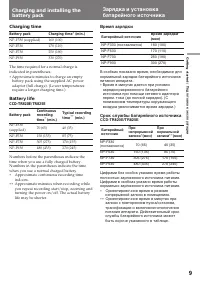
9 Getting started / Подготовка к эксплуатации Charging time Battery pack NP-F330 (supplied) NP-F530 NP-F730 NP-F930 The time required for a normal charge isindicated in parentheses. ∗ Approximate minutes to charge an emptybattery pack using the supplied AC poweradaptor (full charge). (Lower temperat...
Страница 11 - To remove the battery pack; Notes on charging the battery pack; • The CHARGE lamp will remain lit for a while; Снятие батарейного источника; • Аппарат не может работать на сетевого
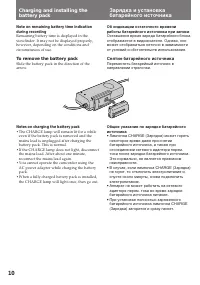
10 Charging and installing thebattery pack Note on remaining battery time indicationduring recording Remaining battery time is displayed in theviewfinder. It may not be displayed properly,however, depending on the conditions andcircumstances of use. To remove the battery pack Slide the battery pack ...
Страница 12 - Installing the battery pack; Note on installing the NP-F930 battery pack
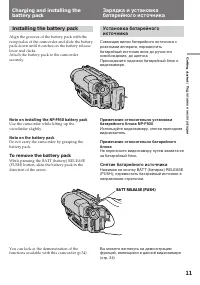
11 Getting started / Подготовка к эксплуатации Installing the battery pack Align the grooves of the battery pack with thereceptacles of the camcorder and slide the batterypack down until it catches on the battery releaselever and clicks.Attach the battery pack to the camcordersecurely. Note on insta...
Страница 13 - Insert a cassette with the window facing out.; Inserting a cassette; Вставить видеокассету окошком наружу.; Извлечение видеокассеты; в видоискателе аппарата; To eject the cassette; and
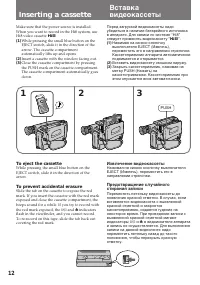
12 Make sure that the power source is installed.When you want to record in the Hi8 system, useHi8 video cassette H . ( 1 ) While pressing the small blue button on theEJECT switch, slide it in the direction of thearrow. The cassette compartmentautomatically lifts up and opens. ( 2 ) Insert a cassette...
Страница 14 - AUTO DATE feature; Basic operations; Camera recording; . При записи одноразовых; функция AUTO DATE; Основные операции; Запись на видеокамере
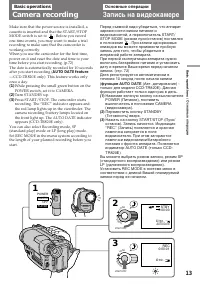
13 Basic operations / Основные операции Make sure that the power source is installed, acassette is inserted and that the START/STOPMODE switch is set to . Before you record one-time events, you may want to make a trialrecording to make sure that the camcorder isworking correctly.When you use the cam...
Страница 15 - Standby mode; To focus the viewfinder lens; Note on Standby mode; режим готовности; Фокусировка видоискательной линзы; Примечание по режиму готовности
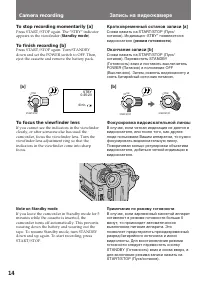
14 START/STOP LO CK S TA N D B Y STBY 0:35:20 40 min. Camera recording To stop recording momentarily [a] Press START/STOP again. The “STBY” indicatorappears in the viewfinder ( Standby mode ). To finish recording [b] Press START/STOP again. Turn STANDBYdown and set the POWER switch to OFF. Then,ejec...
Страница 16 - Notes on recording mode; • Настоящий аппарат имеет возможность; Примечание по записи; • Счетчик метража видеоленты показывает; Примечание по звуковой сигнализации; Как указано знаком
15 Basic operations / Основные операции Notes on recording mode • This camcorder records and plays back in SP (standard play) mode and in LP (long play)mode. However, the playback quality in LPmode will not be as good as that in SP mode. • When a tape recorded on this camcorder in LP mode is played ...
Страница 17 - ON again in the menu system.; Using the zoom feature
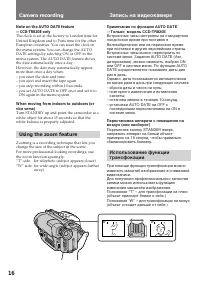
16 Camera recording Note on the AUTO DATE feature—CCD-TR820E only The clock is set at the factory to London time forUnited Kingdom and to Paris time for the otherEuropean countries. You can reset the clock inthe menu system. You can change the AUTODATE settings by selecting ON or OFF in themenu syst...
Страница 18 - Notes on digital zoom; • Трансфокация с увеличением больше 15х
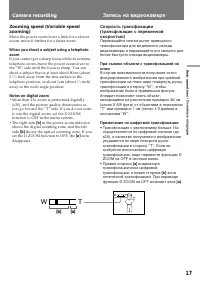
17 Basic operations / Основные операции [a] [b] T W T W Zooming speed (Variable speedzooming) Move the power zoom lever a little for a slowerzoom, move it further for a faster zoom. When you shoot a subject using a telephotozoom If you cannot get a sharp focus while in extremetelephoto zoom, move th...
Страница 19 - Selecting the START/STOP mode; Recording starts when you press; To return to normal recording; Set the START/STOP MODE switch to; Note on 5-SEC and ANTI GROUND SHOOTING; Возврат к нормальному режиму записи
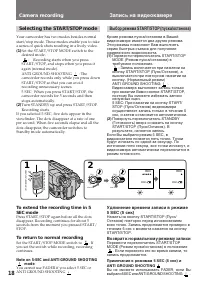
18 START/STOP LO CK S TA N D B Y START/STOP LO CK S TA N D B Y 1 2 40min. REC 40min. REC ANTI GROUND SHOOTING START/STOP MODE Camera recording Запись на видеокамере Selecting the START/STOP mode Your camcorder has two modes besides normalstart/stop mode. These modes enable you to takea series of qui...
Страница 20 - • Hold the camcorder firmly and secure it with
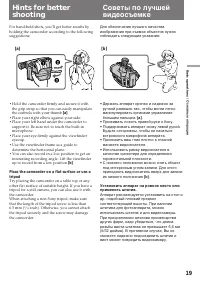
19 Basic operations / Основные операции 2 3 1 For hand-held shots, you’ll get better results byholding the camcorder according to the followingsuggestions: • Hold the camcorder firmly and secure it with the grip strap so that you can easily manipulatethe controls with your thumb [a] . • Place your r...
Страница 21 - Cautions on the viewfinder; • Do not pick up the camcorder by the; Общие указания по видоискателю; • Аппарат нельзя переносить, захватывая за; Hints for better shooting
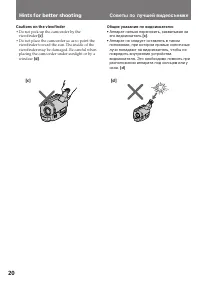
20 Cautions on the viewfinder • Do not pick up the camcorder by the viewfinder [c] . • Do not place the camcorder so as to point the viewfinder toward the sun. The inside of theviewfinder may be damaged. Be careful whenplacing the camcorder under sunlight or by awindow [d] . Общие указания по видоис...
Страница 22 - Rec Review; пересмотр записи; Для останова воспроизведения
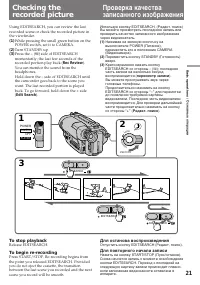
21 Basic operations / Основные операции Checking therecorded picture Using EDITSEARCH, you can review the lastrecorded scene or check the recorded picture inthe viewfinder. ( 1 ) While pressing the small green button on thePOWER switch, set it to CAMERA. ( 2 ) Turn STANDBY up. ( 3 ) Press the – ( Œ ...
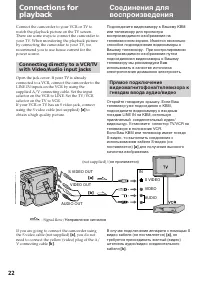
Страница 24 - If your VCR or TV is a monaural type; Connections for playback
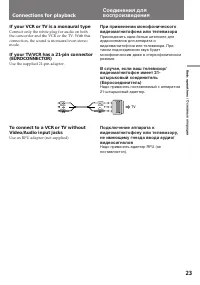
23 Basic operations / Основные операции TV If your VCR or TV is a monaural type Connect only the white plug for audio on boththe camcorder and the VCR or the TV. With thisconnection, the sound is monaural even stereomode. If your TV/VCR has a 21-pin connector(EUROCONNECTOR) Use the supplied 21-pin a...
Страница 25 - Playing back a tape; Press; To stop playback; Using the remote commander; Для отключения режима воспроизведения; С пульта дистанционного управления
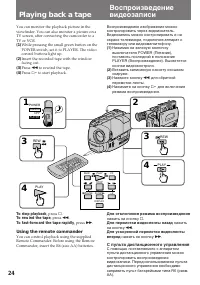
24 Playing back a tape You can monitor the playback picture in theviewfinder. You can also monitor a picture on aTV screen, after connecting the camcorder to aTV or VCR. ( 1 ) While pressing the small green button on thePOWER switch, set it to PLAYER. The videocontrol buttons light up. ( 2 ) Insert ...
Страница 26 - Note on the lens cover; Various playback modes; Примечание по крышке объектива; Режимы воспроизведения
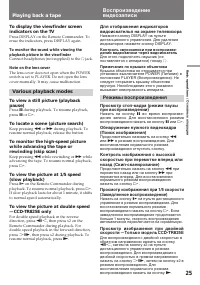
25 Basic operations / Основные операции Playing back a tape To display the viewfinder screenindicators on the TV Press DISPLAY on the Remote Commander. Toerase the indicators, press DISPLAY again. To monitor the sound while viewing theplayback picture in the viewfinder Connect headphones (not suppli...
Страница 27 - To select the playback sound; Notes on playback; Выбор звучания при воспроизведении; Примечания по воспроизведению; —Только модель CCD-TR825Е
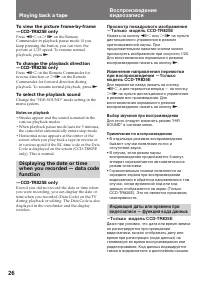
26 To view the picture frame-by-frame—CCD-TR825E only Press '< or >7 on the Remote Commander in playback pause mode. If youkeep pressing the button, you can view thepicture at 1/25 speed. To resume normalplayback, press ( . To change the playback direction—CCD-TR825E only Press '< on the Re...
Страница 29 - Note on power sources; Advanced operations; Место; Примечание по источникам питания
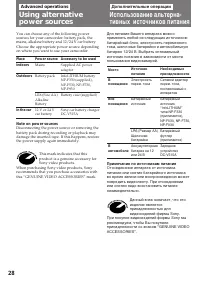
28 You can choose any of the following powersources for your camcorder: battery pack, themains, alkaline battery and 12/24 V car battery.Choose the appropriate power source dependingon where you want to use your camcorder. Place Indoors Outdoors In the car Note on power sources Disconnecting the pow...
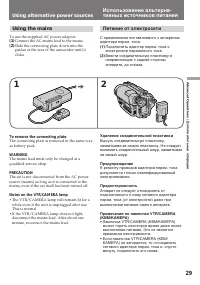
Страница 30 - Using alternative power sources; Удаление соединительной пластинки; • The VTR/CAMERA lamp will remain lit for a; Using the mains; To use the supplied AC power adaptor:; Питание от электросети
29 Advanced Operations / Дополнительные операции Using alternative power sources Использование альтерна-тивных источников питания Удаление соединительной пластинки Вынуть соединительную пластинку,захватывая за самую пластинку. Не следуетвынимать соединительный шнур, захватываяза самый шнур. Предупре...
Страница 32 - Battery Life; Model; Notes; • You may not use the battery case in cold; When the battery case is installed; Using a car battery; To remove the car battery charger; Срок службы батарейного блока; Модель; Если установлен батарейный футляр
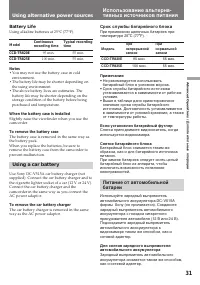
31 Advanced Operations / Дополнительные операции Using alternative power sources Battery Life Using alkaline batteries at 25°C (77°F). Model CCD-TR820E CCD-TR825E Notes • You may not use the battery case in cold environment. • The battery life may be shorter depending on the using environment. • The...
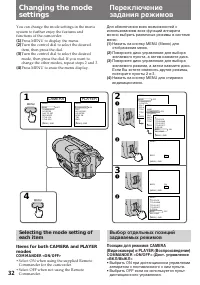
Страница 34 - Changing the mode settings; Items for CAMERA mode only
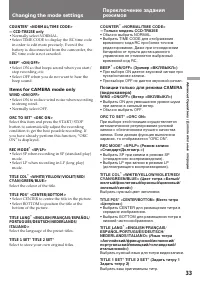
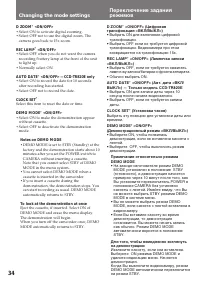
33 Advanced Operations / Дополнительные операции Changing the mode settings COUNTER ∗ <NORMAL/TIME CODE> —CCD-TR825E only • Normally select NORMAL.• Select TIME CODE to display the RC time code in order to edit more precisely. Even if thebattery is disconnected from the camcorder, theRC time c...
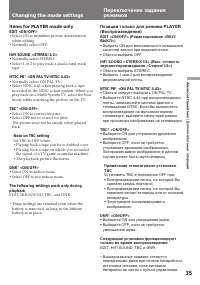
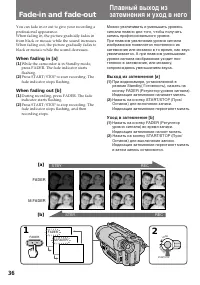
Страница 36 - Items for PLAYER mode only; • Select ON to minimize picture deterioration; NTSC PB; the signal of a TV game or similar machine.; DNR; These settings are retained even when the
35 Advanced Operations / Дополнительные операции Changing the mode settings Переключение заданиярежимов Позиции только для режима PLAYER(Воспроизведения) EDIT <ON/OFF> (Редактирование <ВКЛ/ВЫКЛ>) • Выбрать ON для максимального повышения качества записи при видеомонтаже. • Обычно выбрать ...
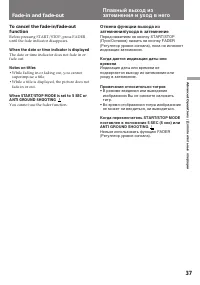
Страница 38 - When the date or time indicator is displayed; • While fading in or fading out, you cannot; Примечания относительно титров; • В режиме введения или выведения
37 Advanced Operations / Дополнительные операции To cancel the fade-in/fade-outfunction Before pressing START/STOP, press FADERuntil the fade indicator disappears. When the date or time indicator is displayed The date or time indicator does not fade in orfade out. Notes on titles • While fading in o...
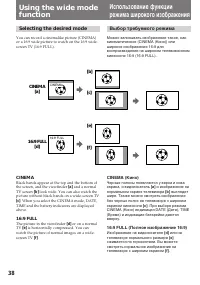
Страница 39 - Selecting the desired mode; CINEMA; Выбор требуемого режима
38 [b] CINEMA [a] [c] [e] [f] CINEMA 16:9 FULL 16:9 FULL [d] Selecting the desired mode You can record a cinemalike picture (CINEMA)or a 16:9 wide picture to watch on the 16:9 wide-screen TV (16:9 FULL). CINEMA Black bands appear at the top and the bottom ofthe screen, and the viewfinder [a] and a n...
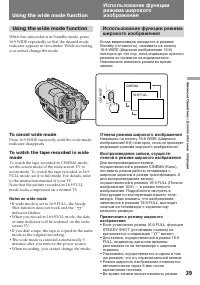
Страница 40 - To cancel wide mode; Notes on wide mode; Отмена режима широкого изображения; Using the wide mode function
39 Advanced Operations / Дополнительные операции 16:9 FULL CINEMA 16:9 WIDE Using the wide mode function While the camcorder is in Standby mode, press16:9 WIDE repeatedly so that the desired modeindicator appears in viewfinder. While recording,you cannot change the mode. To cancel wide mode Press 16...
Страница 41 - Selecting picture effect; SEPIA; The picture is sepia.
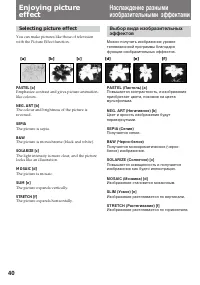
40 Enjoying pictureeffect Selecting picture effect You can make pictures like those of televisionwith the Picture Effect function. PASTEL [a] Emphasize contrast and gives picture animation-like colours. NEG. ART [b] The colour and brightness of the picture isreversed. SEPIA The picture is sepia. B&a...
Страница 42 - Using picture effect function; Press PICTURE EFFECT.; To turn off picture effect; Note on the picture effect; Enjoying picture effect; Отмена изобразительных эффектов
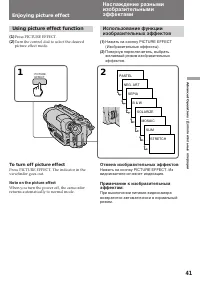
41 Advanced Operations / Дополнительные операции Using picture effect function ( 1 ) Press PICTURE EFFECT. ( 2 ) Turn the control dial to select the desiredpicture effect mode. To turn off picture effect Press PICTURE EFFECT. The indicator in theviewfinder goes out. Note on the picture effect When y...
Страница 43 - Focusing manually; When to use manual focus; • Insufficient light; Когда фокусировать вручную
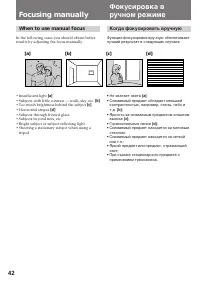
42 Focusing manually When to use manual focus In the following cases you should obtain betterresults by adjusting the focus manually. • Insufficient light [a] • Subjects with little contrast — walls, sky, etc. [b] • Too much brightness behind the subject [c] • Horizontal stripes [d] • Subjects throu...
Страница 44 - To return to autofocus mode; Shooting in relatively dark places; To record a very distant subject; Note on manual focusing; Съемка в относительно темных местах; Примечание к фокусировке в ручном режиме:; Могут появиться следующие индикаторы:
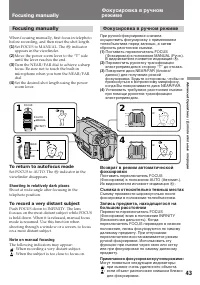
43 Advanced Operations / Дополнительные операции Focusing manually When focusing manually, first focus in telephotobefore recording, and then reset the shot length. ( 1 ) Set FOCUS to MANUAL. The f indicator appears in the viewfinder. ( 2 ) Move the power zoom lever to the “T” sideuntil the lever re...
Страница 45 - Selecting the best mode; Spotlight mode; Выбор оптимального режима; Режим подсветки прожектором
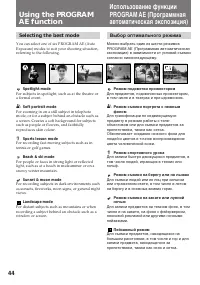
44 Selecting the best mode You can select one of six PROGRAM AE (AutoExposure) modes to suit your shooting situation,referring to the following. Spotlight mode For subjects in spotlight, such as at the theatre ora formal event. a Soft portrait mode For zooming in on a still subject in telephotomode,...
Страница 46 - Using the PROGRAM AE function; To turn off program AE; Notes on focus setting; • In the Spotlight, Sports lesson and Beach & Ski; Note on PROGRAM AE; • В режиме прожекторного освещения,
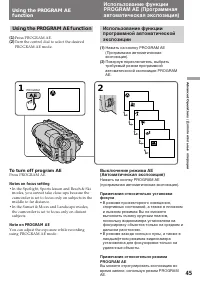
45 Advanced Operations / Дополнительные операции Using the PROGRAM AE function ( 1 ) Press PROGRAM AE. ( 2 ) Turn the control dial to select the desiredPROGRAM AE mode. To turn off program AE Press PROGRAM AE. Notes on focus setting • In the Spotlight, Sports lesson and Beach & Ski modes, you ca...
Страница 47 - • Предмет находится близко к источнику; Для выполнения тонкой регулировки
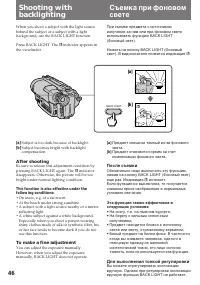
46 Shooting withbacklighting When you shoot a subject with the light sourcebehind the subject or a subject with a lightbackground, use the BACK LIGHT function. Press BACK LIGHT. The c indicator appears in the viewfinder. [a] Subject is too dark because of backlight. [b] Subject becomes bright with b...
Страница 48 - When to adjust the exposure; Turn the control dial to adjust the brightness.; Регулировка экспозиции
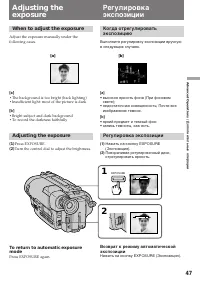
47 Advanced Operations / Дополнительные операции Adjusting theexposure When to adjust the exposure Adjust the exposure manually under thefollowing cases. [a] • The background is too bright (back lighting)• Insufficient light: most of the picture is dark [b] • Bright subject and dark background• To r...
Страница 49 - Adjusting the exposure; • когда кадр включает в себя источник; Съемка в темноте; • Если Вы нажмете кнопку PROGRAM AE,
48 Shooting with the sun behind you If the light source is behind your subject, or in thefollowing situations, the subject will be recordedtoo dark.• The subject is indoors and there is a window behind the subject. • Bright light sources are included in the scene.• When shooting a person wearing whi...
Страница 50 - Superimposing a title; Selecting the language; Press MENU to erase the menu display.; Нанесение титра; Выбор языка; To add the title from the beginning; Использование титров; Добавление титра с самого начала
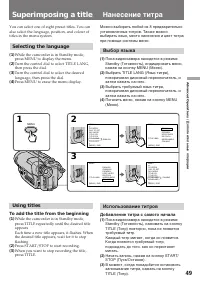
49 Advanced Operations / Дополнительные операции Superimposing a title You can select one of eight preset titles. You canalso select the language, position, and colour oftitles in the menu system. Selecting the language ( 1 ) While the camcorder is in Standby mode,press MENU to display the menu. ( 2...
Страница 51 - Добавление титра во время записи; Titles cycle as follows:; Примечания к нанесению титра:
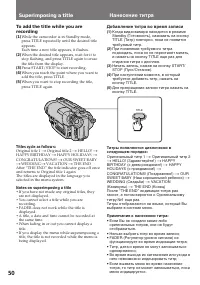
50 To add the title while you arerecording ( 1 ) While the camcorder is in Standby mode,press TITLE repeatedly until the desired titleappears.Each time a new title appears, it flashes. ( 2 ) When the desired title appears, wait for it tostop flashing, and press TITLE again to erasethe title from the...
Страница 52 - To select the colour of the title; Выбор цвета титра; TITLE COL
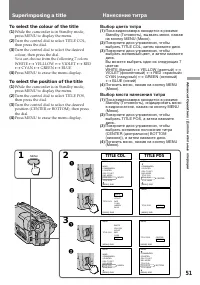
51 Advanced Operations / Дополнительные операции To select the colour of the title ( 1 ) While the camcorder is in Standby mode,press MENU to display the menu. ( 2 ) Turn the control dial to select TITLE COL,then press the dial. ( 3 ) Turn the control dial to select the desiredcolour, then press the...
Страница 53 - To edit the title you have stored; When you enter 22 letters in step 4; Редактирование запомненного титра
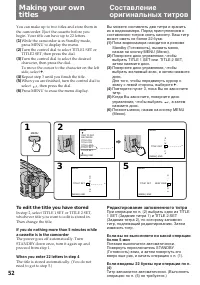
52 Making your owntitles You can make up to two titles and store them inthe camcorder. Eject the cassette before youbegin. Your title can have up to 22 letters. ( 1 ) While the camcorder is in Standby mode,press MENU to display the menu. ( 2 ) Turn the control dial to select TITLE1 SET orTITLE2 SET,...
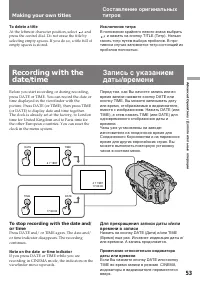
Страница 54 - To delete a title; At the leftmost character position, select; Исключение титра; В положении крайнего левого знака выбрать; Note on the date or time indicator; Making your own titles
53 Advanced Operations / Дополнительные операции To delete a title At the leftmost character position, select and press the control dial. Do not erase the title byselecting empty spaces. If you do so, a title full ofempty spaces is stored. Исключение титра В положении крайнего левого знака выбрать и...
Страница 55 - . The camcorder enters Standby; – Только модель CCD-TR825E; ZERO MEM; COUNTER
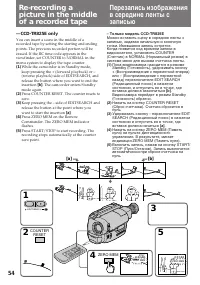
54 —CCD-TR825E only You can insert a scene in the middle of arecorded tape by setting the starting and endingpoints. The previous recorded portion will beerased. If the RC time code appears in theviewfinder, set COUNTER to NORMAL in themenu system to display the tape counter. ( 1 ) While the camcord...
Страница 56 - To change the end point; Notes on re-recording; • The picture and the sound may be distorted at; Для изменения точки конца; Примечания к перезаписи; • Изображение и звук могут искажаться в
55 Advanced Operations / Дополнительные операции To change the end point Press ZERO MEM to erase the ZERO MEMindicator, then repeat steps 2 to 5. Notes on re-recording • The picture and the sound may be distorted at the end of the inserted portion when it isplayed back. • If you re-record on the por...
Страница 57 - • When you set ORC TO SET, the recording on; Если кассета извлечена; • Если Вы выполните установку ORC TO
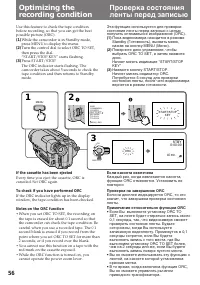
56 Use this feature to check the tape conditionbefore recording, so that you can get the bestpossible picture (ORC). ( 1 ) While the camcorder is in Standby mode,press MENU to display the menu. ( 2 ) Turn the control dial to select ORC TO SET,then press the dial.“START/STOP KEY” starts flashing. ( 3...
Страница 58 - Notes on the Steady Shot function; При съемке индикация; Примечания к функции устойчивой съемки; • Функция устойчивой съемки не
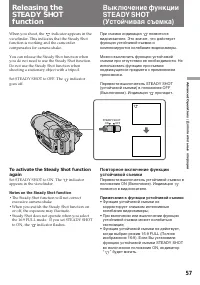
57 Advanced Operations / Дополнительные операции When you shoot, the indicator appears in the viewfinder. This indicates that the Steady Shotfunction is working and the camcordercompensates for camera-shake. You can release the Steady Shot function whenyou do not need to use the Steady Shot function...
Страница 59 - Поиск; Поиск начала определенной даты; Date Search
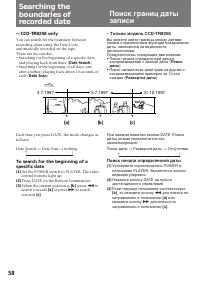
58 – Только модель CCD-TR825E Вы можете найти границы между датамизаписи с применением функции кодированиядаты, записанной на видеолентеавтоматически.Предусмотрены следующие два режима:• Поиск начала определенной даты и воспроизведение с данной даты ( Поиск даты ) • Поиск начала всех дней один за др...
Страница 60 - To stop searching or scanning; To scan the beginning of all days; Поиск границ даты записи; Развертка начала всех дней
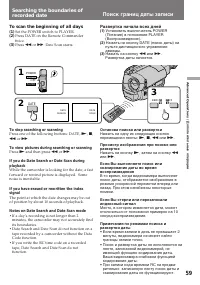
59 Advanced Operations / Дополнительные операции To stop searching or scanning Press one of the following buttons: DATE, ( , p , 0 or ) . To view pictures during searching or scanning Press ( and then press 0 or ) . If you do Date Search or Date Scan duringplayback While the camcorder is looking for...
Страница 61 - Примечания по счетчику длины ленты
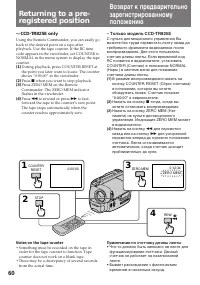
60 Returning to a pre-registered position —CCD-TR825E only Using the Remote Commander, you can easily goback to the desired point on a tape afterplayback. Use the tape counter. If the RC timecode appears in the viewfinder, set COUNTER toNORMAL in the menu system to display the tapecounter. ( 1 ) Dur...
Страница 62 - Notes on ZERO MEM; • When you press ZERO MEM, the counter’s; Marking an index signal; Отметка индексного сигнала
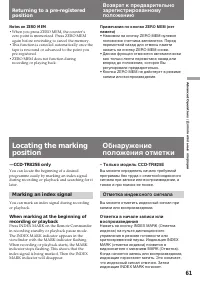
61 Advanced Operations / Дополнительные операции Notes on ZERO MEM • When you press ZERO MEM, the counter’s zero point is memorized. Press ZERO MEMagain before rewinding to cancel the memory. • This function is canceled automatically once the tape is rewound or advanced to the point youpre-registere...
Страница 63 - Locating the marking position; Примечания по отметке; Notes on marking
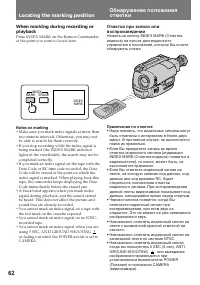
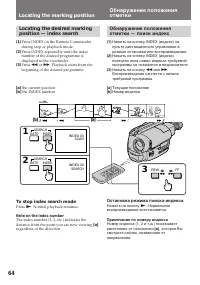
62 When marking during recording orplayback Press INDEX MARK on the Remote Commanderat the point you want to locate later. Locating the marking position Обнаружение положенияотметки Отметка при записи иливоспроизведении Нажать на кнопку INDEX MARK (Отметкаиндекса) на пульте дистанционногоуправления ...
Страница 64 - To cancel index scan mode; Отмена режима развертки индекса; Нажать на кнопку
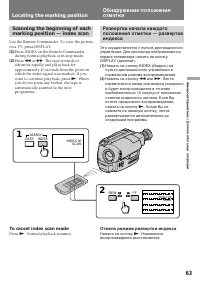
63 Advanced Operations / Дополнительные операции Scanning the beginning of eachmarking position — index scan Use the Remote Commander. To view the pictureon a TV, press DISPLAY. ( 1 ) Press INDEX on the Remote Commanderduring normal playback or in stop mode. ( 2 ) Press 0 or ) . The tape rewinds or ...
Страница 65 - To stop index search mode; Note on the index number; Остановка режима поиска индекса; Примечание по номеру индекса
64 Locating the desired markingposition — index search ( 1 ) Press INDEX on the Remote Commanderduring stop or playback mode. ( 2 ) Press INDEX repeatedly until the indexnumber of the desired programme isdisplayed in the viewfinder. ( 3 ) Press 0 or ) . Playback starts from the beginning of the desi...
Страница 66 - Erasing an index signal; Notes on erasing; Стирание индексного сигнала; Примечания по стиранию; • Нажать на кнопку INDEX ERASE (Стирание; Примечание по коду данных
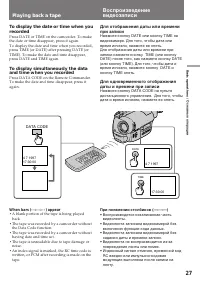
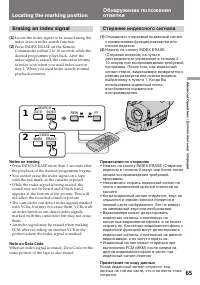
65 Advanced Operations / Дополнительные операции Erasing an index signal ( 1 ) Locate the index signal to be erased using theindex scan or index search function. ( 2 ) Press INDEX ERASE on the RemoteCommander within 2 to 10 seconds while thedesired programme plays back. After theindex signal is eras...
Страница 67 - To stop writing the RC time code
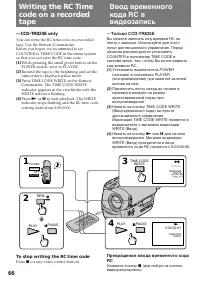
66 —CCD-TR825E only You can write the RC time code on a recordedtape. Use the Remote Commander.Before you begin, we recommend to setCOUNTER to TIME CODE in the menu systemso that you can view the RC time code. ( 1 ) While pressing the small green button on thePOWER switch, set it to PLAYER. ( 2 ) Re...
Страница 68 - Notes on writing the RC time code
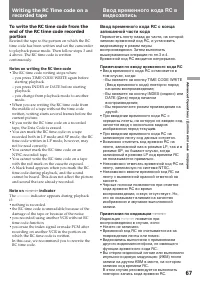
67 Advanced Operations / Дополнительные операции To write the RC time code from theend of the RC time code recordedportion Rewind the tape to the portion on which the RCtime code has been written and set the camcorderto playback pause mode. Then follow steps 3 and4 above. The RC time code is written...
Страница 69 - Before editing; Set EDIT to ON in the menu system.; Перед редактированием; Направление сигнала
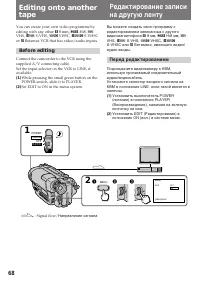
68 Editing onto anothertape You can create your own video programme byediting with any other h 8 mm, H Hi8, j VHS, k S-VHS, VHSC, K S-VHSC or l Betamax VCR that has video/audio inputs. Before editing Connect the camcorder to the VCR using thesupplied A/V connecting cable.Set the input selector on ...
Страница 70 - Starting editing; To edit more scenes; Note on the DISPLAY function; Начало редактирования; Редактирование больших кадров; Примечание по функции индикации; Editing onto another tape
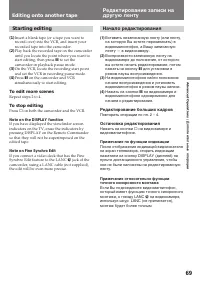
69 Advanced Operations / Дополнительные операции Starting editing ( 1 ) Insert a blank tape (or a tape you want torecord over) into the VCR, and insert yourrecorded tape into the camcorder. ( 2 ) Play back the recorded tape on the camcorderuntil you locate the point where you want tostart editing, t...
Страница 71 - indicator flashes in the; replace; Discard used; Additional Information; надо заменить; Примечания по литиевой батарейке; • Хранить литиевую батарейку в месте, не; Notes on lithium battery; • Wipe the battery with a dry cloth to assure a; Be sure
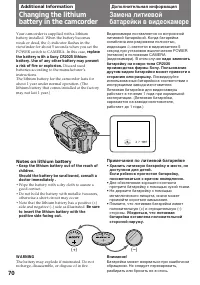
70 (+) (--) - Your camcorder is supplied with a lithiumbattery installed. When the battery becomesweak or dead, the I indicator flashes in the viewfinder for about 5 seconds when you set thePOWER switch to CAMERA. In this case, replace the battery with a Sony CR2025 lithiumbattery. Use of any other ...
Страница 72 - Changing the lithium battery
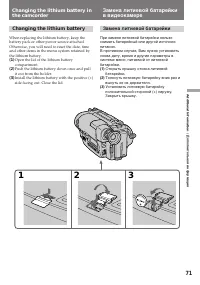
71 Additional Information / Дополнительная информация Changing the lithium battery When replacing the lithium battery, keep thebattery pack or other power source attached.Otherwise, you will need to reset the date, timeand other items in the menu system retained bythe lithium battery. ( 1 ) Open the...
Страница 73 - To correct the date and time setting; Repeat the above procedure.
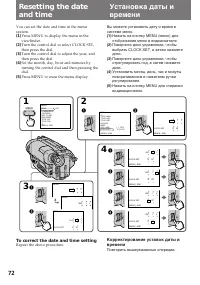
72 Resetting the dateand time You can set the date and time in the menusystem. ( 1 ) Press MENU to display the menu in theviewfinder. ( 2 ) Turn the control dial to select CLOCK SET,then press the dial. ( 3 ) Turn the control dial to adjust the year, andthen press the dial. ( 4 ) Set the month, day,...
Страница 74 - To check the preset date and time; The year indicator changes as follows:; Выбор типов видеокассеты; Установка даты и времени
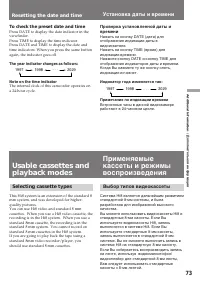
73 Additional Information / Дополнительная информация To check the preset date and time Press DATE to display the date indicator in theviewfinder.Press TIME to display the time indicator.Press DATE and TIME to display the date andtime indicators. When you press the same buttonagain, the indicator go...
Страница 75 - When you play back; Note on AFM HiFi stereo; • You record the tape on an AFM HiFi monaural; Foreign 8 mm video; Playing back an NTSC-recorded tape; • The playback picture in the viewfinder will be; Иностранные 8-мм ленты; • Воспроизводимое в видоискателе
74 When you play back The playback mode (SP/LP) and system (Hi8/standard 8 mm) are selected automaticallyaccording to the format in which the tape hasbeen recorded. The quality of the recordedpicture in LP mode, however, will not be as goodas that in SP mode. Note on AFM HiFi stereo When you play ba...
Страница 76 - • You cannot play back a tape recorded in NTSC; Preparing the battery pack; Always carry additional batteries
75 Additional Information / Дополнительная информация • You cannot play back a tape recorded in NTSC video system with LP mode neither in theviewfinder nor on a TV screen. • If a tape has portions recorded in PAL and NTSC video systems, the tape counter readingis not correct. This discrepancy is due...
Страница 77 - Tips for using the battery pack; в видоискателе; Общее указание; Нагрев батарейного источника; indicator appears and starts; Caution
76 Tips for using the battery pack When to replace the batterypack While you are using your camcorder, theremaining battery indicator in the viewfinderdecreases gradually as battery power is used up.Remaining time in minutes appears. Рекомендации по применениюбатарейного источника При замене батарей...
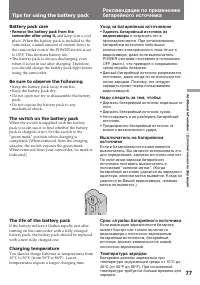
Страница 78 - Battery pack care; and keep it in a cool; Be sure to observe the following; • Do not expose the battery pack to any; Уход за батарейным источником; и сохранять его в; The switch on the battery pack
77 Additional Information / Дополнительная информация Battery pack care • Remove the battery pack from thecamcorder after using it, and keep it in a cool place. When the battery pack is installed to thecamcorder, a small amount of current flows tothe camcorder even if the POWER switch is setto OFF. ...
Страница 79 - What is the “InfoLITHIUM”; indicator may also flash under some condition.; Что такое “InfoLITHIUM”; также может мигать при
78 Tips for using the battery pack Рекомендации по применениюбатарейного источника Notes on the “InfoLITHIUM”battery pack What is the “InfoLITHIUM” The “InfoLITHIUM” is a lithium ion battery packwhich can exchange data with compatible videoequipment about its battery consumption. Sonyrecommends that...
Страница 80 - Примечания по зарядке; Батарейный источник новой марки; • After you have used the “InfoLITHIUM”; Notes on charging; A brand-new battery pack; • После того, как Вы использовали
79 Additional Information / Дополнительная информация Примечания по зарядке Батарейный источник новой марки Батарейный источник новой марки незаряжен. Перед применением батарейногоисточника зарядить его полностью. Перезарядка батарейного источникапри необходимости Батарейный источник не требует разр...
Страница 81 - • Использовать только со щелочными
80 Notes on the terminals If the terminals (metal parts on the back) arenot clean, the battery charge duration will beshortened. When the terminals are not clean or when thebattery pack has not been used for a long time,repeatedly install and remove the battery pack afew times. This improves the con...
Страница 82 - If battery leakage occurred; • Wipe off the liquid in the battery case carefully; При утечке раствора из батарейки; • Протереть тшательно жидкость в; Moisture condensation; Inside the camcorder; indicator flashes. If this; Конденсация влаги; В видеокамере; . В этом случае ни одна из
81 Additional Information / Дополнительная информация If battery leakage occurred • Wipe off the liquid in the battery case carefully before replacing the batteries. • If you touch the liquid, wash it off with water.• If the liquid get into your eyes, wash your eyes with a lot of water and then cons...
Страница 83 - On the lens; Video head cleaning; indicator and; На объективе; Очистка видеоголовок; и сообщение “
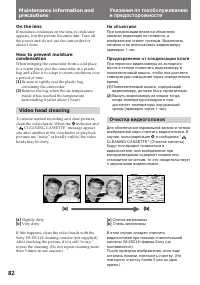
82 On the lens If moisture condenses on the lens, no indicatorappears, but the picture becomes dim. Turn offthe power and do not use the camcorder forabout 1 hour. How to prevent moisturecondensation When bringing the camcorder from a cold placeto a warm place, put the camcorder in a plasticbag and ...
Страница 84 - Note; Общие указания; Примечание; Очистка видоискателя от пыли; Предостережение
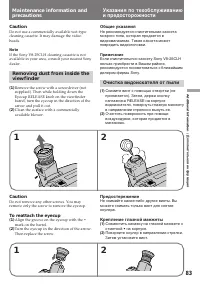
83 Additional Information / Дополнительная информация Caution Do not use a commercially available wet-typecleaning cassette. It may damage the videoheads. Note If the Sony V8-25CLH cleaning cassette is notavailable in your area, consult your nearest Sonydealer. Removing dust from inside theviewfinde...
Страница 85 - По эксплуатации видеокамеры; Precautions; Camcorder operation
84 Общие указания По эксплуатации видеокамеры • Видеокамера должна питаться от тока напряжением 7,2 В (от батарейногоисточника) или 8,4 В (от сетевого адаптераперем. тока). • Для эксплуатации на напряжении питания постоянного или переменного тока следуетприменять принадлежности,рекомендуемые в насто...
Страница 86 - AC power adaptor; Charging; Сетевой адаптер перем. тока; Зарядка
85 Additional Information / Дополнительная информация AC power adaptor Charging • Use only a lithium ion type battery pack.• Place the battery pack on a flat surface without vibration during charging. • The battery pack will get hot during charging. This is normal. Others • Unplug the unit from the ...
Страница 87 - Notes on dry batteries; соблюдением полярности.
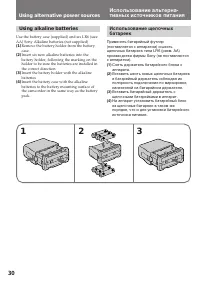
86 Notes on dry batteries To avoid possible damage from battery leakageor corrosion, observe the following.• Be sure to insert the batteries in the correct direction. • Dry batteries are not rechargeable.• Do not use a combination of new and old batteries. • Do not use different types of batteries.•...
Страница 88 - Power sources; PAL system; Brazil; NTSC system; Источник питания; Система PAL; Бразилия; Система NTSC
87 Additional Information / Дополнительная информация Using your camcorderabroad Each country or area has its own electric and TVcolour systems. Before using your camcorderabroad, check the following points. Power sources You can use your camcorder in any country orarea with the supplied AC power ad...
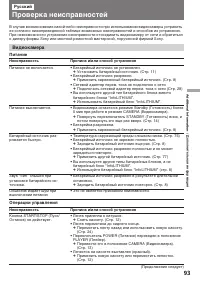
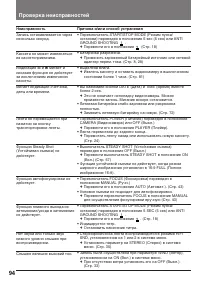
Страница 94 - Видеокамера; Питание; Операции управления; Неисправность; Проверка неисправностей; Причина и/или способ устранения
93 Additional Information / Дополнительная информация В случае возникновения какой-либо неисправности при использовании видеокамеры устранитьее согласно нижеприведенной таблице возможных неисправностей и способов их устранения.При невозможности устранения неисправности отсоединить видеокамеру от сет...
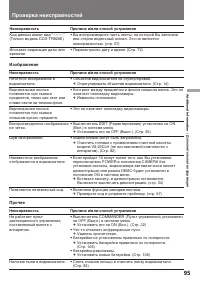
Страница 96 - Изображение
95 Additional Information / Дополнительная информация Изображение Неисправность Нечеткое изображение ввидоискателе. Вертикальная полосапоявляется при съемкепредметов, таких как свет илипламя свечи на темном фоне. Вертикальная полосапоявляется при съемкеслишком яркого предмета. Воспроизведенное изобр...
Страница 97 - Когда мигает сигнальная лампа CHARGE (Зарядка); Провести проверку по следующей схеме:; Cпособ устранения; • Отсоединить главный вывод. Примерно через 1 мин.; Установите другой батарейный блок.; Если лампочка CHARGE мигает опять
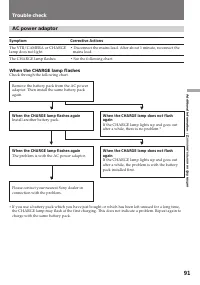
96 Сетевой адаптер перем. тока Неисправность Сигнальная лампа VTR/CAMERA(Видеомагнитофон/Видеокамера) или CHARGE(Зарядка) не загорается. Мигает сигнальная лампаCHARGE (Зарядка). Когда мигает сигнальная лампа CHARGE (Зарядка) Провести проверку по следующей схеме: ∗ Когда вы используете батарейный ист...
Страница 98 - Первые три знака; Функция самодиагностики; Причина и /или действия по устранению; Произошла конденсация влаги.
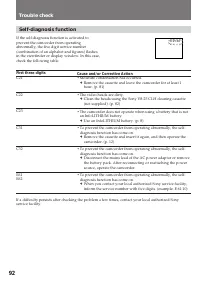
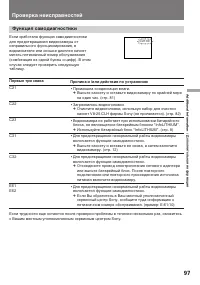
97 Additional Information / Дополнительная информация C:21:00 Первые три знака C21 C22 C23 C31 C32 E61E62 Функция самодиагностики Если сработала функция самодиагностикидля предотвращения видеокамеры отнеправильного функционирования, ввидоискателе или окошке дисплея начнетмигать пятизначный номер обс...
Страница 100 - Технические характеристики
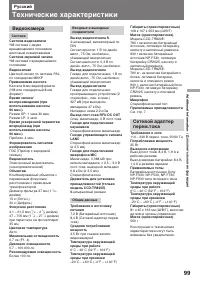
99 Additional Information / Дополнительная информация Русский Технические характеристики Габариты (ориентировочные) 108 x 107 x 203 мм (Ш/В/Г) Масса (ориентировочная) Модель CCD-TR820E:780 г не включая батарейныйисточник, литиевую батарейку,кассету и наплечный ремешок930 г включая батарейныйисточник...
Страница 101 - Identifying the parts; Дисплейное окошко
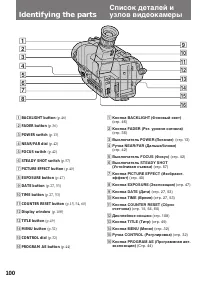
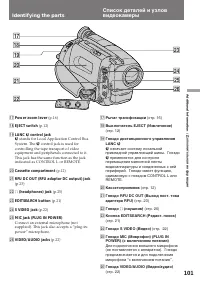
100 Identifying the parts 1 BACKLIGHT button (p.46) 2 FADER button (p.36) 3 POWER switch (p.13) 4 NEAR/FAR dial (p.42) 5 FOCUS switch (p.42) 6 STEADY SHOT switch (p.57) 7 PICTURE EFFECT button (p.40) 8 EXPOSURE button (p.47) 9 DATE button (p.27, 53) !º TIME button (p.27, 53) !¡ COUNTER RESET button ...
Страница 102 - stands for Local Application Control Bus; Рычаг трансфокации; означает систему локальной; Кассетоприемник
101 Additional Information / Дополнительная информация !¶ Power zoom lever (p.16) !• EJECT switch (p.12) !ª LANC l control jack l stands for Local Application Control Bus System. The l control jack is used for controlling the tape transport of videoequipment and peripherals connected to it.This jack...
Страница 103 - Identifying the Parts
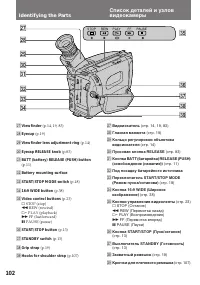
102 Identifying the Parts @¶ Viewfinder (p.14, 19, 83) @• Eyecup (p.19) @ª Viewfinder lens adjustment ring (p.14) #º Eyecap RELEASE knob (p.83) #¡ BATT (battery) RELEASE (PUSH) button (p.11) #™ Battery mounting surface #£ START/STOP MODE switch (p.18) #¢ 16:9 WIDE button (p.38) #∞ Video control butt...
Страница 104 - Дистанционный датчик
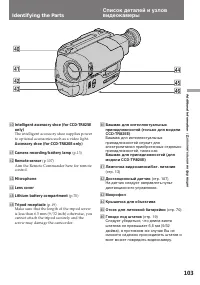
103 Additional Information / Дополнительная информация $º Башмак для интеллектуальныхпринадлежностей (только для моделиCCD-TR825E) Башмак для интеллектуальныхпринадлежностей служит дляэлектропитания приобретенных отдельнопринадлежностей, таких как Башмак для принадлежностей (длямодели CCD-TR820E) $¡...
Страница 105 - Для просмотра демонстрации; Держа нажатой кнопку; Note on the intelligent accessory shoe; To watch the demonstration; While holding down
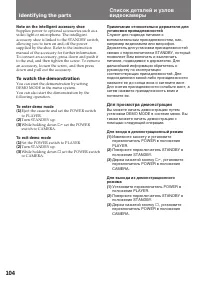
104 Identifying the parts Список деталей и узловвидеокамеры Примечание относительно держателя дляустановки принадлежностей Служит для подвода питания квспомогательным принадлежностям, как,например видеолампа или микрофон.Держатель для установки принадлежностейсвязан с переключателем STANDBY, который...
Страница 106 - Remote Commander; Video Control buttons
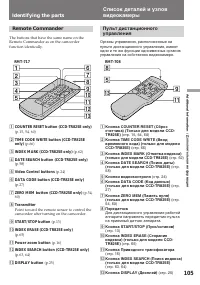
105 Additional Information / Дополнительная информация Remote Commander The buttons that have the same name on theRemote Commander as on the camcorderfunction identically. 1 COUNTER RESET button (CCD-TR825E only) (p.15, 54, 60) 2 TIME CODE WRITE button (CCD-TR825Eonly) (p.66) 3 INDEX MARK (CCD-TR825...
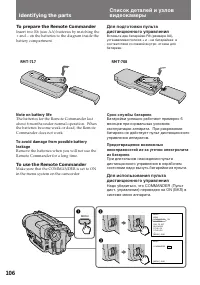
Страница 107 - To prepare the Remote Commander; Note on battery life; To use the Remote Commander; Срок службы батареек
106 Identifying the parts To prepare the Remote Commander Insert two R6 (size AA) batteries by matching the+ and – on the batteries to the diagram inside thebattery compartment. Список деталей и узловвидеокамеры Для подготовки пультадистанционного управления Вставьте две батарейки R6 (размера АА),ус...
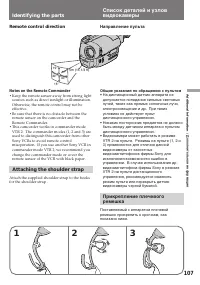
Страница 108 - Remote control direction; Notes on the Remote Commander; • Keep the remote sensor away from strong light; Attaching the shoulder strap; Направление пульта; Общие указания по обращению с пультом; • На дистанционный датчик аппарата не
107 Additional Information / Дополнительная информация 30° 15° 30° 15° 5m (15 1/3 ft) Remote control direction Notes on the Remote Commander • Keep the remote sensor away from strong light sources such as direct sunlight or illumination.Otherwise, the remote control may not beeffective. • Be sure th...
Страница 109 - ORC; Функциональный индикатор
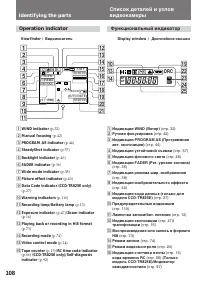
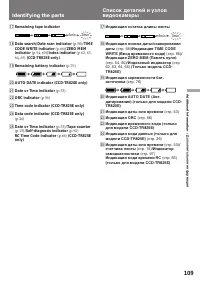
108 Operation indicator Identifying the parts 1 WIND indicator (p.32) 2 Manual focusing (p.42) 3 PROGRAM AE indicator (p.44) 4 SteadyShot indicator (p.57) 5 Backlight indicator (p.46) 6 FADER indicator (p.36) 7 Wide mode indicator (p.38) 8 Picture effect indicator (p.40) 9 Data Code indicator (CCD-T...
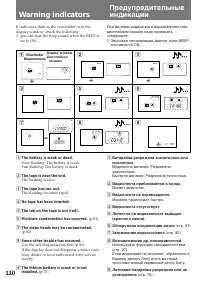
Страница 111 - Warning indicators; : you can hear the beep sound when the BEEP is
110 1 2 3 4 5 6 7 8 9 5min 0min CLEANING CASSETTE C:31:10 C:21:00 4 7 1997 Warning indicators If indicators flash in the viewfinder or in thedisplay window, check the following: ≥ : you can hear the beep sound when the BEEP is set to ON. 1 The battery is weak or dead. Slow flashing: The battery is w...

 Sony CCD-TR2300E
Инструкция по эксплуатации
Sony CCD-TR2300E
Инструкция по эксплуатации
 Sony CCD-TR3100E
Инструкция по эксплуатации
Sony CCD-TR3100E
Инструкция по эксплуатации
 Sony CCD-TR311E
Инструкция по эксплуатации
Sony CCD-TR311E
Инструкция по эксплуатации
 Sony CCD-TR315E
Инструкция по эксплуатации
Sony CCD-TR315E
Инструкция по эксплуатации
 Sony CCD-TR317E
Инструкция по эксплуатации
Sony CCD-TR317E
Инструкция по эксплуатации
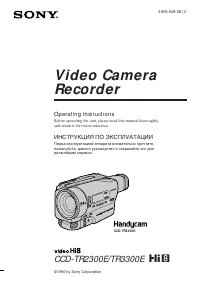 Sony CCD-TR3300E
Инструкция по эксплуатации
Sony CCD-TR3300E
Инструкция по эксплуатации
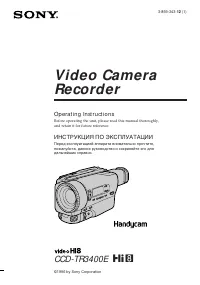 Sony CCD-TR3400E
Инструкция по эксплуатации
Sony CCD-TR3400E
Инструкция по эксплуатации
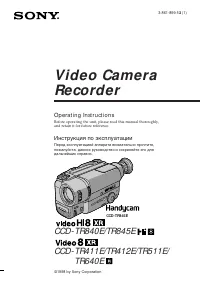 Sony CCD-TR411E / CCD-TR412E
Инструкция по эксплуатации
Sony CCD-TR411E / CCD-TR412E
Инструкция по эксплуатации
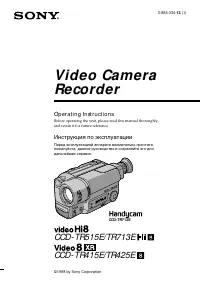 Sony CCD-TR415E
Инструкция по эксплуатации
Sony CCD-TR415E
Инструкция по эксплуатации
 Sony CCD-TR417E
Инструкция по эксплуатации
Sony CCD-TR417E
Инструкция по эксплуатации
 Sony CCD-TR425E
Инструкция по эксплуатации
Sony CCD-TR425E
Инструкция по эксплуатации
 Sony CCD-TR427E
Инструкция по эксплуатации
Sony CCD-TR427E
Инструкция по эксплуатации
 Sony CCD-TR501E / CCD-TR502E
Инструкция по эксплуатации
Sony CCD-TR501E / CCD-TR502E
Инструкция по эксплуатации
 Sony CCD-TR503E / CCD-TR506E
Инструкция по эксплуатации
Sony CCD-TR503E / CCD-TR506E
Инструкция по эксплуатации
 Sony CCD-TR511E / CCD-TR512E
Инструкция по эксплуатации
Sony CCD-TR511E / CCD-TR512E
Инструкция по эксплуатации
 Sony CCD-TR515E
Инструкция по эксплуатации
Sony CCD-TR515E
Инструкция по эксплуатации
 Sony CCD-TR516E
Инструкция по эксплуатации
Sony CCD-TR516E
Инструкция по эксплуатации
 Sony CCD-TR617E
Инструкция по эксплуатации
Sony CCD-TR617E
Инструкция по эксплуатации
 Sony CCD-TR618E
Инструкция по эксплуатации
Sony CCD-TR618E
Инструкция по эксплуатации