Страница 2 - Contents
2 Contents Contents.................................................................................... 2Introduction .............................................................................. 3Important Safety Information .................................................. 41. Overview ............
Страница 3 - Introduction
3 EN Introduction Thank you for purchasing the OMRON M2 Eco Upper Arm Blood Pressure Monitor. The OMRON M2 Eco is a fully automatic blood pressure monitor, operating on the oscillometric principle. It measures your blood pressure and pulse rate simply and quickly. For comfortable controlled inflatio...
Страница 4 - Important Safety Information; - When you are not going to use the unit for a long period of time
4 Important Safety Information Consult your doctor during pregnancy, arrhythmia and arteriosclerosis.You should never change the dosage of medication prescribed by your doctor.Use the M2 Eco only for yourself. Caution: • Do not leave the unit unattended with infants or persons who cannot express the...
Страница 5 - Main unit
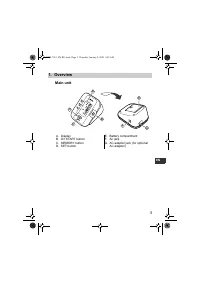
5 1.Overview EN 1. Overview Main unit A. DisplayB. O/I START button C. MEMORY buttonD. SET button E. Battery compartmentF. Air jack G. AC adapter jack (for optional AC adapter) B D A C E G F M 2 E co HEM-7051_EN-RU.book Page 5 Thursday, January 8, 2009 9:09 AM
Страница 6 - Arm Cuff
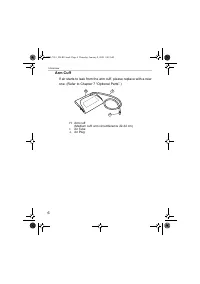
6 1.Overview Arm Cuff If air starts to leak from the arm cuff, please replace with a new one. (Refer to Chapter 7 “Optional Parts”.) H. Arm cuff (Medium cuff: arm circumference 22-32 cm) I. Air Tube J. Air Plug I H J HEM-7051_EN-RU.book Page 6 Thursday, January 8, 2009 9:09 AM
Страница 8 - Installing/Replacing the Batteries
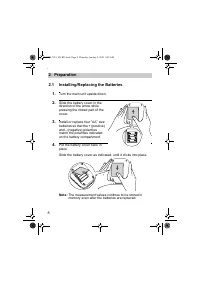
8 2.Preparation 2. Preparation 2.1 Installing/Replacing the Batteries 1. Turn the main unit upside down. 2. Slide the battery cover in the direction of the arrow while pressing the ribbed part of the cover. 3. Install or replace four “ AA ” size batteries so that the + (positive) and - (negative) po...
Страница 9 - Battery Life & Replacement
9 2.Preparation EN Battery Life & Replacement If the battery low symbol ( ) appears on the display, replace all four batteries at the same time. - When the battery low symbol ( ) starts to blink, you will still be able to use the unit for a short while. You should replace the batteries with new ...
Страница 10 - Setting the Date and Time
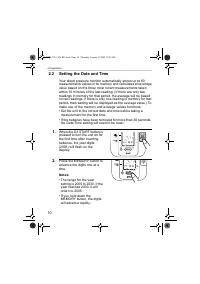
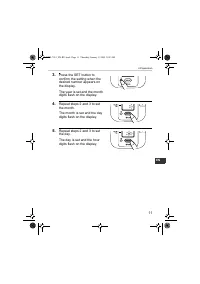
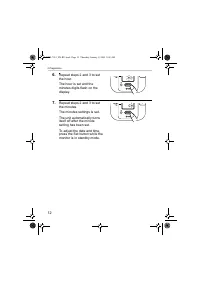
10 2.Preparation 2.2 Setting the Date and Time Your blood pressure monitor automatically stores up to 60 measurements values in its memory and calculates an average value based on the three most recent measurements taken within 10 minutes of the last reading. (If there are only two readings in memor...
Страница 13 - Adjusting the Settings Modes; Buzzer Mode
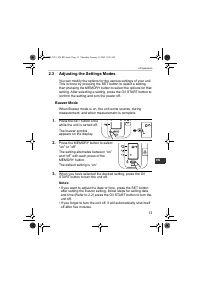
13 2.Preparation EN 2.3 Adjusting the Settings Modes You can modify the options for the various settings of your unit. This is done by pressing the SET button to select a setting, then pressing the MEMORY button to select the options for that setting. After selecting a setting, press the O/I START b...
Страница 14 - How to Sit Correctly When Taking a Measurement; Correct
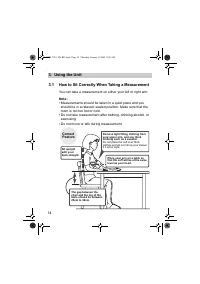
14 3.Using the Unit 3. Using the Unit 3.1 How to Sit Correctly When Taking a Measurement You can take a measurement on either your left or right arm. Note: • Measurements should be taken in a quiet place and you should be in a relaxed, seated position. Make sure that the room is not too hot or cold....
Страница 15 - Incorrect Posture
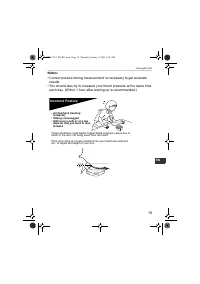
15 3.Using the Unit EN Notes: • Correct posture during measurement is necessary to get accurate results. • You should also try to measure your blood pressure at the same time each day. (Within 1 hour after waking up is recommended.) Incorrect Posture These situations could lead to higher blood press...
Страница 16 - Applying the Arm Cuff; Taking measurements on the left arm
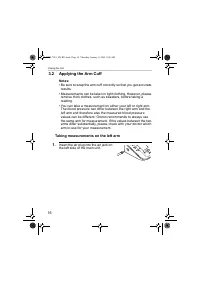
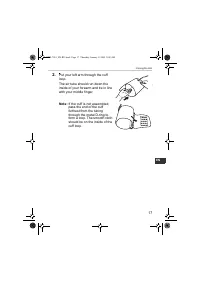
16 3.Using the Unit 3.2 Applying the Arm Cuff Notes: • Be sure to wrap the arm cuff correctly so that you get accurate results. • Measurements can be taken in light clothing. However, please remove thick clothes, such as sweaters, before taking a reading. • You can take a measurement on either your ...
Страница 18 - Taking measurements on the right arm
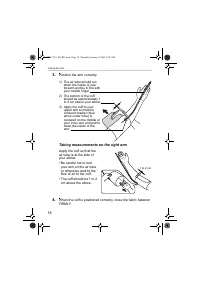
18 3.Using the Unit 3. Position the arm correctly. Taking measurements on the right arm Apply the cuff so that the air tube is at the side of your elbow.• Be careful not to rest your arm on the air tube, or otherwise restrict the flow of air to the cuff. • The cuff should be 1 to 2 cm above the elbo...
Страница 19 - Taking a Reading; Common Causes of Inaccurate Results
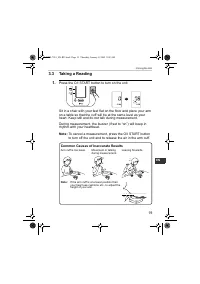
19 3.Using the Unit EN 3.3 Taking a Reading 1. Press the O/I START button to turn on the unit. Sit in a chair with your feet flat on the floor and place your arm on a table so that the cuff will be at the same level as your heart. Keep still and do not talk during measurement. During measurement, th...
Страница 21 - What is Irregular Heartbeat?; Normal Heartbeat
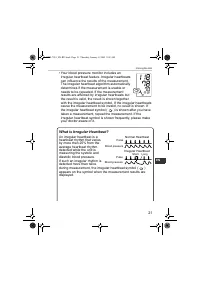
21 3.Using the Unit EN • Your blood pressure monitor includes an irregular heartbeat feature. Irregular heartbeats can influence the results of the measurement. The irregular heartbeat algorithm automatically determines if the measurement is usable or needs to be repeated. If the measurement results...
Страница 23 - Instructions for special conditions
23 3.Using the Unit EN 3.4 Instructions for special conditions If your systolic pressure is known to be more than 220 mmHg, press and hold the O/I START button until the arm cuff inflates 30 to 40 mmHg higher than your suspected systolic pressure. 1. Press the O/I START button to turn the unit on. M...
Страница 24 - Using the Memory Function
24 3.Using the Unit 3.5 Using the Memory Function This unit has a memory capable of storing 60 sets of readings. Every time you complete the measurement, the unit automatically stores the blood pressure and pulse rate. If there are three readings within 10 minutes of the last reading, the average of...
Страница 26 - To Delete All the Values Stored in Memory
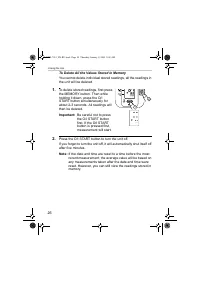
26 3.Using the Unit To Delete All the Values Stored in Memory You cannot delete individual stored readings, all the readings in the unit will be deleted. 1. To delete stored readings, first press the MEMORY button. Then while holding it down, press the O/I START button simultaneously for about 2-3 s...
Страница 27 - Quick Reference Guide; If you are using this device for the first time, please read
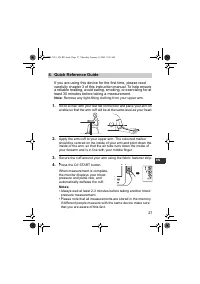
27 4.Quick Reference Guide EN 4. Quick Reference Guide If you are using this device for the first time, please read carefully chapter 3 of this instruction manual. To help ensure a reliable reading, avoid eating, smoking, or exercising for at least 30 minutes before taking a measurement. Note: Remov...
Страница 28 - Handling Errors and Problems
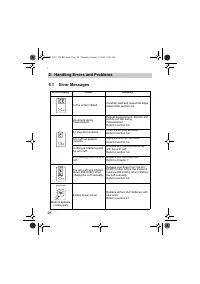
28 5.Handling Errors and Problems 5. Handling Errors and Problems 5.1 Error Messages Error Display Cause Remedy Cuff is under inflated. Carefully read and repeat the steps listed under section 3.4. Movement during measurement Repeat measurement. Remain still and do not talk during measurement.Refer ...
Страница 30 - Troubleshooting
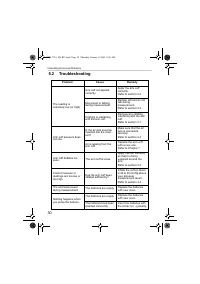
30 5.Handling Errors and Problems 5.2 Troubleshooting Problem Cause Remedy The reading is extremely low (or high). Arm cuff not applied correctly. Apply the arm cuff correctly. Refer to section 3.2. Movement or talking during measurement. Remain still and do not talk during measurement.Refer to sect...
Страница 32 - Maintenance and Storage; Maintenance; To protect your unit from damage, please observe the; • Do not carry out repairs of any kind by yourself. If a defect
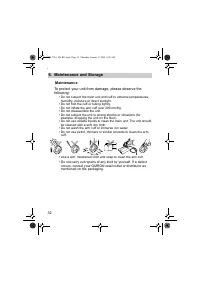
32 6.Maintenance and Storage 6. Maintenance and Storage Maintenance To protect your unit from damage, please observe the following: • Do not subject the main unit and cuff to extreme temperatures, humidity, moisture or direct sunlight. • Do not fold the cuff or tubing tightly. • Do not inflate the a...
Страница 33 - Calibration and Service
33 6.Maintenance and Storage EN Calibration and Service • The accuracy of this blood pressure monitor has been carefully tested and is designed for a long service life. • It is generally recommended to have the unit inspected every two years to ensure correct functioning and accuracy. Please consult...
Страница 34 - Storage
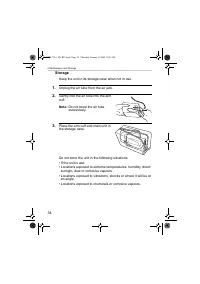
34 6.Maintenance and Storage Storage Keep the unit in its storage case when not in use. 1. Unplug the air tube from the air jack. 2. Gently fold the air tube into the arm cuff. Note: Do not bend the air tube excessively. 3. Place the arm cuff and main unit in the storage case. Do not store the unit ...
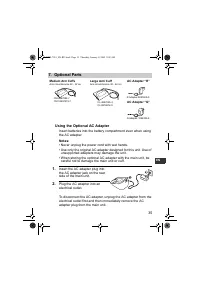
Страница 35 - Using the Optional AC Adapter; Medium Arm Cuffs; Large Arm Cuff; AC Adapter “R”
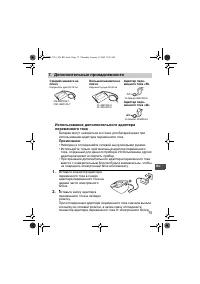
35 7.Optional Parts EN 7. Optional Parts Using the Optional AC Adapter Insert batteries into the battery compartment even when using the AC adapter. Notes: • Never unplug the power cord with wet hands.• Use only the original AC adapter designed for this unit. Use of unsupported adapters may damage t...
Страница 36 - Caution: Please read the instruction manual carefully
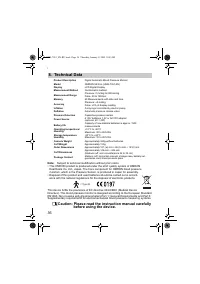
36 8.Technical Data 8. Technical Data Note: Subject to technical modification without prior notice • This OMRON product is produced under the strict quality system of OMRON Healthcare Co. Ltd., Japan. The Core component for OMRON blood pressure monitors, which is the Pressure Sensor, is produced in ...
Страница 38 - Some Useful Information about Blood Pressure; What is Blood Pressure?
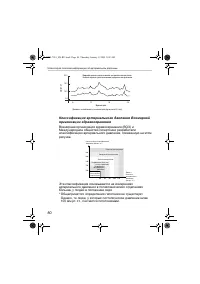
38 9.Some Useful Information about Blood Pressure 9. Some Useful Information about Blood Pressure What is Blood Pressure? Blood pressure is a measure of the force of blood flowing against the walls of the arteries. Arterial blood pressure is constantly changing during the course of the heart's cycle...
Страница 40 - Made in China; EC
Made in China Manufacturer OMRON HEALTHCARE CO., LTD. 24, Yamanouchi Yamanoshita-cho, Ukyo-ku, Kyoto, 615-0084, Japan EU-representative OMRON HEALTHCARE EUROPE B.V. Kruisweg 577, 2132 NA Hoofddorp, The Netherlands www.omron-healthcare.com Exclusive distributor in Russia & importer ComplectServic...
Страница 41 - РУКОВОДСТВО
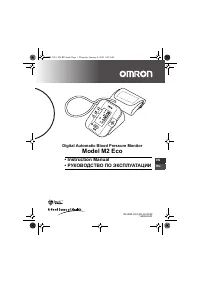
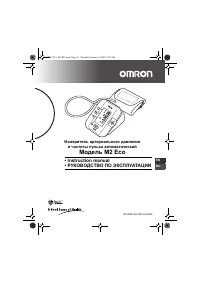
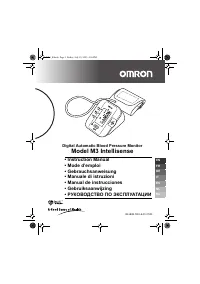
Измеритель артериального давления и частоты пульса автоматический Модель M2 Eco • Instruction manual• РУКОВОДСТВО ПО ЭКСПЛУАТАЦИИ M 2 E co EN RU IM-HEM-7051-RU-04-03/09 HEM-7051_EN-RU.book Page 41 Thursday, January 8, 2009 9:09 AM
Страница 42 - Содержание
42 Содержание Содержание ................................................................................ 42 Введение ..................................................................................... 43 Важные меры предосторожности .......................................... 44 1. Обзор ............
Страница 43 - Введение; OMRON M2 Eco
43 RU Введение Благодарим Вас за покупку прибора OMRON M2 Eco для измерения давления на плече . OMRON M2 Eco является полностью автоматическим прибором для измерения давления , работающим по осциллометрическому принципу . Он измеряет артериальное давление и пульс просто и быстро . Для удобного контр...
Страница 44 - M2 Eco; Внимание
44 Важные меры предосторожности При беременности , аритмии или атеросклерозе проконсультируйтесь с лечащим врачом . Никогда не изменяйте дозировку медикаментов , выписанных лечащим врачом . M2 Eco предназначен только для личного использования . Внимание : • Не оставляйте прибор без присмотра в прису...
Страница 45 - Обзор; Электронный
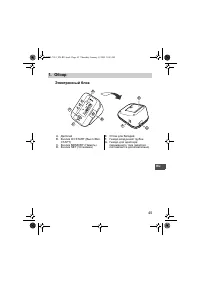
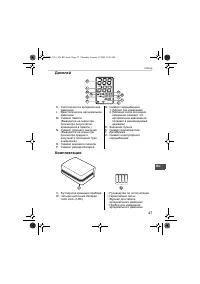
45 1. Обзор RU 1. Обзор Электронный блок A. Дисплей B. Кнопка O/I START ( Выкл ./ Вкл . СТАРТ ) C. Кнопка MEMORY ( Память ) D. Кнопка SET ( Установка ) E. Отсек для батарей F. Гнездо воздушной трубки G. Гнездо для адаптера переменного тока ( адаптер поставляется дополнительно ) B D A C E G F M 2 E c...
Страница 46 - Манжета
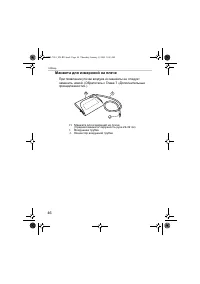
46 1. Обзор Манжета для измерений на плече При появлении утечки воздуха из манжеты ее следует заменить новой . ( Обратитесь к Главе 7 « Дополнительные принадлежности ».) H. Манжета для измерений на плече ( Средняя манжета : окружность руки 22-32 см ) I. Воздушная трубка J. Коннектор воздушной трубки...
Страница 47 - Дисплей
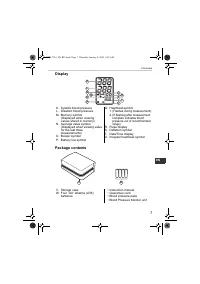
47 1. Обзор RU Дисплей Комплектация K. Систолическое артериальное давление L. Диастолическое артериальное давление M. Символ памяти ( Выводится на экран при просмотре результатов , хранящихся в памяти .) N. Символ среднего значения ( Выводится на экран при просмотре среднего результата последних тре...
Страница 48 - Подготовка; AA; Примечание
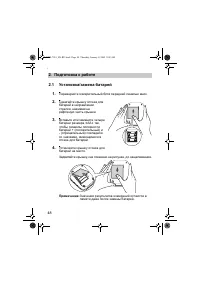
48 2. Подготовка к работе 2. Подготовка к работе 2.1 Установка / замена батарей 1. Переверните измерительный блок передней панелью вниз . 2. Сдвигайте крышку отсека для батарей в направлении стрелки , нажимая на рифленую часть крышки . 3. Вставьте или замените четыре батареи размера « AA » так , что...
Страница 49 - Срок
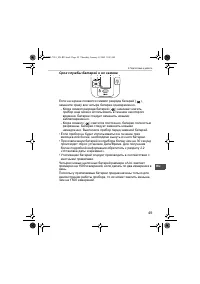
49 2. Подготовка к работе RU Срок службы батарей и их замена Если на экране появился символ разряда батарей ( ), замените сразу все четыре батареи одновременно . - Когда символ разряда батарей ( ) начинает мигать , прибор еще можно использовать в течение некоторого времени . Батареи следует заменить...
Страница 50 - Установка; MEMORY; Примечания
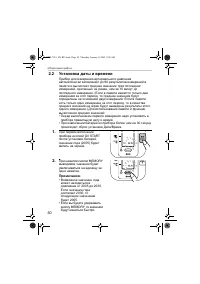
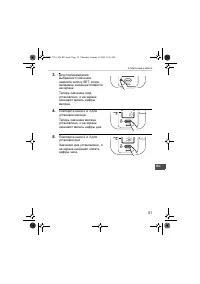
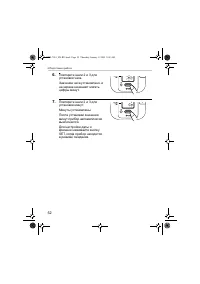
50 2. Подготовка к работе 2.2 Установка даты и времени Прибор для измерения артериального давления автоматически запоминает до 60 результатов измерений в памяти и вычисляет среднее значение трех последних измерений , сделанных не ранее , чем за 10 минут до последнего измерения . ( Если в памяти имею...
Страница 53 - Настройка; Состояние
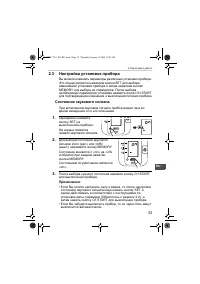
53 2. Подготовка к работе RU 2.3 Настройка установок прибора Вы можете изменять параметры различных установок прибора . Это осуществляется нажатием кнопки SET для выбора изменяемой установки прибора и затем нажатием кнопки MEMORY для выбора ее параметров . После выбора необходимых параметров установ...
Страница 54 - Правиль
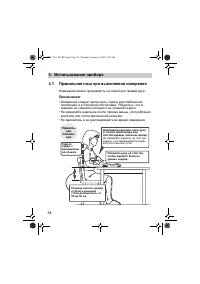
54 3. Использование прибора 3. Использование прибора 3.1 Правильная поза при выполнении измерения Измерение можно производить на левой или правой руке . Примечания : • Измерения следует выполнять , сидя в расслабленном положении и в спокойной обстановке . Убедитесь , что в комнате не слишком холодно...
Страница 55 - Неправильное
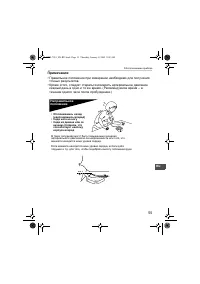
55 3. Использование прибора RU Примечания : • Правильное положение при измерении необходимо для получения точных результатов . • Кроме этого , следует стараться измерять артериальное давление каждый день в одно и то же время . ( Рекомендуемое время – в течение одного часа после пробуждения .) Неправ...
Страница 56 - Закрепление; Omron; Измерение
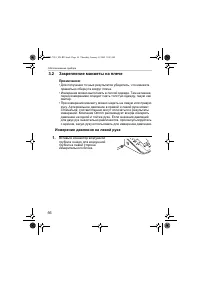
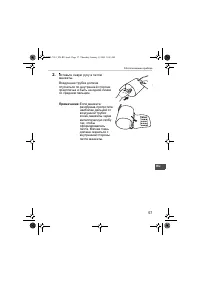
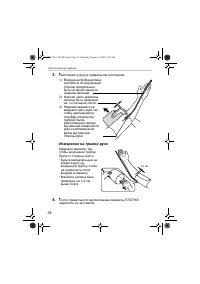
56 3. Использование прибора 3.2 Закрепление манжеты на плече Примечания : • Для получения точных результатов убедитесь , что манжета правильно обернута вокруг плеча . • Измерения можно выполнять в легкой одежде . Тем не менее , перед измерением следует снять толстую одежду , такую как свитер . • При...
Страница 59 - Выполнение
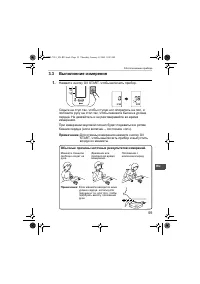
59 3. Использование прибора RU 3.3 Выполнение измерения 1. Нажмите кнопку O/I START, чтобы включить прибор . Сядьте на стул так , чтобы ступни ног опирались на пол , и положите руку на стол так , чтобы манжета была на уровне сердца . Не двигайтесь и не разговаривайте во время измерения . При измерен...
Страница 60 - Важно
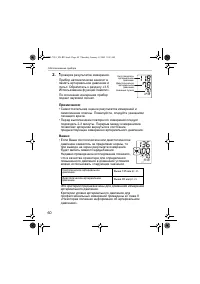
60 3. Использование прибора 2. Проверка результатов измерения . Прибор автоматически заносит в память артериальное давление и пульс . Обратитесь к разделу «3.5 Использование функции памяти ». По окончании измерения прибор подает звуковой сигнал . Примечания : • Самостоятельная оценка результатов изм...
Страница 62 - Что
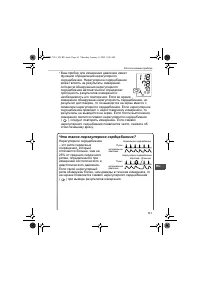
62 3. Использование прибора Что такое аритмия ? Биение сердца вызывается электрическими сигналами , заставляющими сердце сокращаться . Аритмия – это состояние , когда ритм сердцебиения нарушен из - за сбоев в биоэлектрической системе , управляющей сердцебиением . Ее типичными признаками являются вып...
Страница 63 - Указания
63 3. Использование прибора RU 3.4 Указания для особых состояний Если известно , что Ваше систолическое давление превышает 220 мм рт . ст ., нажмите и удерживайте кнопку O/I START до тех пор , пока давление в манжете не достигнет значения , на 30-40 мм рт . ст . превышающего Ваше ожидаемое систоличе...
Страница 64 - Использование
64 3. Использование прибора 3.5 Использование функции памяти Этот прибор имеет память , в которой могут храниться результаты 60 измерений . Каждый раз по окончании измерения прибор автоматически заносит в память артериальное давление и частоту пульса . Если в течение предшествующих десяти минут были...
Страница 66 - Удаление; START
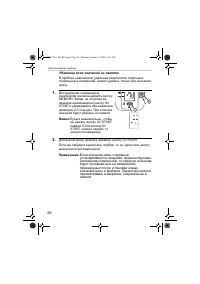
66 3. Использование прибора Удаление всех значений из памяти В приборе невозможно удаление результатов отдельных сохраненных измерений , можно удалить только все значения сразу . 1. Для удаления сохраненных результатов сначала нажмите кнопку MEMORY. Затем , не отпуская ее , нажмите одновременно кноп...
Страница 67 - Краткое
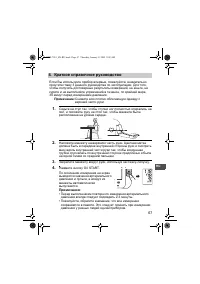
67 4. Краткое справочное руководство RU 4. Краткое справочное руководство Если Вы используете прибор впервые , пожалуйста , внимательно прочтите главу 3 данного руководства по эксплуатации . Для того , чтобы получить достоверные результаты измерений , не ешьте , не курите и не выполняйте упражнений ...
Страница 70 - Поиск
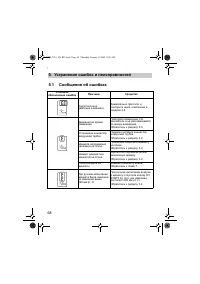
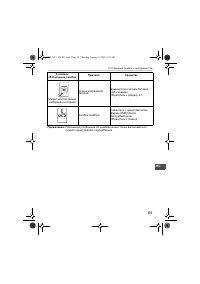
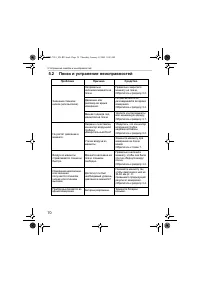
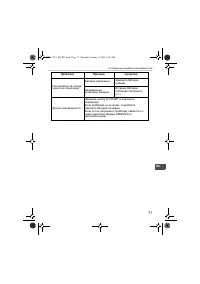
70 5. Устранение ошибок и неисправностей 5.2 Поиск и устранение неисправностей Проблема Причина Средство Значение слишком низкое ( или высокое ). Неправильно наложена манжета на плечо . Правильно закрепите манжету на плече . Обратитесь к разделу 3.2. Движение или разговор во время измерения . Не дви...
Страница 72 - Обслуживание
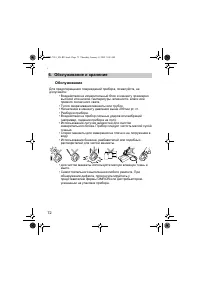
72 6. Обслуживание и хранение 6. Обслуживание и хранение Обслуживание Для предотвращения повреждений прибора , пожалуйста , не допускайте : • Воздействия на измерительный блок и манжету чрезмерно высокой или низкой температуры , влажности , влаги или прямого солнечного света . • Тугого сворачивания ...
Страница 73 - Проверка
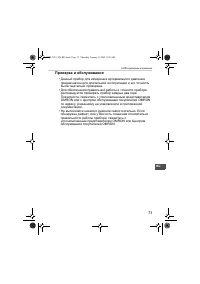
73 6. Обслуживание и хранение RU Проверка и обслуживание • Данный прибор для измерения артериального давления предназначен для длительной эксплуатации и его точность была тщательно проверена . • Для обеспечения правильной работы и точности прибора рекомендуется проверять прибор каждые два года . Пож...
Страница 74 - Хранение
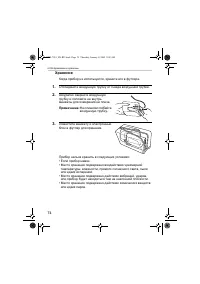
74 6. Обслуживание и хранение Хранение Когда прибор не используется , храните его в футляре . 1. Отсоедините воздушную трубку от гнезда воздушной трубки . 2. Аккуратно сверните воздушную трубку и положите ее внутрь манжеты для измерения на плече . Примечание : Не слишком сгибайте воздушную трубку . ...
Страница 76 - Тип
76 8. Технические характеристики 8. Технические характеристики Примечание : Технические характеристики могут быть изменены без предварительного уведомления • Это изделие компании OMRON произведено под контролем строгой системы обеспечения качества компании OMRON Healthcare Co. Ltd., Япония . Датчик ...


 Omron M1 Eco (HEM-4011C-RU) Инструкция по эксплуатации
 Omron M1 Plus (HEM-4011C-E) Инструкция по эксплуатации
 Omron M2 Basic (HEM-7116-ARU) Инструкция по эксплуатации
 Omron M2 Classic (HEM-7117-RU) Инструкция по эксплуатации
 Omron M2 Classic (HEM-7117H-ARU) Инструкция по эксплуатации
 Omron M2 Compact (HEM-7102-E) Инструкция по эксплуатации
 Omron M3 (HEM-7154-E) Инструкция по эксплуатации
 Omron M3 Expert (HEM-7200H-ARU) Инструкция по эксплуатации
 Omron M3 Family (HEM-7202-ARU) Инструкция по эксплуатации
 Omron M4 (НЕМ–722) Инструкция по эксплуатации
 Omron M4-I (HEM-752) Инструкция по эксплуатации
 Omron M5 (HEM-7214-ARU) Инструкция по эксплуатации
 Omron M5-I Инструкция по эксплуатации
 Omron M6 (HEM-7213-ARU) Инструкция по эксплуатации
 Omron M6 Comfort (HEM-7360-E) Инструкция по эксплуатации
 Omron M7 Intelli IT (HEM-7322T-E) Инструкция по эксплуатации
 Omron M7 Intelli IT (HEM-7361T-EBK) Инструкция по эксплуатации
 Omron MIT Инструкция по эксплуатации