Siemens Xelibri 2 - Инструкция по эксплуатации - Страница 18

Features and Settings
17
Using the calendar
As an aid to planning, your phone provides a calendar.
Choose the
Calendar
menu and click
to see different
months.
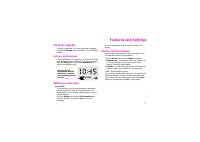
Using a screensaver
Your phone displays an image (e.g., a clock) when it has
been idle for a couple of minutes. To change the image,
from the
Display
menu choose
Screensaver
and
select the image you want.
Setting up voice mail
Voice mail
If you subscribe to your service provider’s answering
service (voice mail), they will usually have set it up
automatically. If not, you may need to enter your voice
mailbox number.
From the
Setup
menu, choose
Voice mailbox
and
enter the number you need to
call
to hear your
messages.
You may additionally need to switch on divert (see
below).
Divert (call forwarding)
Divert must be switched on to use voice mail, but you
can also divert calls to other numbers.
From the
Setup
menu, choose
Divert
and select:
•
Unanswered
– forward calls when your phone is off
or out of coverage or when you’re busy or don’t
answer. This is the usual setting.
•
All calls
– forward every call (useful if you’re abroad
and don’t want to be charged for incoming calls).
•
Off
– don’t forward any calls.
If you elect to forward calls, then enter (or confirm) the
telephone number to which you want calls redirected.
This is either your service provider’s voice mail
divert
number or an alternative number of your choice.
Ô
Network
µ
Ò
this icon on the
screensaver display
indicates you have a
new message, missed
call, etc.
"Загрузка инструкции" означает, что нужно подождать пока файл загрузится и можно будет его читать онлайн. Некоторые инструкции очень большие и время их появления зависит от вашей скорости интернета.