LG ON9 - Инструкция по эксплуатации
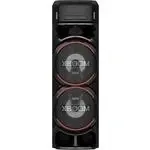
Акустика LG ON9 - инструкция пользователя по применению, эксплуатации и установке на русском языке. Мы надеемся, она поможет вам решить возникшие у вас вопросы при эксплуатации техники.
Если остались дополнительные вопросы — свяжитесь с нами через контактную форму.
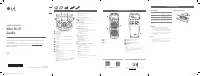
a
Disc tray
b
Lighting
c
Remote sensor
d
OPTICAL IN
: Connect an optical device.
e
GUITAR IN:
Connect a guitar.
f
MIC
(Microphone)
IN
:
Connect a mi
cro
phone.
g
ANTENNA
(FM)
h
AC IN
socket
Make sure to properly align and connect the
optical cable; improper alignment may cause
damage to the jack.
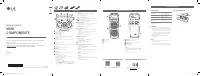
Top panel
n
l k
i
j
h
f
g
a
b
c
d
e
m
o
a
1
(Standby)
Turns the power on or off.
b
USB REC / DEMO
- Records to USB.
- Stops recording.
- In power off status, if you press
USB REC / DEMO
, show
demo mode.
c
USB 1 Port
You can play sound files by connecting the USB device.
d
Display window
e
USB 2 Port
You can play sound files by connecting the USB device.
f
F
(Function)
Selects the function and input source.
g
LIGHTING
Selects the lighting mode.
h
3
TWIN
Connects two units for TWIN mode in WIRELESS PARTY LINK.
i
C
/
V
(Skip/Search)
- Skips backward or forward.
- Searches for a section within a track/file.
- Selects the radio stations.
N
(Play/Pause)
- Starts or pauses playback.
- Selects stereo/mono.
-
Bluetooth
connection lock (BT LOCK): Select the
Bluetooth
function by pressing
F
repeatedly. And long press
N
to limit
Bluetooth
connection to only BT and LG TV.
Z
(Stop)
Stops playback or cancels DELETE function.
VOL
(Volume)
-/+
Adjusts speaker volume.
MIC
(Microphone)
/ GUITAR
-/+
Adjusts Microphone volume or Guitar volume.
j
(Auto Music Play)
Plays the audio currently playing by tagging the mobile to this
unit.(Android Only)
k
VOICE CANCELLER
You can reduce the vocal tones during music playback from
various input sources.
B
(Open/Close)
Opens and closes the disc tray.
l
CLUB, DRUM, USER
(DJ PAD)
Selects CLUB, DRUM or USER sound effect to mix.
(If you want to use USER, you have to register a source with
“LG XBOOM” app.(Android Only))
1, 2, 3
(DJ PAD)
Press a desired sound pad.
m
MIC
(Microphone)
ECHO
Selects ECHO mode.
VOCAL EFFECTS
Selects various vocal effects mode.
KEY CHANGER (
l
/
L
)
Changes the key to suit your vocal range.
n
Remote sensor
o
SPECIAL EQ / BASS BLAST
(or
BASS BLAST+
)
- Chooses special equalizer.
- Press and hold to select BASS (or BASS+) effect directly.
SEARCH
Moves to folder or file in selection mode.
OK
Selects a folder when searching a file.
USER EQ
Selects the equalizer created by your own.
Multi jog
- Searches a folder or a file.
- Turns clockwise or counterclockwise to control the USER EQ
level.
- Chooses special equalizer.
Additional Information
Specifications
Power Requirements
Refer to the main label on
the unit.
Power Consumption
Refer to the main label on
the unit.
Dimensions (W x H x D)
Approx. 330.0 mm x
1,056.0 mm x 368.0 mm
Bus Power Supply (USB)
5 V
0
500 mA
Design and specifications are subject to change without
notice.
Caution
y
Connect the power cord to wall outlet directly if
possible. Or when you use an extension cable, it is
highly recommended to use an extension cable of 110
V / 15 A or 230 V / 15 A, otherwise the unit may not
operate properly because of the lack of power supply.
y
Do not overload the extension cord with excessive
electrical load.
Note
y
Do not look directly at the light emitting part when the
LIGHTING is turned on.
y
If the illumination brightness is glaring, switch on the
room lights or turn off the LIGHTING of the unit.
Replacement of battery
(R03)
(R03)
ENGLISH
www.lg.com
Copyright © 2020 LG Electronics Inc. All Rights Reserved.
2001_Rev01
MFL71662708
SIMPLE MANUAL
Mini Hi-Fi
Audio
Please read this manual carefully before operating your set and retain it for
future reference.
To view the instructions of advanced features, visit http://www.lg.com and
then download Owner’s Manual. Some of the content in this manual may
differ from your unit.
MODEL
ON9
Front panel / Rear panel
a
b
c
h
f g
e
d
Download the
LG XBOOM
App to your device.
For more information, download the online owner’s
manual.
http://www.lg.com
LG Sound Sync
Controller App
Android
iOS
ON9-F.DPERLLK_SIM_ENG_SPA(MEX)_MFL71662708.indd 1-4
2020-01-17 4:19:32
"Загрузка инструкции" означает, что нужно подождать пока файл загрузится и можно будет его читать онлайн. Некоторые инструкции очень большие и время их появления зависит от вашей скорости интернета.
Была ли эта инструкция полезной?
Об этой инструкции
- Бренд
- LG
- Модель
- ON9
- Тип документа
- Инструкция по эксплуатации
- Категория
- Акустика
- Язык(и)
- Русский
- Страницы
- 2
- Размер файла
- 2,5 MB
- Формат
Задать вопрос
Похожие инструкции
Популярные акустика LG


Ещё модели: акустика LG
 LG OM5540 Инструкция по эксплуатации
 LG OM6540 Инструкция по эксплуатации
 LG OM6560 Инструкция по эксплуатации
 LG OM7550K Инструкция по эксплуатации
 LG OM7560 Инструкция по эксплуатации
 LG ON7 Инструкция по эксплуатации
 LG ON44DK Инструкция по эксплуатации
 LG ON66 Инструкция по эксплуатации
 LG ON77DK Инструкция по эксплуатации
 LG ON88 Инструкция по эксплуатации
 LG ON99 Инструкция по эксплуатации
 LG RAD125 Инструкция по эксплуатации
 LG RAD226B Инструкция по эксплуатации
 LG RAT376B Инструкция по эксплуатации
 LG RBD154K Инструкция по эксплуатации
 LG XA14 Инструкция по эксплуатации
 LG XB14 Инструкция по эксплуатации